
Reaxys Release Notes
Last updated on October 08, 2026
Natural-language search over reaction data, with on-demand AI summaries
Reaxys can now interpret natural-language questions about reactions. Building on the AI-enhanced document search introduced in February 2026, you can now ask a reaction question in plain English - no Boolean logic, no field codes and no Query Builder syntax - and Reaxys returns a relevant set of reactions alongside the related literature. Once you have your results, an on-demand AI Assistant summarises them for you: it surfaces the most common conditions, techniques and yields, and points you to the most relevant records, so you can see where to start rather than reading through every hit. As with all AI capabilities in Reaxys, every summary is grounded in curated Reaxys content and traceable back to its source.
What’s new
Natural-language search now extends to reaction data.
Ask reaction questions in plain language
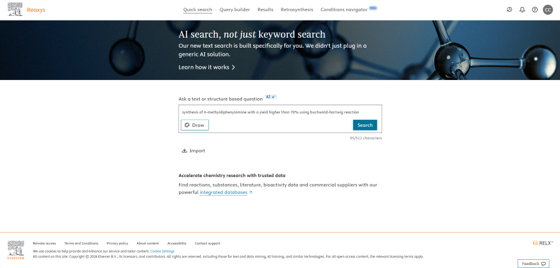
From the familiar Quick Search box, you can now type a reaction question the way you would say it - for example, “synthesis of 4-methyldiphenylamine with a yield higher than 70% using Buchwald-Hartwig reaction.” Reaxys interprets your question and returns a relevant set of reactions.
The Quick Search box accepts a plain-language reaction question - no query syntax required.
One query return both documents and reactions
A single plain-language query is now interpreted across both content types. The results preview shows your literature (Documents) and your reaction hits (Reactions) side by side, each with the interpreted query clearly shown. You can open either set, and - as always - select Edit in Query Builder to see exactly how your question was interpreted and refine it if you wish.
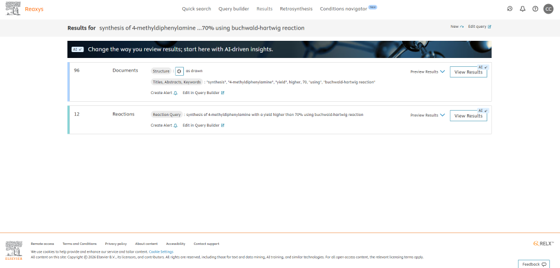
One natural-language query returns Documents and Reactions, with the interpretation shown for each.
Summarise your results on demand with the AI Assistant
The reaction results page works the way you already know - reaction schemes, conditions, yields and references are all shown in full, and you can apply filters and use your own chemistry judgement at any point. What’s new is the AI Assistant panel on that page: when it helps, open it and ask it to summarise your results. The Assistant reads the set and returns a written overview including a structured table you can copy or refine - highlighting the dominant conditions, catalysts and yields, and flagging outliers worth a closer look.
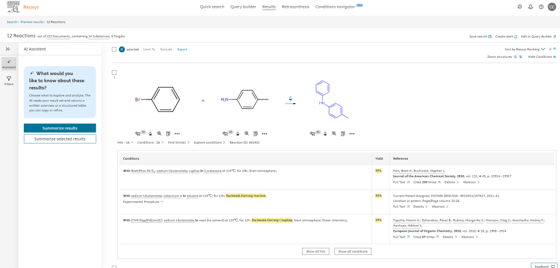
The reaction results page with the AI Assistant panel. Conditions, yields and references remain in full view; Summarise results and Summarise selected results sit in the panel.
When a summary helps
A summary is most valuable when a query returns a large set. Instead of reading every hit, you get a direct answer up front - often enough to decide whether the set is worth a deeper review or whether to refine your query first. It also makes the wider pattern visible and highlights gaps or outliers you might otherwise miss, so you know where to focus before a deep dive.
Two ways to summarise
- Summarise results - generates a summary across your returned set, considering up to 20 of the most relevant results.
- Summarise selected results - review the result set first, select the records of interest, and summarise only those.
Every claim and snippet in a summary is drawn from your returned results and is referenced back to the underlying records for easy access, so you can verify the evidence in one click. Size of the summary panel is adjustable to your preference.
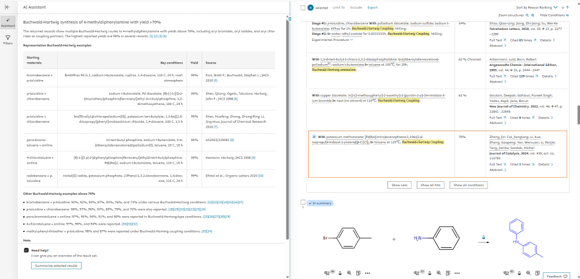
The AI Assistant summarises the set - representative examples, key conditions, yields and sources - with every claim linked back to a Reaxys record.
On-demand and never intrusive
The Assistant is entirely on demand. It sits in the same space as the filter panel and can be switched to filters whenever you need them, so AI insight is there when you want it and out of the way when you don’t. You can use the AI Assistant as often as you need. You stay in control, inside Reaxys.
What you can ask at this release
Natural-language reaction search supports a growing range of question types. The following are available now, from a single reaction attribute up to three combined attributes and additional question types may be supported in future releases
Query type | Example (plain language) | Status |
|---|---|---|
Single reaction attribute | “Show me reactions with supercritical conditions” | Supported |
Named compound (name / CAS / InChIKey / SMILES / abbreviation) | “How to make 162011-90-7?” | Supported |
Two attributes combined | “Diels-Alder using C2H4 as starting material” | Supported |
Three attributes combined | “Xanthine to caffeine, yield above 80%” | Supported |
More examples to try
You can phrase questions naturally and mix attributes freely. A few examples across common tasks:
Learn or recall a named reaction
- “What is a Stille coupling?”
- “What is an Appel reaction?”
- “Tell me what you know about the Wittig reaction at room temperature”
Make or convert a specific compound (by name, CAS or InChIKey)
- “How can I convert nitrobenzene to aniline?”
- “How to prepare astaxanthin from beta-carotene”
- “How can I convert cyclopropyl phenyl ketone to (1-cyclopropylvinyl)benzene?”
- “Convert 91-01-0 to RWCCWEUUXYIKHB-UHFFFAOYSA-N”
Add yield, scale or temperature limits
- “Synthesis of imatinib with >70% yield at room temperature”
- “Synthesis of Vioxx at temperature below 100 °C and yield above 70%”
- “How is celecoxib synthesised, and which routes give yields above 80%?”
Specify conditions, reagents or technique
- “Green chemistry and furfural synthesis”
- “Furfural synthesis in a sealed tube and microwave”
- “Huisgen cycloaddition synthesis using flow”
- “Synthesis of 4-iodoacetophenone with silica-supported Jones reagent with a yield higher than 90%”
- “Enantioselective reduction of a ketone - which conditions work?”
Transparent and secure AI, grounded in trusted chemistry data
All AI capabilities in Reaxys are built in line with Elsevier’s Responsible AI Principles, with data privacy and security at their core. User prompts are not used to train large language models, and zero-retention agreements ensure they are not stored or reused. Summaries are generated exclusively from curated Reaxys chemistry content within Elsevier’s secure cloud environment, and every insight remains traceable to its Reaxys source - supporting the scientific rigour and trust that define Reaxys. Summaries support your judgement; they do not replace it.
Previous Release Notes
Did we answer your question?
Related answers
Recently viewed answers
Functionality disabled due to your cookie preferences