
View by category
How can I find the manuscript I submitted for an Elsevier journal?
Last updated on October 03, 2026
Also available in
If you have submitted a manuscript as the corresponding author, you will be able to log in to view the status of your submission by logging in to your account, and complete any necessary actions (if required).
If you designated another author as the corresponding author, you may have access to view the submission depending on the journal's policies, and whether your corresponding author entered your registered email address.
How to locate the manuscript I've submitted?
- If you do not see 'Author Main Menu' on the screen, switch to the Author role.
- The role switcher is located on the top of the screen just under the system logo as shown in this screenshot.
- Every user has an Author role, you may be assigned additional reviewer or editor roles as well.
- You can select a different default login role by clicking 'Update My Information'.
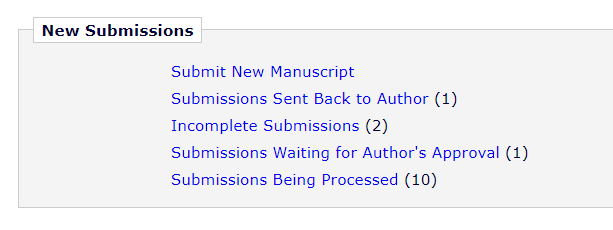
- Your submissions are divided into folders based on the current status as in this example. Click on any folder to view the submissions.
- The submissions within each folder are listed in a table as in this example.
- The exact columns will differ based on journal policy, and the current folder.
- To sort, click on the Up and Down arrows under each column heading.
- Journals can customize status terms. The default status terms are explained in What does the status of my submission mean in Editorial Manager?opens in new tab/window
- The action list at the left can be expanded or collapsed. Actions available depend on the journal policy, the submission status, and whether you are the corresponding author or not.
- As corresponding author, you may have a Send Email action available. See How do I send an email about my submission?opens in new tab/window


Click the "Chat with us" icon at the bottom‑right for further assistance. Please have ready:
- The title of the submission.
- The name of the corresponding author.
- The approximate date of submission.
- Any manuscript number you’ve been given.
- Any email you have received regarding the submission.
Co-author access to submissions differs by journal policy.
- If co-author verification is enabled for the journal, an email is sent every co-author with a link to verify the submission. You will not be able to view the submission in your Editorial Manager account until you have verified. See What is Editorial Manager Co-Author registration?opens in new tab/window
- If you are requested to log in during verification and you do so, then the submission is linked to your account as a co-author. It is possible for a journal to enable verification without login, in that case the submission are not linked to co-authors.
- If linked, Co-authored submissions are in the Author Main Menu, in the same status folders as described below for Corresponding Authors.
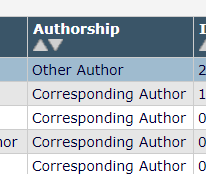
- The Authorship Column indicates whether you are the corresponding author for each listed submission, as shown here.
- Co-authors have very few actions available, and journals may choose to hide status, status date, and other details from co-authors.
If you are unable to find the submission after logging in, please click the "Chat with us" icon at the bottom‑right for further assistance. Please have ready:
- The title of the submission.
- The journal it was submitted to.
- The name of the corresponding author.
- The approximate date of submission.
- Any manuscript number you’ve been given.
- Any email you have received regarding the submission.
Reasons the submission may not be found:
- The submission is not always on the author menu for co-authors. See What is Editorial Manager Co-Author registration?opens in new tab/window
- Removed and expired submissions cannot be found on the author’s menu. This includes:
- Incomplete submissions removed by author.
- Submissions removed by the editor during initial screening.
- Incomplete submissions expired due to the retention policy of the journal.
- Log into the journal's submission site.
- If you have received system email regarding your submission, it should include a link.
- For login help see:
- If you are not sure how to locate the journal's submission site, see this FAQopens in new tab/window.
Watch this short videoopens in new tab/window to see the steps to check the status of submitted manuscripts in Editorial Manager.
Did we answer your question?
Related answers
Recently viewed answers
Functionality disabled due to your cookie preferences