
View by category
What should I do if I have accepted my review task but I can’t complete it?
Last updated on October 03, 2026
Also available in
If you are unable to complete the review you previously agreed on, or if you need an extension on the due date, contact the Editorial Team through the submission system.
You may have a direct link to the submission details on the most recent email correspondence, or you can log in manually as described below.
How?
Follow these steps to contact the Editorial Staff about your review task:
- Log in to the journalopens in new tab/window in which you agreed to review.
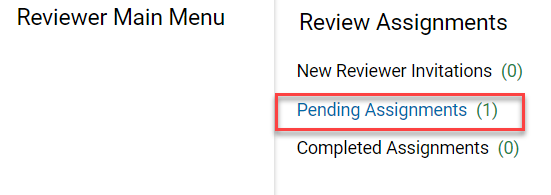
- Locate the manuscript on your main menu under 'Review Assignments' .
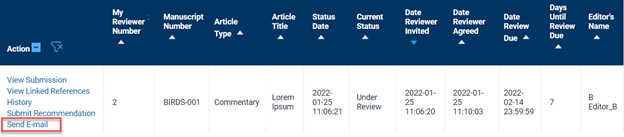
Click 'Send E-mail' in the action column . If the links are collapsed, click 'Action Links' to expand the list.
There are a few journals for which the Send E-mail function is not currently activated. If this is the case for you, please click the "Chat with us" icon at the bottom‑right for further assistance with your request (including the message for the Editorial Team as well as the journal title and the manuscript details) and we will ensure it reaches the Editor on your behalf.
- Select the most relevant template from the drop-down menu and click 'Customize Letter'.
- Some journals may have only one template, which will open immediately.
- Write your request to extend the due date or cancel your review task.
- The letter template will include identifying information such as your name and the manuscript details, keep those details unchanged to help the Editorial Team find the relevant submission.
- Click 'Preview and Send' to view your email.
- Click 'Send E-mail' to send your cancellation request.
After completing these steps, you should receive a confirmation email from the editorial staff to let you know what action they take.
We can help. Click “Chat with us” at the bottom right to reach Eva, our virtual assistant, for further assistance.
Did we answer your question?
Related answers
Recently viewed answers
Functionality disabled due to your cookie preferences