
What should I do if my organization (i.e. affiliation or funder) is not found when I am asked for it in the Rights and Access form?
Last updated on October 03, 2026
Watch this short videoopens in new tab/window to see how to add your institution when submitting as an author in Editorial Manager.
When you are asked for the name of the organization, type the first letters of your organization to see a list of the names of the organizations for you to select from.
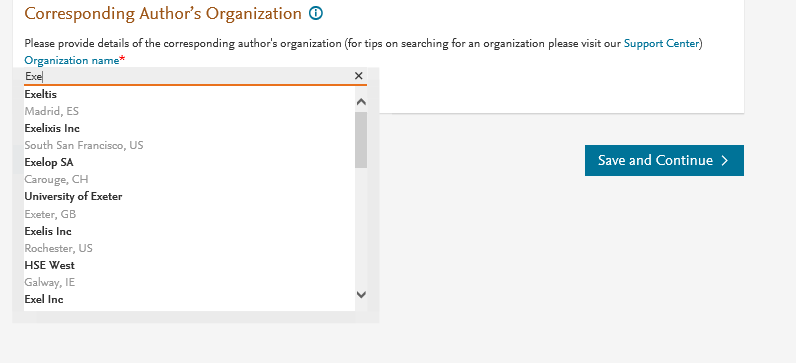
If the search does not display any organizations, or yours or your co-authors’ institution is not listed/recognized, follow these steps:
Names of some organizations may be in the local language and not English, or the other way around. Try typing the name in both languages to make sure the name of your institution is not there, before adding it as per the below instructions.
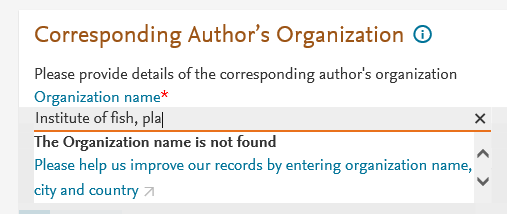
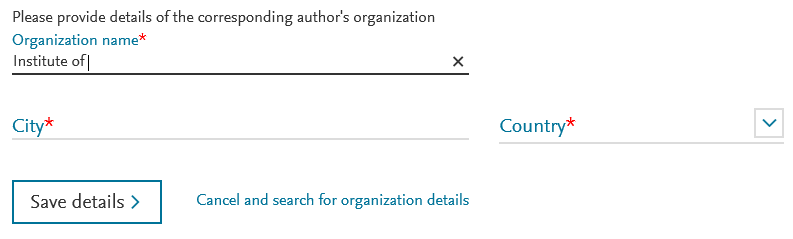
- Select the option 'The Organization name is not found' and click on the sentence in blue 'Please help us improve our records by entering organization name, city and country'. You can add the Organization name.
- You will be asked to add the name of the city and select the country. Once entered, click 'Save details'.
This should allow you to proceed. Typing the name incorrectly or adding extra characters will also return the same search result ("The Organization name is not found"):
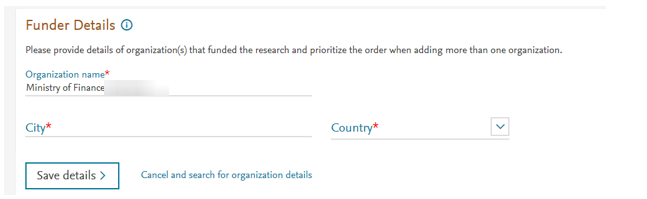
Similar steps will need to be taken, if the funder of your research is not on the list:
If you are not affiliated with any organization, add ‘Not affiliated to an organization', and follow the above steps, as you'll still need to add the city and the country of where you're located.
Still have a question?
We can help. Click “Chat with us” at the bottom right to reach Eva, our virtual assistant. If none of the suggested topics match your question, choose the option for other topics. Then tell Eva your open access query, including your article reference or invoice number if you have one, and Eva will help directly or connect you with the right team.
Did we answer your question?
Related answers
Recently viewed answers
Functionality disabled due to your cookie preferences