
What are callouts/how can I number items in my text
Last updated on August 29, 2025
What are callouts?
Callouts are references or in-text citations you insert into your text to link to figures, tables, boxes, or to cross-reference other items. Inserting a callout also allows you to number these items. They:
- Save you from numbering and cross-referencing manually.
- Automatically re-number if assets or chapters are added, moved, or deleted.
Inserting Callouts
Check that you have first inserted your figure, table, or box into the Write space.
- Place your cursor where you want the callout.
Navigate to the Insert ribbon of the toolbar and then select the Callout icon.
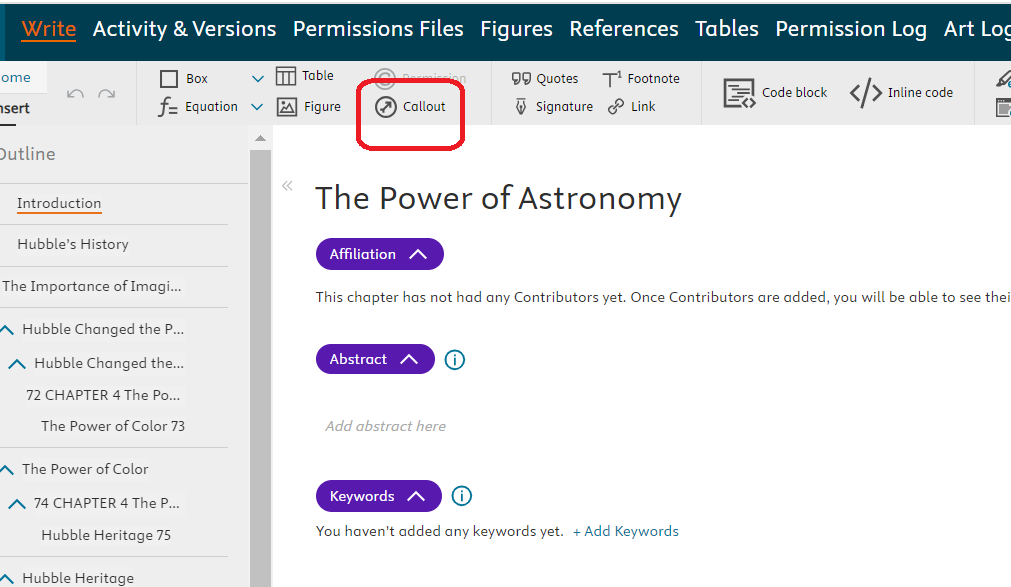
- Choose the callout type from the dropdown:
- Figure
- Table
- Box
- Multi-part Figure
- Cross-reference (another chapter)
- Cross-reference asset (e.g., a figure/box in another chapter)
- Select the asset (and chapter, if cross-referencing).
- Click Insert.
Note: Figures, Tables, and Boxes remain unnumbered (“0.00”) until a callout is added.
You can insert only one callout at a time.
Behavior of Callouts
- When inserted, the related asset moves directly below the callout (or to the end of a list if the callout is within a list).
- Callouts and their linked assets are automatically renumbered when moved, copied, or pasted within the text.
Editing Callouts
- Move: Copy-paste to a new location; numbering updates automatically.
- Delete: Place your cursor behind the callout and press Backspace.
Cross-references
- If the original chapter or asset is deleted, Elsa will flag the missing item both in the text and in Publishing Assistant.
- If a cross-referenced asset exists in multiple chapters, and one version is deleted, Elsa will update the callout to reference the remaining chapter automatically.
- Example: If Figure 1.1 is cross-referenced in Chapters 3 and 71, and the original in Chapter 1 is deleted, Chapter 3’s reference will update to Figure 71.1.
Callout Reminders
- Any figure, table, box, or multi-part figure without a callout will be flagged with a warning unless using a custom Publishing Assistant.
- Warnings will not block submission, but you are strongly encouraged to insert callouts for every asset.
Did we answer your question?
Related answers
Recently viewed answers
Functionality disabled due to your cookie preferences