
How do I update my affiliation?
Last updated on August 21, 2024
Editors/Authors and Contributors can add and update their affiliation information from their Elsa profile page. You can also update your affiliation or that of another project member directly from the Write Space.
Please note affiliations should be added directly in Elsa and cannot be imported a Word document.
To add and update affiliations in your profile, click on your avatar in the upper right corner of your screen, then click on "Elsa Profile".
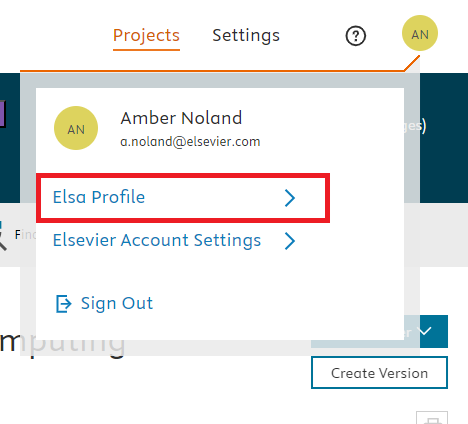
Once you are in your profile, click "Update Affiliation" and fill out the appropriate fields to update your information. Keep in mind that any item marked with an * is required.

Update Your Affiliation in the Write Space
To update your or someone else’s affiliation from within the Write Space, click on the Affiliation pill to open up the chapter contributor list. Click on the "Add Affiliation" button next to the contributor’s name. From the Affiliation window, enter the contributor’s institution information. You may also need to submit other required information such as country/city. Click "Save".
Affiliation information will then be updated for the contributor across Elsa, including in their Elsa profile.
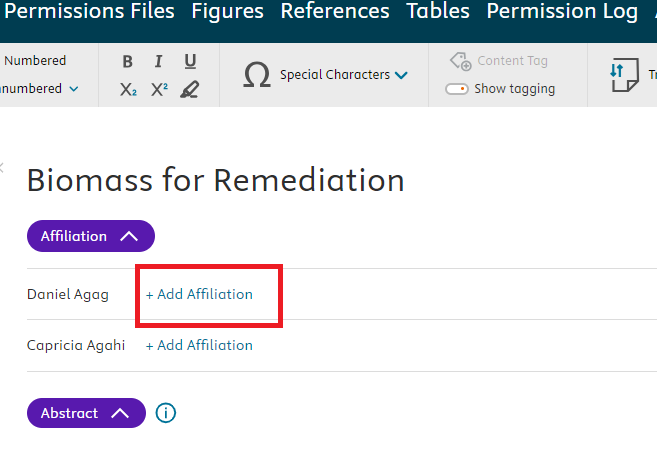
Author order is currently listed alphabetically by default in the Affiliation section of the Elsa Write space. Editors do not appear in the in-chapter Affiliation section.
- If you would like to re-order the author order or include an editor(s), we recommend including the preferred ordering at the top of the Write Space (ex. Wang, X., Rodriguez, M., Smith, N.) and notifying an Elsevier staff member.
- If you have a colleague that does not appear in the Affiliation section, confirm that they have been added as a contributor on the relevant chapter on the Table of Contents.
Did we answer your question?
Related answers
Recently viewed answers
Functionality disabled due to your cookie preferences