
How do I add chapter keywords?
Last updated on March 08, 2024
Elsa allows you to tag your content and add chapter keywords directly in the platform. Adding keywords in Elsa will make a chapter and/or its individual elements easier to discover on Elsevier platforms and search engines after publication. For many Elsa projects, a minimum of 5 chapter keywords are required to encourage discoverability of digital content.
Keywords and content tags must be added directly from the Elsa Write Space and cannot be imported via a Word file.
To Add Chapter Keywords
To add chapter keywords, click on the purple Keywords pill and then select "Add Keywords" to launch the modal window. Select from pre-populated options or create your own by typing in a keyword and hitting enter.
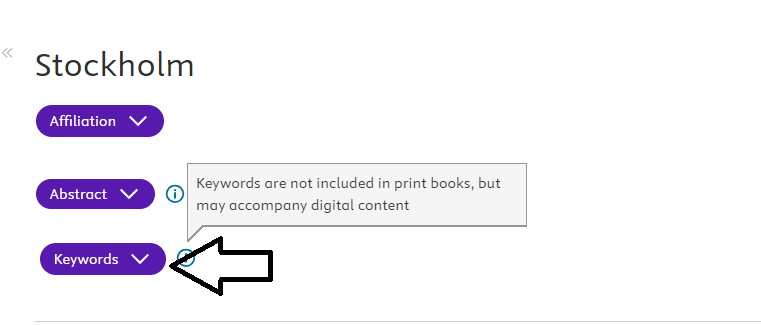
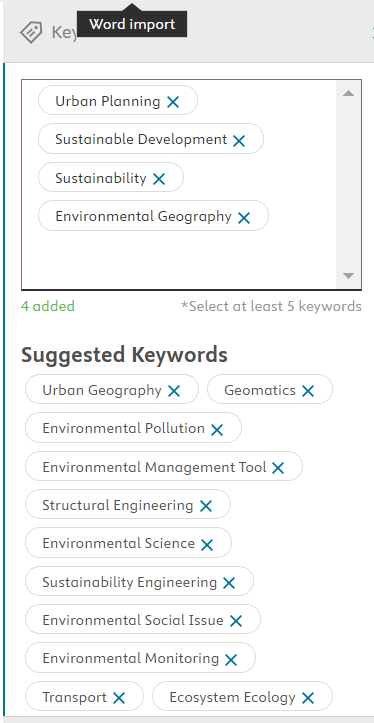
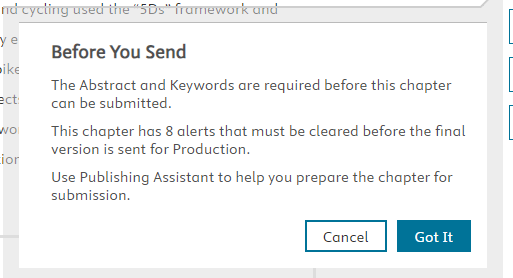
On many Elsa projects, there are Abstracts and Keywords (minimum 5 keywords) are compulsory elements on the Publishing Assistant and chapters cannot be sent in the workflow without entering these elements in the designated sections at the top of the Write Space.
If these items are not entered, an alert will display when sending the chapter.
To Add Content Tags
To get started with tagging, highlight the section of content you would like to tag, and click on the "Content Tag" icon in the top toolbar. Select from pre-populated options or create your own by typing in a keyword and hitting enter.

Types of Tags
- Chapter keywords describe the most important topics in the chapter in a few words.
- Content tags describe the concept(s)/topics of an individual paragraph or asset.
- Component tags are applied to a section, paragraph, or figure and tell what the function of that content is.
To show or hide tagging, click the pill next to the "Show tagging" button on the toolbar.

There are several tagging icons visible on the right side of the document editor that indicate where content and component tags have been added in the chapter  , and where you still need to add at least one tag to figures
  (when this icon is blue, you can click on it directly to add tags).
To access the Discoverability Score, click on the "Content Tag" icon on the toolbar and hover over the Discoverability Score progress bar at the bottom of the modal window. A pop-up will display the breakdown of tags in the chapter.
Did we answer your question?
Related answers
Recently viewed answers
Functionality disabled due to your cookie preferences