
How do I insert headings?
Last updated on July 22, 2025
To create headings in Elsa, click into the space in which you would like to insert the heading or highlight the text which you would like to promote to a heading.
From the toolbar Home ribbon, select which level of heading you would like to create:
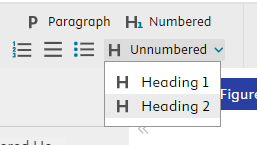
- Numbered H1 Heading
- Un-numbered H1 Heading
- Un-numbered H2 Heading
Note that if you select un-numbered H1 heading, then all previously numbered H1 headings will be converted to un-numbered.
Elsa does not currently have the option to create numbered sub-headings. If you would like to create numbered sub-headings, we recommend creating an H2 heading and then adding the sub-numbering to the left manually.
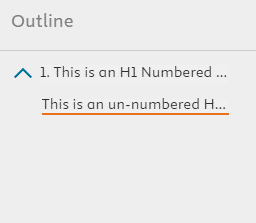
Once you start to add headings to your text, it will create an outline on the left-hand side of the screen:
Did we answer your question?
Related answers
Recently viewed answers
Functionality disabled due to your cookie preferences