
How do I create and insert boxes?
Last updated on July 09, 2025
Boxes can be an important means of highlighting key information within your chapter. There are currently 4 types of boxes in Elsa: standard, un-numbered, Key Point, and Pearl.
Standard boxes can be numbered and called out in your text while unnumbered boxes can be used if a callout is not needed. Key Point and Pearl can also be used to highlight core concepts and do not require a callout.
For information on how to import boxes from a Word file, see hereopens in new tab/window.
Navigate to the Insert ribbon on the toolbar and click on the Box icon or click on the carrot icon to the right and select Key Point, Pearl, or Unnumbered box.
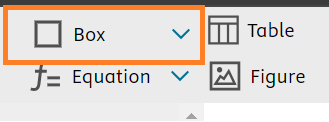
The box will automatically populate into the Write space for you to title and add content.
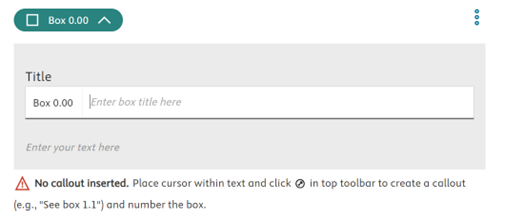
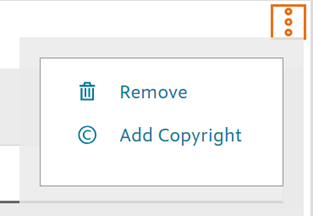
To delete a box either click into the white space surrounding it and click the backspace button on your keyboard or select the three dots ellipsis icon to the right of the box and click Remove.
To Create an Unnumbered Box, navigate to the Insert ribbon on the toolbar and click on the carrot next to the Box icon. Select "Unnumbered" from the dropdown menu.
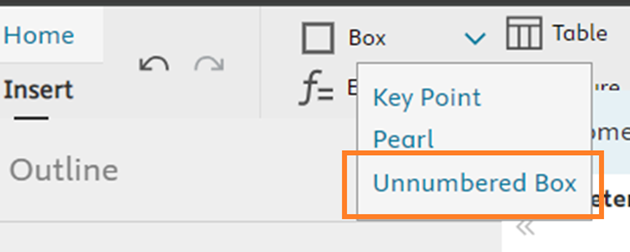
The box will then appear in the Write space for you to title and enter content.
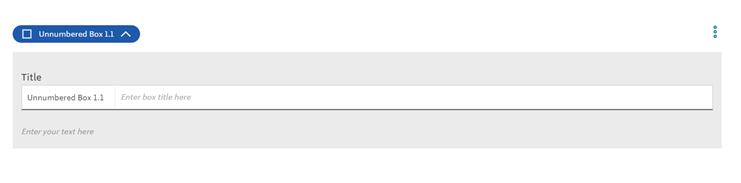
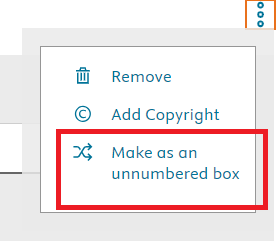
You can also convert an existing, numbered box into an unnumbered box by clicking on the More Options: ellipsis icon on the right-hand side of the box and select "Make as an Unnumbered box".
Did we answer your question?
Related answers
Recently viewed answers
Functionality disabled due to your cookie preferences