
FAQ for Blind and Nonblind Reviews
Last updated on April 13, 2026
Overview of the blind and nonblind reviewer features in Elsa:
- The process of inviting reviewers is similar to how editors invite contributors to a project and is done via the Team page. Elsa essentially prompts the author/editor through the steps in inviting these external parties (contributors or reviewers) to the project.
There is a help guide in Elsa for authors and editors on how to add reviewers. The link in the Elsa Help is here: How do I add reviewers to my project?
If authors/editors have technical issues with this feature, they are encouraged to reach out to Elsa Support: Elsa Support And, when a Content Manager is assigned to the project, they can also guide the author/editor through the process.
- A lead editor or author can select a single chapter or several specific chapters when inviting a reviewer. This feature allows the editor to customize the assignment of reviewers to selected chapters.
- Non-blind reviewers can be added by either Content Managers or editor/authors.
Blind reviewers can be added only by Content Managers (in order to maintain anonymity). Similarly, only a Content Manager can designate a reviewer as read only. Note! If a reviewer has an existing role on the project and need to be added as a blind reviewer, they will need to be added to Elsa under a different email as their existing role will supersede their role as a blind reviewer and they will not appear as anonymized. Adding a blind reviewer is very similar to adding a non-blind reviewer--both can be added from the Team page and can be granted editing or read-only access. To indicate that a reviewer should be blind, the Content Manager uses the radio button to select the appropriate option
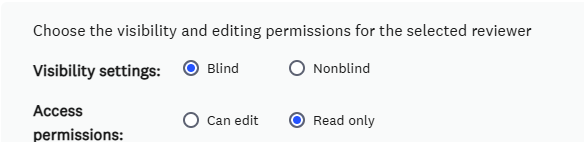
- Blind reviewers will be anonymized on the Team page to all project members except Content Managers
- When a blind or non-blind reviewer is invited to Elsa, they receive an invitation that includes a brief agreement (an abridged version of the contributor agreement). By selecting ‘Accept’ to the agreement, the reviewer gains immediate access to Elsa and the chapter(s) they are invited to work on.
- Track changes are always enabled for a reviewer, so that the lead author/editor can see their edits and decide whether or not to accept them. Read-only access only gives reviewers the ability to add comments.
- Remuneration: Comp copies and payments for reviewers are not currently accommodated in Elsa. (If there is a need for either reviewer comp copies or payments, please confirm with the Elsa Implementation Manager how often and in what manner this is a need, so the Elsa team can investigate further.)
One-off comp copy requests are sent directly to [email protected] - Can reviewers (both blind and non-blind) be added between any stages in the workflow?
Reviewers cannot be added before the contributor first draft stage (which is the first workflow stage) or after staff review workflow stage (which is the last workflow stage). Otherwise, reviewers can be added between workflow stages where desired. - Can multiple reviewers be added to a single chapter at the same stage?
Yes, you can add multiple reviewers to a single chapter. However, simultaneous editing is not a feature in Elsa; multiple reviewers on a single chapter would need to edit one at a time, similar to authors, editors, and contributors. - Can two different reviewers be added to the same chapter but at different stages in the workflow? (For textbooks, for example, an SME may review the chapter content during early draft stage, and a different reviewer may review the near-final stage of the process.)
Yes, reviewers can be added to the same chapter but at different stages in the workflow. You can add a second review stage in the Custom Workflow. - If there are different reviewers on each chapter, will those reviewers see each other’s identity?
Non-blind reviewers will be able to see each other’s identities on the Teams tab and in the comments. Blind reviewers will be anonymized.
Custom Workflow feature overview, by comparison to the Reviewers feature in Elsa:
- The addition of a Series Editor, Section Editor, Associate Editor, or similar, is different from adding a reviewer. Adding a Series Editor, for example, falls under the feature of Custom Workflow. This feature allows Content Managers the flexibility to create a custom workflow and add additional steps to the standard pre-set Monograph and Edited workflows.
Content Managers can decide which workflow stages to use and what order of stages for a project. - A Series Editor, for example, is a contracted party, and they would be added to the Elsa workflow when the Elsa record is initially set up. If a workflow stage needs to be added mid-development, Elsa allows the Content Manager to insert the workflow.
- The placement of a custom step in the workflow can be placed where the head contract or Elsevier representative indicates, for example:
Contributor > Section Editor > Editor > Series Editor > Elsevier Staff
The writing/editing cycle can loop back to earlier stages as needed and move forward again until the manuscript is submitted to the Elsevier staff member as final.
Did we answer your question?
Related answers
Recently viewed answers
Functionality disabled due to your cookie preferences