
What do the Exit Chapter and Create Version buttons mean?
Last updated on July 17, 2025
When editing a chapter in Elsa, you’ll see two important buttons on the right side of the screen: Create Version and Exit Chapter. Here’s what they mean and when to use them:
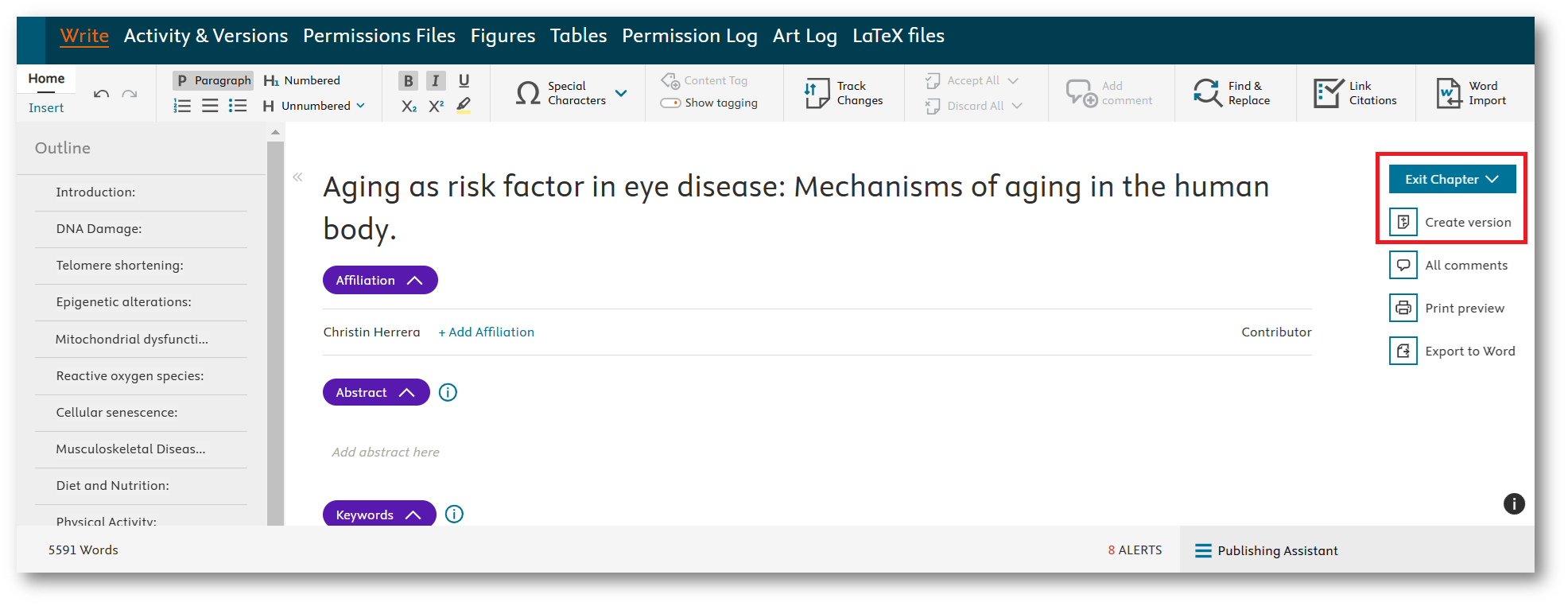
Clicking this icon does the following:
- Clicking "Create Version", creates a new, read-only version of the chapter.
- Your team will be able to view the most recent updates.
- This does not change the workflow status — the chapter stays in its current step.
- A new entry is added to the Version History (see below).
Use this when you’ve finished working or are pausing work on a chapter.
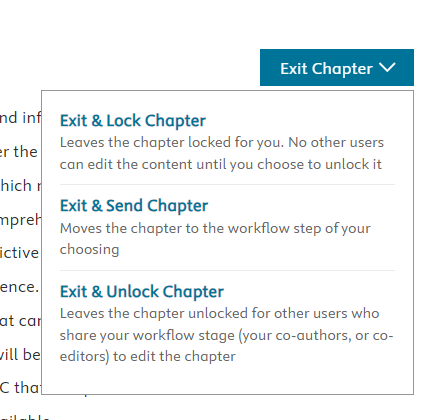
When you click Exit Chapter, you’ll be prompted to choose one of the following actions:
- Exit & Lock Chapter – Locks the chapter so others can’t edit it and your changes remain private.
- Exit & Send Chapter – Sends the chapter forward in the workflow and creates a new version.
- Exit & Unlock Chapter – Unlocks the chapter so others can edit it. Also creates a new version.
A new version of the chapter is created when you:
- Click Create Version
- Choose Exit & Send Chapter
- Choose Exit & Unlock Chapter
You can view previous versions under the “Activity & Versions” tab. For more details, see this FAQopens in new tab/window.
Note that Elsa saves automatically and is separate to Exit Chapter and Create Version.
Did we answer your question?
Related answers
Recently viewed answers
Functionality disabled due to your cookie preferences