
How do I copy references from text and then paste into Elsa?
Last updated on July 07, 2025
You can copy references from text (like a Word Document) and paste into Elsa to build your reference library.
To paste your references:
- Navigate to the Insert ribbon on the toolbar
- Click on the References icon
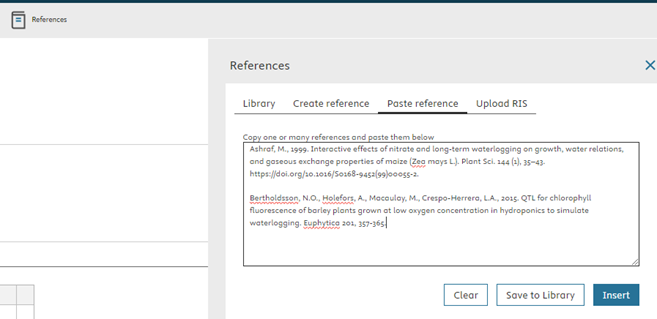
- Click on the Paste reference tab once the References pane opens
- Enter your reference (s) into the open text field
- Select Insert to create an in-text citation and save the reference to your reference library or select Save to Library to save the reference without creating an in-text citation
Did we answer your question?
Related answers
Recently viewed answers
Functionality disabled due to your cookie preferences