
As an author/editor/contributor, how do I use structured authoring templates in Elsa?
Last updated on February 23, 2024
Using templates in Elsa allows for greater uniformity of style and presentation of information in a book so that readers can easily navigate the content and find what they need presented in a manner that is useful for them.
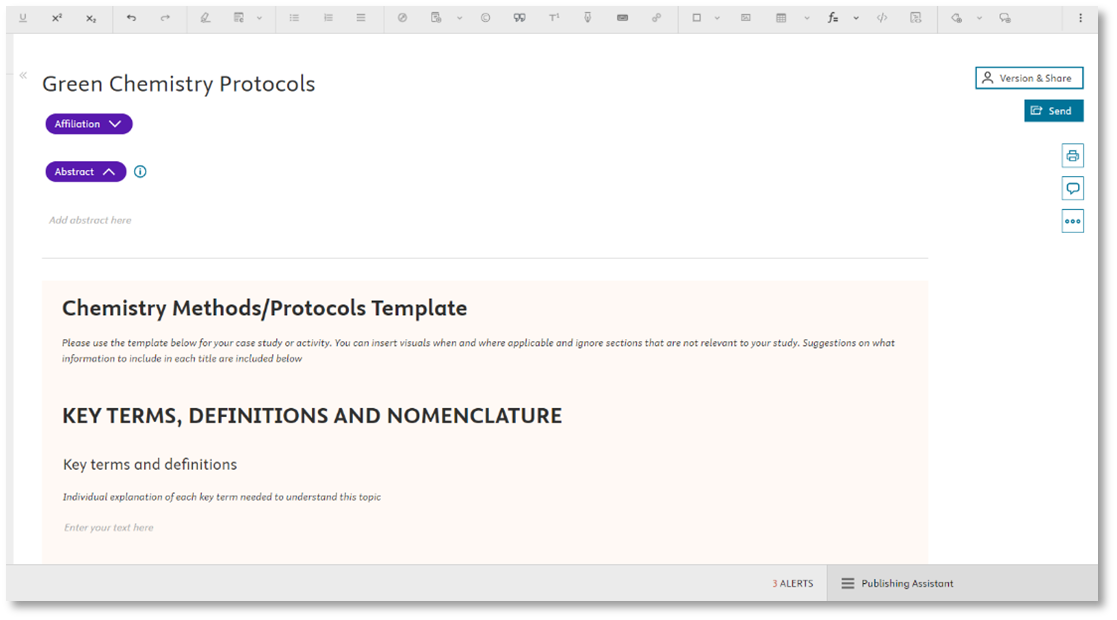
If your project will be using a template(s), this will be noted for our project set-up team and the template (s) will be added when creating your project. The chapter template will then display electronically in the Write Space as shown below. You can start writing in the templated chapters once you receive access to your Elsa project.
What are the current template types available?
- Case Study/Activity
- Chemistry Methods/Protocols
- Life Science Lab Protocols
- Materials Science and Engineering Methods/Protocols
Can I create my own templates in Elsa?
No, the templates used in Elsa are pre-defined.
Can chapters have multiple templates?
No. Only one template per chapter can be applied.
Can projects have more than one template?
Yes, a project can have multiple template styles but only one template style per chapter.
Can a template be applied after a project has been set up or at any other stage in the authoring process?
In order to minimize the risk of content loss, templates cannot be added to individual chapters after set-up. If the need for a template arises at a later point in the authoring process, we recommend reaching out to an Elsevier staff member can enable templates for your project. You would then need to copy+paste any existing content over to the new, templated chapter.
Can Word Import be used if a chapter contains a template?
Yes. If a chapter has a template, content can still be imported via a Word file. The imported content will come in below the template.
Can figures, equations, references or other elements be added inside a template?
Yes, figures, equations, references and other chapter elements can be used inside a template.
Will a template show in Print Preview?
Yes, templates will appear in print preview.
Can an author import a template via Word import?
Structured authoring templates in Elsa are digital and an author will need to work in Elsa in order to use the template.
Templates cannot be turned off once activated for a project. If a template has been applied to a chapter where it is not needed, this can be resolved in two ways:
- Content can be entered below the template and it can be removed by our production teams in during the production process.
- The chapter can be deleted and a new chapter created from the ToC without selecting from the dropdown menu to apply a given template.
Did we answer your question?
Related answers
Recently viewed answers
Functionality disabled due to your cookie preferences