
How does Complete Anatomy integrate with my school’s Learning Management System (LMS)?
Last updated on December 01, 2025
Complete Anatomy integrates with Canvas and Moodle. With our LMS integration, educators can easily embed Deep Links into their courses, which allows the selected content to load directly within Complete Anatomy.
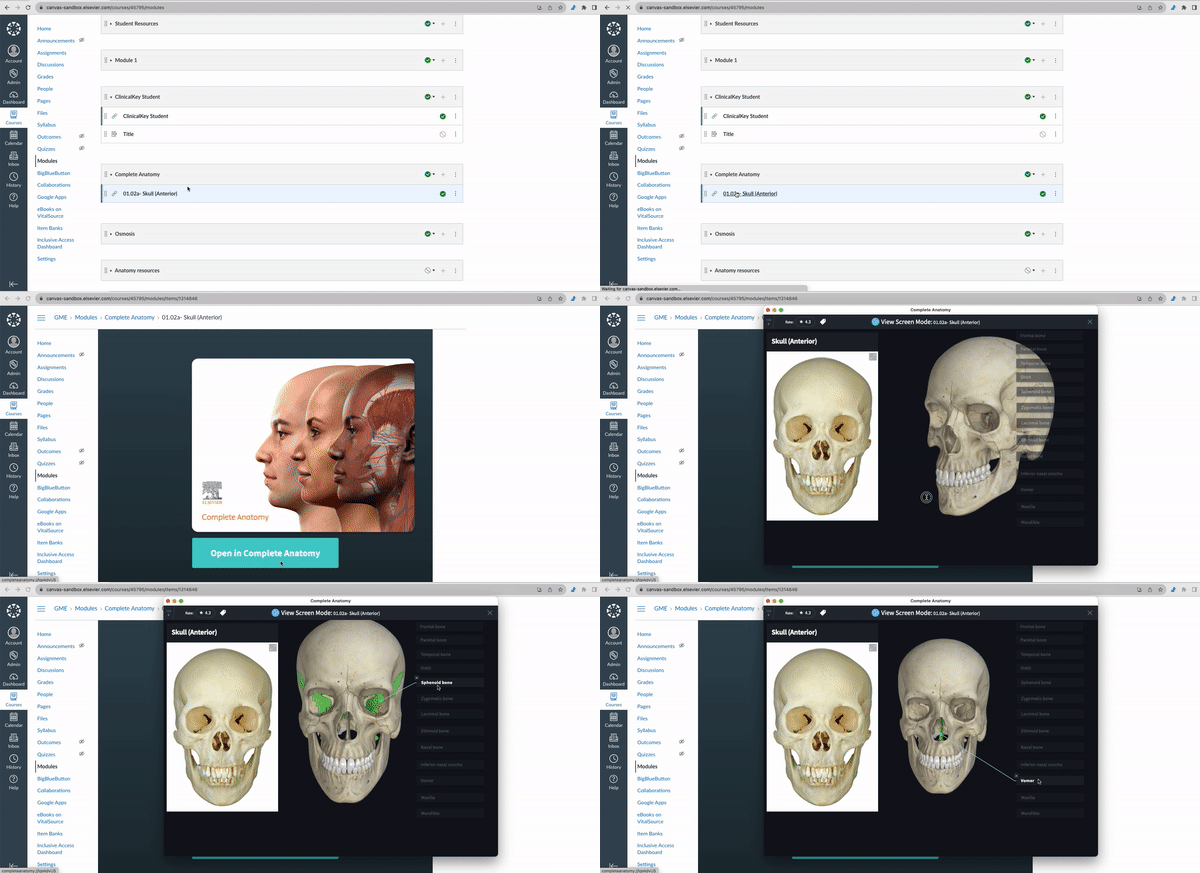
View how to add Deep Links through LMS integration below:
Currently, we are in the process of defining our LMS integration roadmap. We are exploring new integrations and looking for ways to enhance our existing ones. We have compiled a list of frequently asked questions about the current integration to address some common queries.
Complete Anatomy integrates with Canvas and Moodle using LTI 1.3.
Unfortunately, it is not currently possible to access Complete Anatomy without downloading it to your device. However, once downloaded, the Deep Links in the LMS will direct the app to launch and load the content you have selected.
Not at the moment. To monitor participation and track grades, content must be shared to a Group in the Curriculum Dashboard.
This isn’t a current feature, however, grades can be exported from the Curriculum Dashboard Manager and imported into the LMS.
Not currently. Users still need to download Complete Anatomy and redeem their access within the app.
Not at this time. Students and faculty will need to register with their school email address and a password to log into the Complete Anatomy app.
If you're interested in setting up LMS integration for Complete Anatomy but haven't done so yet, please click on one of our contact options below and submit a request. Our Digital Integration Team will get in touch with you to assist you further.
Did we answer your question?
Related answers
Recently viewed answers
Functionality disabled due to your cookie preferences