
How do I manage auto-renewal on my Complete Anatomy subscription?
Last updated on May 07, 2026
Also available in
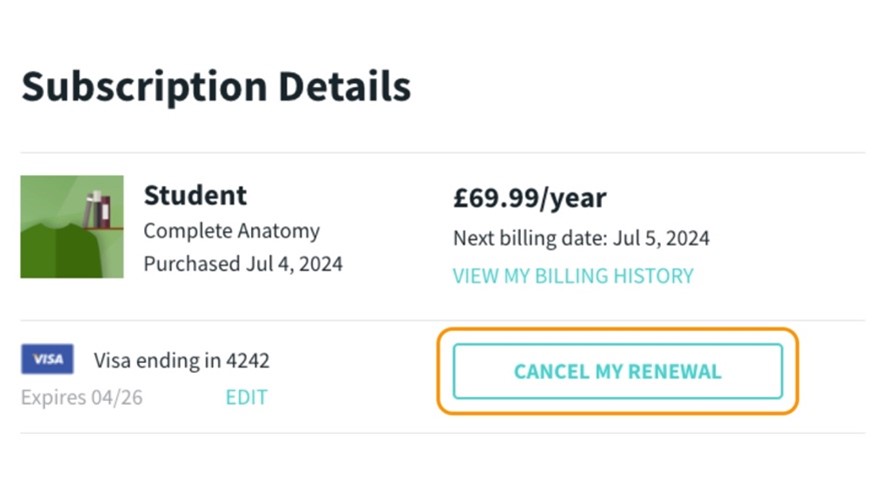
If you don't want to renew your subscription for the next year, you can turn off auto-renew. You'll still have access to your subscription features until the end of your current subscription period. However, if you let your license expire without renewing, you'll lose access to all your created content until you re-subscribe to your license. To turn off auto-renewal, please follow these steps:
If you purchased on our website
Simply log in to your My Account and go to Subscription Details. Click on the “CANCEL MY RENEWAL” button.
For Chinese mainland customers, please visit your My Account here.
If you purchased in-app
iPad, Mac or iPhone
You can manage your subscription in the App Store
Windows
You can manage your subscription in the Microsoft Store
Android
You can manage your subscription in the Play Store
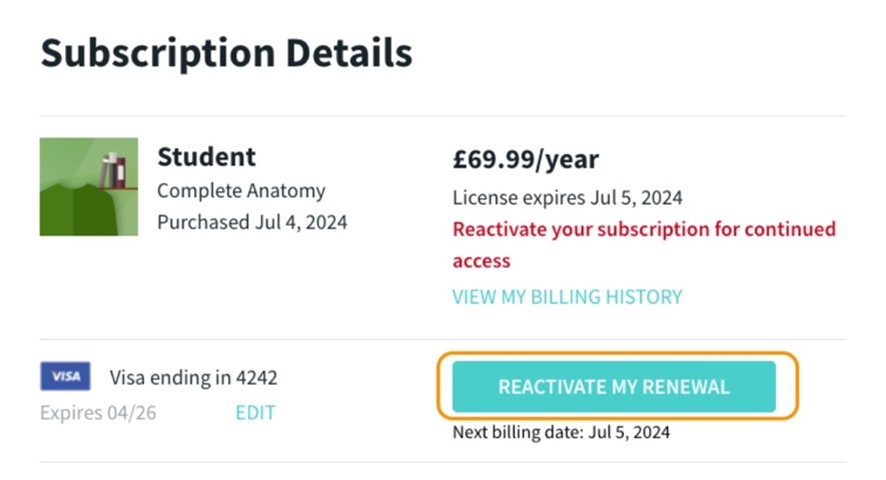
If you have disabled auto-renewal for your Complete Anatomy subscription and would like to re-enable it, you can easily do so by following these steps:
If you purchased on our website
Simply log in to your My Account and go to Subscription Details. Click on the “REACTIVATE MY RENEWAL” button.
For Chinese mainland customers, please visit your My Account here.
If you purchased in-app
iPad, Mac or iPhone
You can manage your subscription in the App Store
Windows
You can manage your subscription in the Microsoft Store
Android
You can manage your subscription in the Play Store
Did we answer your question?
Related answers
Recently viewed answers
Functionality disabled due to your cookie preferences