
View by category
How can my institution find collaboration partners?
Last updated on November 15, 2024
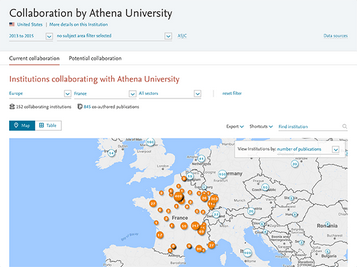
Get an overview of your collaboration landscape. The map view in Current collaboration gives you a global overview of the collaboration partners of your institution. You can then zoom in to a specific country. For example, to see your collaboration partners in France:
How
Follow these instructions to get an overview of collaboration partners:
By default, the number of co-authored publications for each institution is shown, but you can also see the citation impact of those collaborations. Use the drop-down menu in the top-right corner of the map to switch to number of citations, Citations per Publication or Field-Weighted Citation. |
- Select your institution from the entity selection panel on the left-hand side.
- Go to 'Current collaboration' and select the Map view
- To find collaboration partners in France, click on the Europe marker to zoom in and see all the European countries where collaboration with your institution has taken place.
- Click on the round marker shown in France to zoom in and see all collaborating institutions and researchers in France.
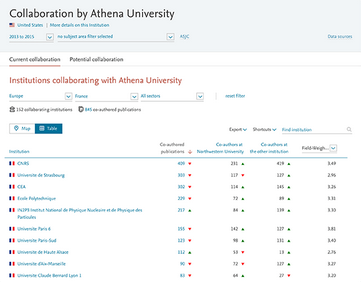
- Switch from map to table view to see the collaborating institutions in France in a tabular list view. Click on one of these institutions to explore the collaborating with that institution in more detail.
- Go to the Export menu to export the full list of collaborating institutions to a spreadsheet file.
- To view collaboration in France within a particular sector (such as corporate or medical), select the sector from the rightmost olf the drop-down menus along the top of the map.
The table view lets you compare institutions by the scholarly output co-authored with each. You can also evaluate the impact of your collaborations using metrics such as number of citations or Field-Weighted Citation Impact.
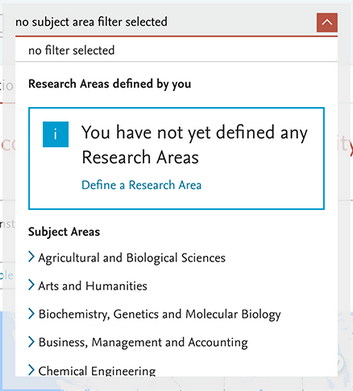
View your collaborations within a specific field of research. Do you want to see the collaborations of your institution within a specific field of research? Then select a filter from the dropdown menu at the top of the page. For example, to see collaboration within chemistry only, choose Chemistry from the menu.
- You can choose from 27 main subject areas and 334 subcategories within the Scopus subject classification.
- You can also define your own research areas, which can be as granular or interdisciplinary as you like.
Did we answer your question?
Related answers
Recently viewed answers
Functionality disabled due to your cookie preferences