
View by category
How do I add Contributors to a Figures List?
Last updated on August 17, 2026
Both internal (RELX employees and contractors) and external users can contribute to figures listsopens in new tab/window. Contributors can only be invitedopens in new tab/window by owner, co-owners, or content managers of a figures list.
How
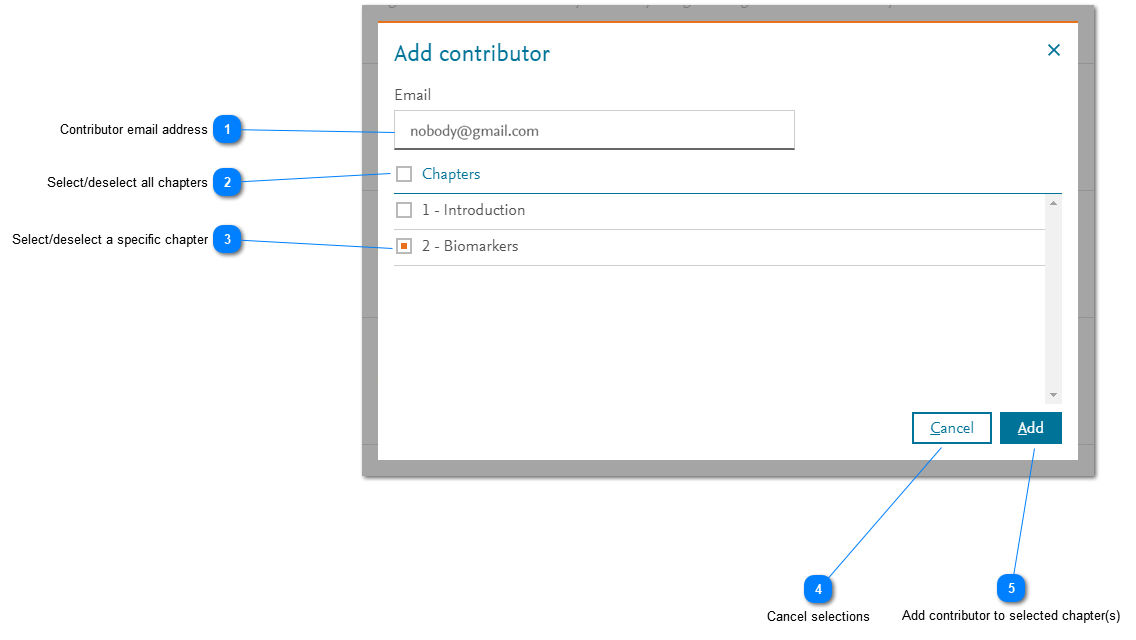
- Contributor email address: Enter the email address of the contributor. The email address is used for the recipient of an automatically generated email that invitesopens in new tab/windowthe user to contribute to the selected chapters. The email address must match the address used by the user to sign in to Image Finderopens in new tab/window.
- Select/deselect all chapters: Click the box for Chapters to select all (current) chapters in a figures list. If the box is selected, clicking it again removes the selection of all chapters in the list.
- Select/deselect a specific chapter: Click the box for a specific chapter to select that particular chapter in a figures list. If the box is selected, clicking it again removes the selection of that chapter in the list.
- Cancel selections: Click 'Cancel' to cancel any selections that you have made. The 'Add/Edit contributors' pop-up windowopens in new tab/window is displayed.
- Add contributor to selected chapter(s): Click 'Add' to add the user as a contributor to the selected chapters. The 'Add/Edit contributors' pop-up windowopens in new tab/window is displayed.
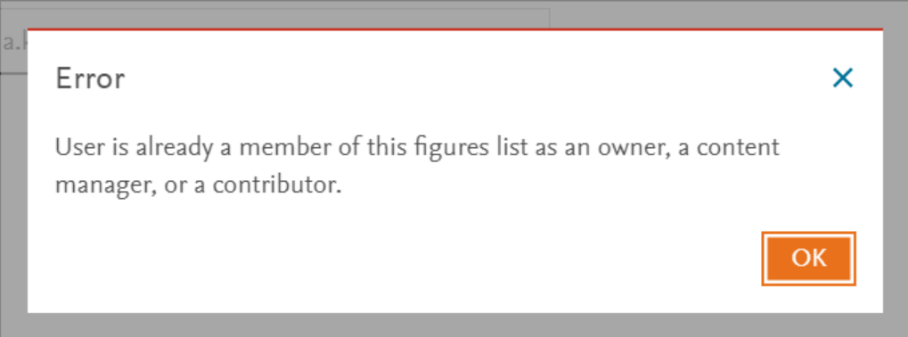
If the user is already an owner, a co-owner, or a content manager of the selected figures list, an Error message is displayed and the user is not added as a contributor. A user can only be assigned to one of the three rolesopens in new tab/window in a figures list, as appropriate.Users won't be able to contribute until they have been invitedopens in new tab/window and they have accepted the invitationsopens in new tab/window.





Did we answer your question?
Related answers
Recently viewed answers
Functionality disabled due to your cookie preferences