
View by category
How do I invite Contributors to a chapter in Figures Lists?
Last updated on August 17, 2026
After you added contributorsopens in new tab/window to chapters in a figures listopens in new tab/window, you can either send an invitation to individual contributors or you can send invitations to all contributors for all chapters in a selected figures list.
If you want to send an invitation to individual contributors, in the Add/Edit contributors pop-up window, click the vertical ellipsis under 'Action' to display a menu of actions that you can apply to individual contributors.
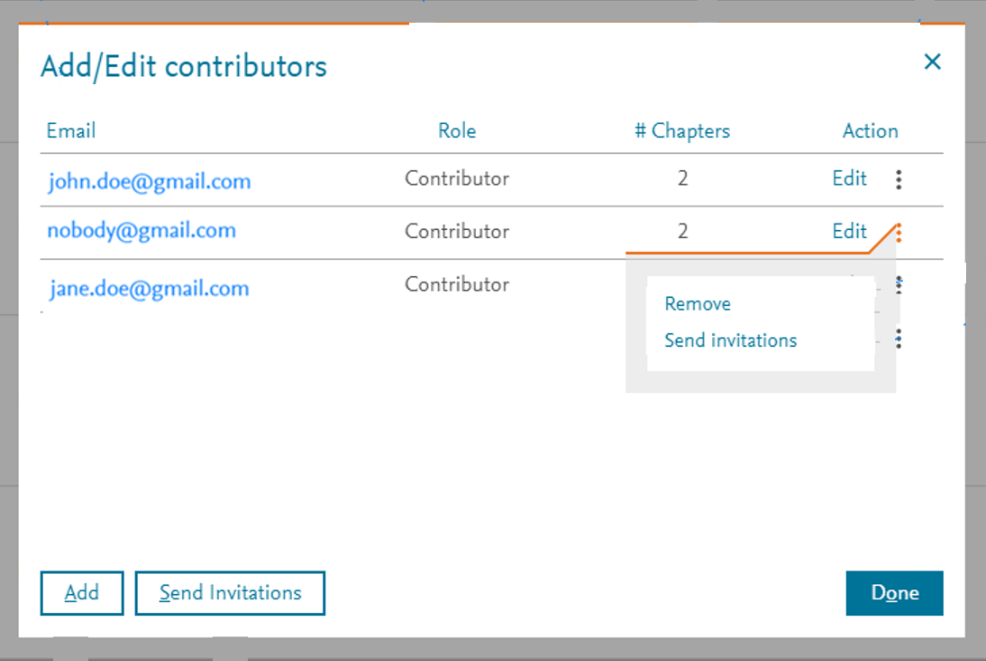
Click 'Send invitations' for a particular contributor to send an invitation for all the chapters that the selected contributor are assigned to in the selected Figures List, if an invitation is still appropriate for the selected contributor. The selected contributor will receive a single invitation for all the chapters in which they participate. An invitation is only sent for chapters if the contributor has not already accepted the invitation.
Two emails are sent automatically to the affected users. One email with the subject line "Figures list invite – [Figures list name]" is automatically sent to the newly invited contributor, informing them who invited them to be a contributor for those chapters into a particular figures list. Another email with the subject line "User added to the Figures list" is automatically sent to the person who invited the contributor, confirming they have invited a particular user with their user ID to those chapters in a particular figures list.
If you want to send invitations to ALL contributors for all chapters in a selected figures list, click the 'Send Invitations' button in the Add/Edit contributors pop-up window, if invitations are still appropriate (i.e. any contributor who has not yet accepted an invitation or an invitation has not been sent).
Two emails are sent automatically to the affected users. One email with the subject line "Figures list invite – [Figures list name]" is automatically sent to the newly invited contributors, informing them who invited them to be contributors for those chapters into a particular figures list. Another email with the subject line "User added to the Figures list" is automatically sent to the person who invited the contributors, confirming they have invited a particular user with their user ID to those chapters in a particular figures list.
Did we answer your question?
Related answers
Recently viewed answers
Functionality disabled due to your cookie preferences