
View by category
How do I edit a Contributor in a Figures List?
Last updated on August 17, 2026
Owner, co-owners, and content managers of a figures listopens in new tab/window can decide which chapters a contributor can participate in by selecting and deselecting the relevant chapters.
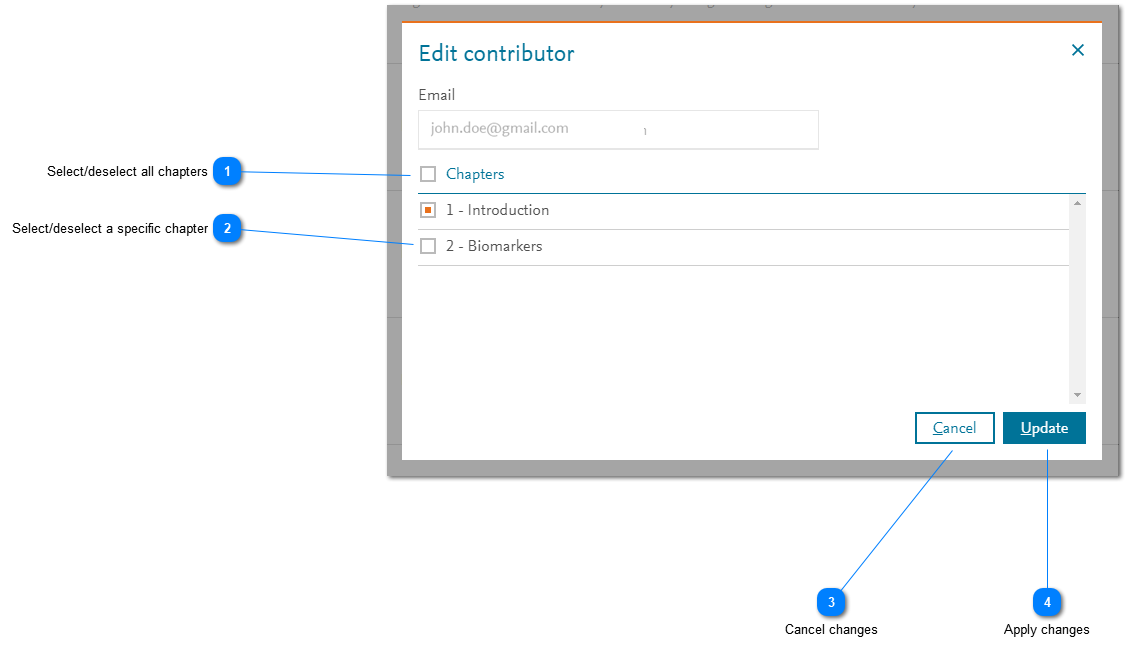
- Select/deselect all chapters: Click the box for 'Chapters' to select all (current) chapters in a figures list. If the box is selected, clicking it again removes the selection of all chapters in the list.
- Select/deselect a specific chapter: Click the box for a specific chapter to select that particular chapter in a figures list. If the box is selected, clicking it again removes the selection of that chapter in the list.
- Cancel changes: Click 'Cancel' to cancel any selections that you have made. The 'Add/Edit' contributorsopens in new tab/window pop-up window is displayed.
- Apply changes: Click 'Update' to add or remove the user as a contributor to or from the selected chapters. The 'Add/Edit' contributorsopens in new tab/window pop-up window is displayed.
Users won't be able to contribute to any chapters that they have been added until they have been invitedopens in new tab/window and they have accepted the invitationsopens in new tab/window for those chapters. If any assigned chapters are removed from the users, they will not be able to modify figures in those chapters. However, any figures that they have contributed in those chapters will remain in place.



Did we answer your question?
Related answers
Recently viewed answers
Functionality disabled due to your cookie preferences