
What is Emtree and how do I use it?
Last updated on February 21, 2023
Emtree is a thesaurus tool for biomedicine and related life sciences that allows users to:
- Identify the most suitable terms for a search, based on the indexing of all Embase content (from 1947 and later). This helps in the construction of explosion searches.
- Browse through all indexed terms using a tree structure which also allows searching for groups of terms (e.g., all monoclonal antibodies). Such searches are impossible using databases with no tree hierarchy. Without using Emtree, a search on 'heart attack' would miss records mentioning 'myocardial infarction'.
- Build a query using several Emtree terms. You can search directly with these search queries or you can transfer your query to the Advanced Search form to refine it with filters and subheadings.
Emtree has been used to index all of the Embase content, dating back to 1947. It is unrivalled in its coverage of drug, disease and medical device terminology. It is more than twice as large as the MEDLINE thesaurus MeSH, and it includes all of the MeSH terms. We update Emtree three times a year and all Embase records (we do not index MEDLINE records) are updated at this time to reflect any changes in Emtree.
Emtree also covers all new International Non-Proprietary Names (INNs) for drugs registered with the World Health Organization (WHO), as well as all US Adopted Names and NDAs (New Drug Approvals) listed by the Food & Drug Administration (FDA) and European Medicines Agency (EMA). Trade names belonging to major pharmaceutical companies are also covered. Please also see our latest Emtree release.
How
Click 'Emtree' in the 'Browse' dropdown menu at the top of the screen. You can also browse Emtree directly on the PICO search form and apply the best Emtree term, along with synonyms, to each of the 4 different elements in the PICO framework.
There are three options for browsing the terms in Emtree: Query Builder, Find Term and Browse by Facet. Click the option to find out how to use it:
The query builder helps you to build search queries with multiple Emtree terms. You can search directly with these search queries or you can transfer your query to the Advanced Search form to refine it with filters and subheadings.
Follow these steps to use the Query Builder:
- Click 'Query Builder' to expand the feature
- Build your query using Emtree terms and search syntax (Boolean operators AND, OR, NOT, NEAR or NEXT, field labels, limits, and subheadings).
- You can also add terms to the Query Builder by first using the 'Find Term' or 'Browse by Facet' function in Emtree to identify which term to use and then clicking 'Add to Query Builder'.
- Use single or double quotes (as long as they match, e.g., ‘heart infarction’ or “heart infarction”) around multi-word phrases.
- For more information on how to use command-line search syntax, view our FAQs on Operators and wildcards, and on Field labels, limits and subheadings.
- Click 'Search' to see the retrieved records from your search or Click 'Take this query to Advanced Search' to choose more options and limits available in the Advanced Search form, such as specific publication years, priority journals, article languages and subject age groups.
Find Term helps you to identify the correct Emtree terms and to find the terms that are related to your search. This helps in the construction of explosion searches.
Follow these steps to get the most out of the Find Term feature:
- Type a word or phrase in the search field and click the 'Find Term' button. Do not use quotation marks, wildcards or Boolean operators. The field should only contain the words of interest.
- An alphabetical list will appear with all terms containing the word(s) you typed, including both synonyms and preferred index terms.
- Terms in normal black text are synonyms. Preferred Emtree terms are live blue links with a use: reference. For example, 'myocardial infarction use: heart infarction' shows that the preferred Emtree term is 'heart infarction'.
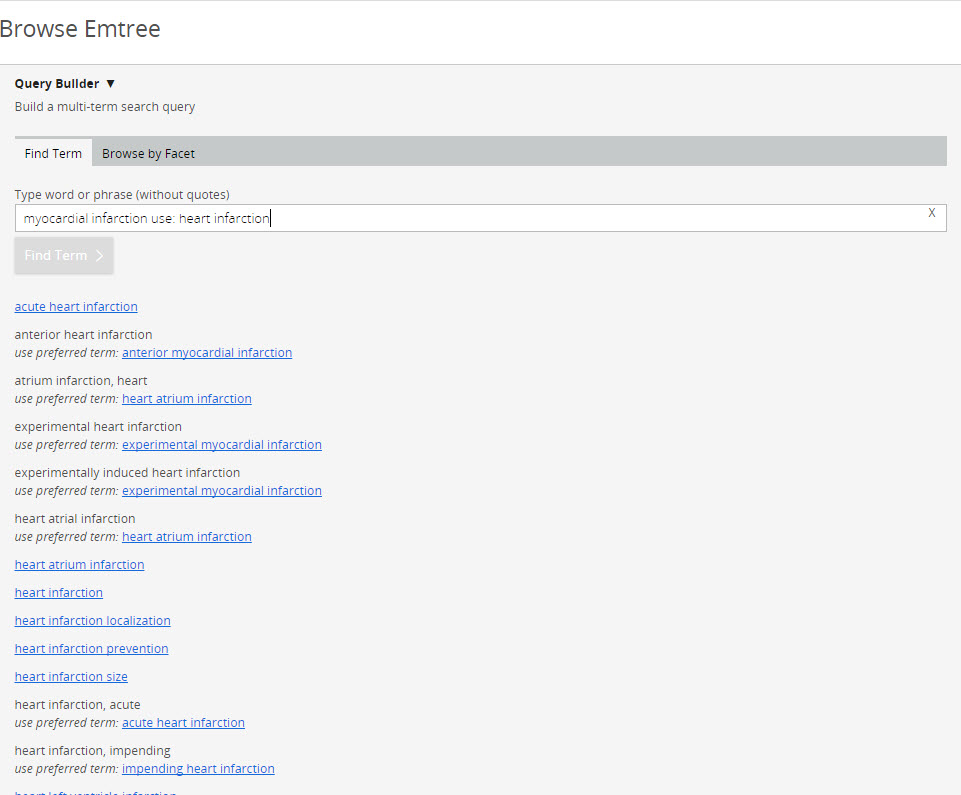
- Click on any blue Emtree term to see a tree display showing its position(s) in the Emtree thesaurus hierarchy.
- For example, click on 'heart infarction' and you can clearly see its relationship to both broader disease categories (infarction, cardiovascular disease, necrosis, etc.) and narrower (more specific) infarction terms (infarction, ischemia, ischemic heart disease, etc.). Narrower terms include acute heart infarction, Dressler syndrome, heart atrium infarction and silent myocardial infarction. These terms would be retrieved in an explosion search.
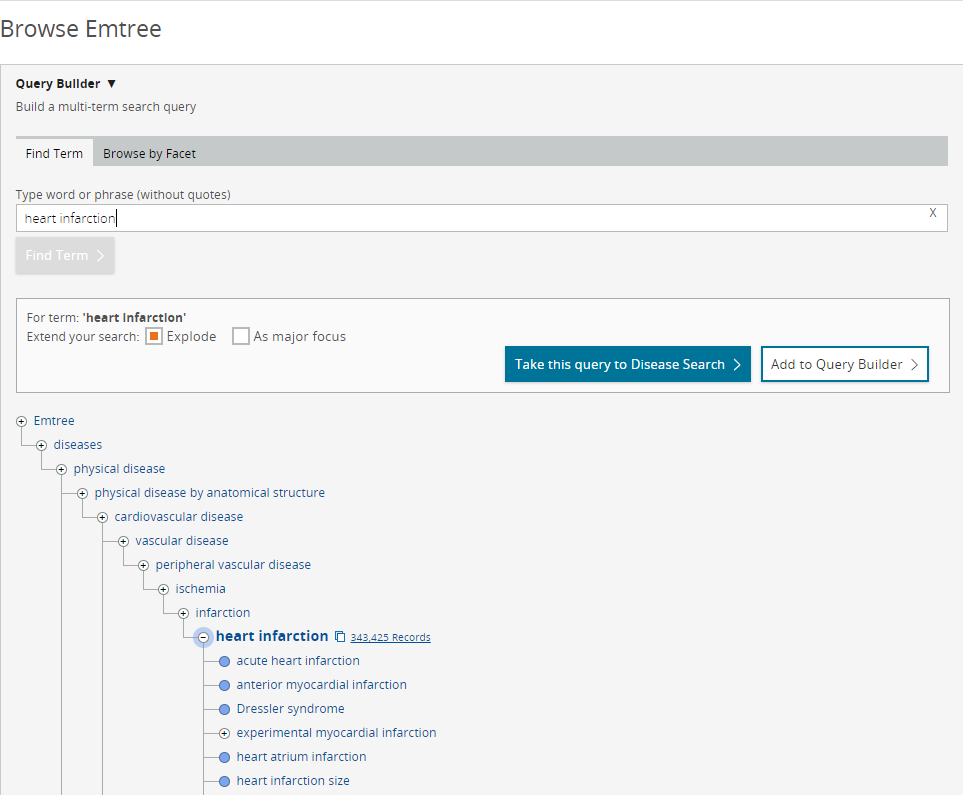
- To expand or refine your search or to learn more about a specific term:
- Click the ‘+/-’ symbol next to a term: this will collapse or expand the tree-structure. For example, you can click on the broader term 'ischemia' to see additional terms under that level or, click the (-) adjacent to 'heart infarction' if you wish to suppress the display of its narrower terms.
- Check the ‘Explode’ or ‘As major focus’ box: ‘Explode’ includes all narrower (more specific) terms in the search query, so you don’t have to enter each one individually. It’s an excellent way to search for large groups of related concepts very quickly. ‘As major focus’ limits your search to records where the term(s) are the main emphasis of the article. This eliminates references where they are merely peripheral or implied. This is an effective way to maximize search relevance and reduce your number of hits.
- To show your search results or use your search in a query or form:
- Click the number of indexed records next to a term to go directly to the Search Results Page.
- Click ‘Take this query to …’ to use your term in the appropriate search form (e.g. Disease Search, Drug Search, Device Search). This allows you to apply limits, date ranges, and so on.
- Click ‘Add to Query Builder’ to use your term in a Query Builder search. If other terms are already present there, the new one is added with a Boolean AND operator.
Browse by Facet lets you explore the Embase thesaurus as a tree structure. The top fifteen levels (facets) of the Emtree subject hierarchy are displayed. Each facet represents a broad category of subjects (anatomy, organisms, drugs/chemicals, diseases, medical techniques and equipment, patient groups, etc).
Because Emtree terms are grouped conceptually in hierarchical 'trees', you can look at any level of a tree to see broader or narrower (more specific) subjects. This is very helpful for understanding how subjects relate to one another. It also shows what terms are retrieved in an explosion search.
Record counts are given at each tree level to indicate the number of documents currently indexed in Embase to each specific term.
To browse the trees, simply click on any facet. The lower levels (branches) appear, showing you the narrower terms. Continue clicking on subsequent levels to browse as deeply within the tree as you wish. For example, you can navigate from 'Physical diseases, disorders and abnormalities' all the way down through 'brain injury' and its narrower terms.
The (-) and (+) symbols show where tree levels can be collapsed or expanded. Here, clicking the (-) beside 'brain injury' will suppress the display of narrower terms.
Some terms have more than one logical context within Emtree. In this case, a tree for each context will be shown. For example, 'brain injury' appears in Emtree under 'nervous system injury' and within the trees for 'head injury' and 'brain disease'. In each case, its narrower terms remain identical to ensure consistency within the thesaurus.
Did we answer your question?
Related answers
Recently viewed answers
Functionality disabled due to your cookie preferences