
How do I add front/back matter to my project?
Last updated on March 12, 2026
Both front and back matter can be added in Elsa. Read on to learn more about how to add these elements to your project.
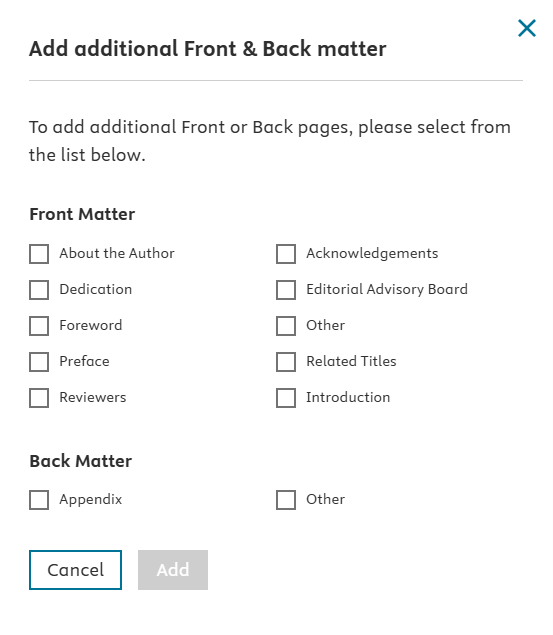
To add front matter/back matter pages, go to the Table of Contents, edit the Table of Contents, and click on "Front/Back matter".

To add front and back pages including dedication, foreword and appendix, select from the list on the panel opening on the right side.
To create customized front/back pages, choose ‘Other.’ Multiple pages can be created at one time.
Front and back matter elements are optional and up to the discretion of the Editor/Author and Content Manager.
NOTE: The Table of Contents and List of Contributors frontmatter elements in your TOC are auto-generated by Elsa and will automatically appear in every project (if a project does not have contributors, the LOC page will not appear).
The Index will be created at a later stage during production. Users do not need to add an Index page.
Remember: Don’t forget to click ‘Publish Changes’ to update the ToC with your most recent changes.
Editors/Authors can add Contributors to front/back matter pages. For complete instructions on how to add Contributors in Elsa, see this Elsa support article: How do I add Contributors to my project in Elsa?opens in new tab/window
While Elsa uses the wording ‘Contributors,’ Editors/Authors can be assigned to the front/back pages in the same way and it is not compulsory that a Contributor be added to these front/back pages.
Did we answer your question?
Related answers
Recently viewed answers
Functionality disabled due to your cookie preferences