
How do I share in-app content via web links (Deep Links)?
Last updated on May 07, 2026
Also available in
With the launch of Complete Anatomy for Webopens in new tab/window, Screens shared through a deep-link will now open directly on your web browser using Complete Anatomy for Web.
Please note, Lectures, Quizzes, Questions and Videos will continue to open in the native app for now. However, we are working towards making all deep-linked content accessible via Complete Anatomy for Web in the future.
Please note, Lectures, Quizzes, Questions and Videos will continue to open in the native app for now. However, we are working towards making all deep-linked content accessible via Complete Anatomy for Web in the future.
Educators and Faculty holders within an Institutional licenseopens in new tab/window can create links that launch the app and open a specific Screen or Lecture when opened in a web browser. These links, known as Deep Links, can be shared just like any other website link.
To create a Deep Link, simply select the three-dot pull-up menu on the Screen or Lecture you'd like to share from your Library, then select the copy icon. You will then see the button to copy the Deep Link to your clipboard.
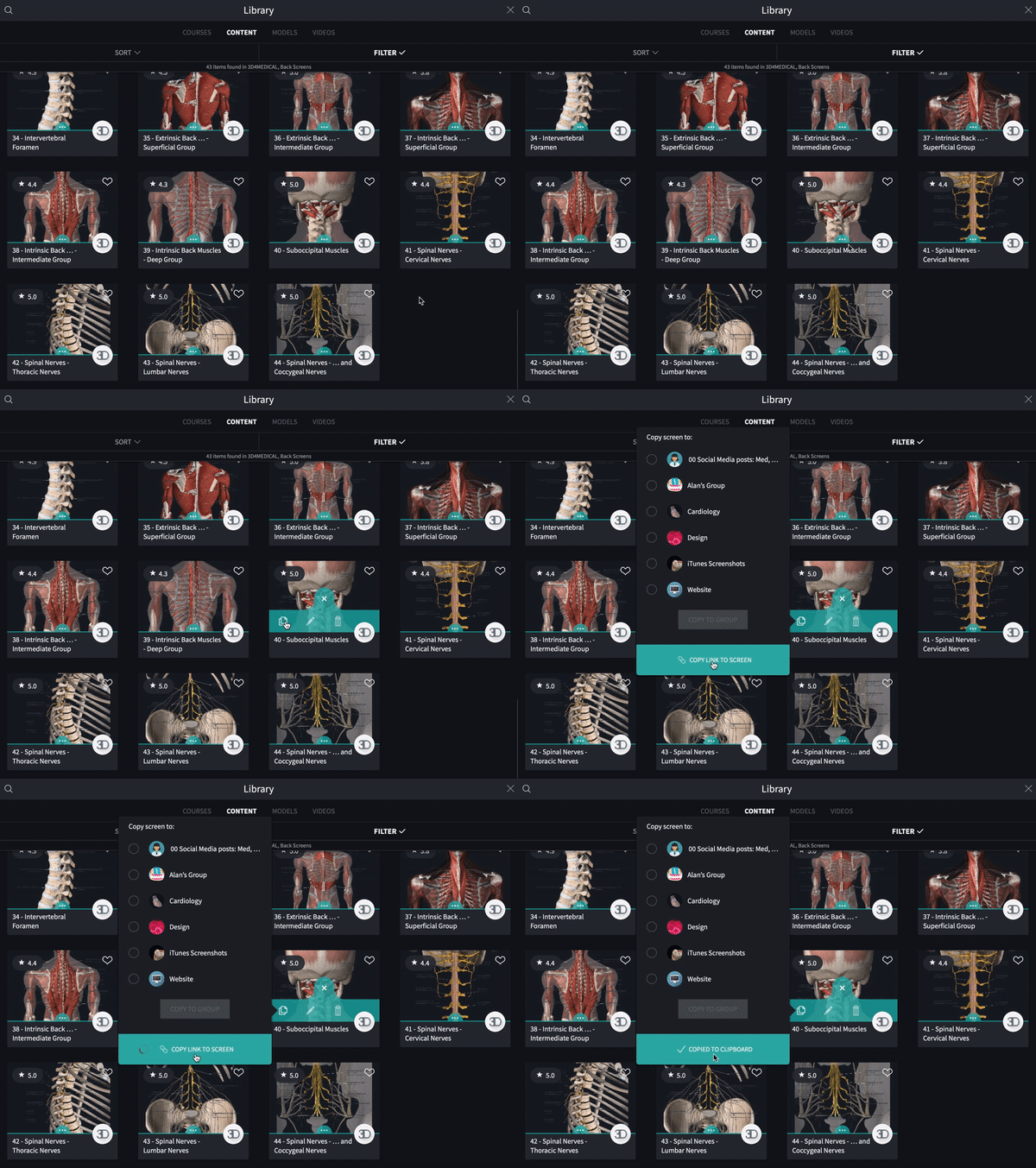
The person opening the deep link will need to have Complete Anatomy installed on the device that they are accessing the Deep Link from. They will also only be able to see content that is available to them on their current license.
Did we answer your question?
Related answers
Recently viewed answers
Functionality disabled due to your cookie preferences