
View by category
Analyze the research trends of any self or pre-defined Research Area, Publication Set, Topic or Topic Cluster with citation, publications and usage data, to discover key researchers, rising stars and current developments in fields of interest.
Analyses for trends in research fields in SciVal provides the ability to perform advanced Topic centric analysis of any Research Area, Publication Set, Topic or Topic Cluster.
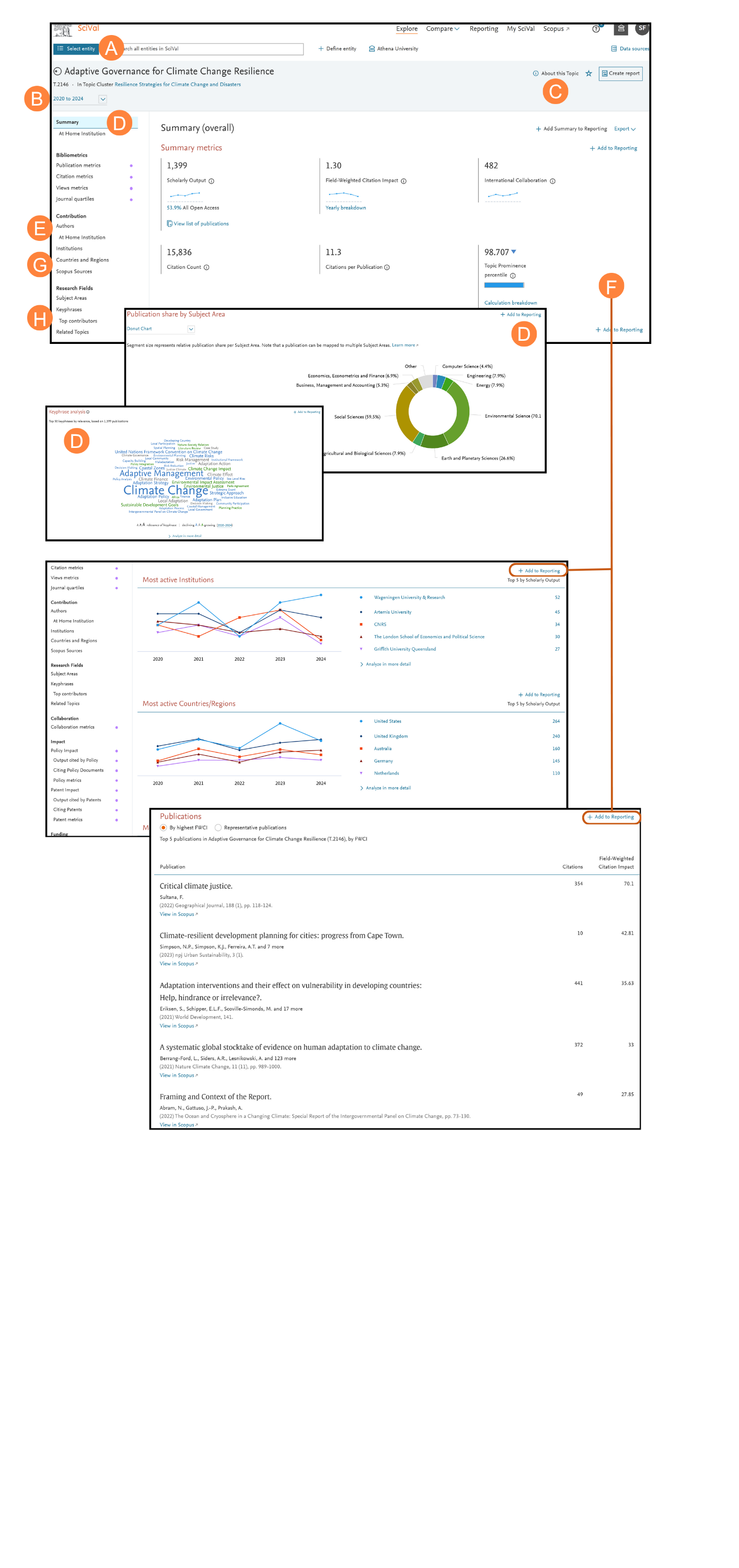
- Using the entity selection panel, select the self- or pre-defined Research Area, Publication Set, Topic or Topic Cluster you wish to analyze
- Select your desired year range from:
- 3 years*
- 5 years*
- 10 years
- *+current year and beyond
- With About this Topic you can quickly understand the core question(s) being addressed in each Topic or Topic Cluster with GenAI powered titles
- The Summary page provides an overview of your Research Area, Publication Set, Topic or Topic Cluster of interest. Several key metrics are displayed at the top of the tab followed by a donut chart (default) showing ‘Publication share by Subject Area’ and a
word cloud which provides a visual representation of the top 50 keyphrases within the area of interest - Additional pages provide insights into the selected Research Area, Publication Set, Topic or Topic Cluster across:
- Institutions
- Countries/Regions
- Authors
- Scopus Sources
- Keyphrases
- Related Topics (for Topics)
- Topics (for Topic Clusters)
- Funding Bodies (for ASJC pre-defined
- Research Areas
- Scroll down the Summary page to see
- Most active Institutions, Authors, Countries/Regions and Scopus Sources related to the Research Area, Publication Set, Topic or
Topic Cluster - Representative publications when analyzing a Topic, allow you to focus on the 5 publications most strongly linked to the Topic of interest
- The Institutions page details the Top 100 institutions as a table or allows you to view the geographical distribution of the Top 100 institutions via the map view
- The Keyphrases page allows you to analyze the Top 50 keyphrases relating to the area of interest
How are keyphrases calculated?
SciVal uses the Elsevier Fingerprint Engine (R) to extract keyphrases within the Research Area, Publication Set, Topic or Topic Cluster.
The text mining is done by applying a variety of Natural Language Processing techniques to the titles, abstracts and keywords of the documents in the Research Area, Publication Set, Topic or Topic Cluster in order to identify important concepts.
Concepts are matched against a unified thesaurus spanning all major disciplines. For each document, we take the list of standardized keyphrases and select which ones are important based on Inverse Document Frequency (IDF). This technique incorporates a factor that diminishes the weight of Words that occur frequently in the document set and increases the importance of words that occur rarely. Each keyphrase is then given a relevance between 0 and 1, with 1 given to the most frequently occurring keyphrase. Remaining keyphrases are given a value based on their relative frequency.
In SciVal, we take a weighted list of keyphrases per publication and aggregate this to each entity such as a Research Area or Topic.
Did we answer your question?
Related answers
Recently viewed answers
Functionality disabled due to your cookie preferences