
View by category
Combine impact data, metrics and insights with local knowledge to demonstrate your broader research impact.
Click on the image below for a larger version.
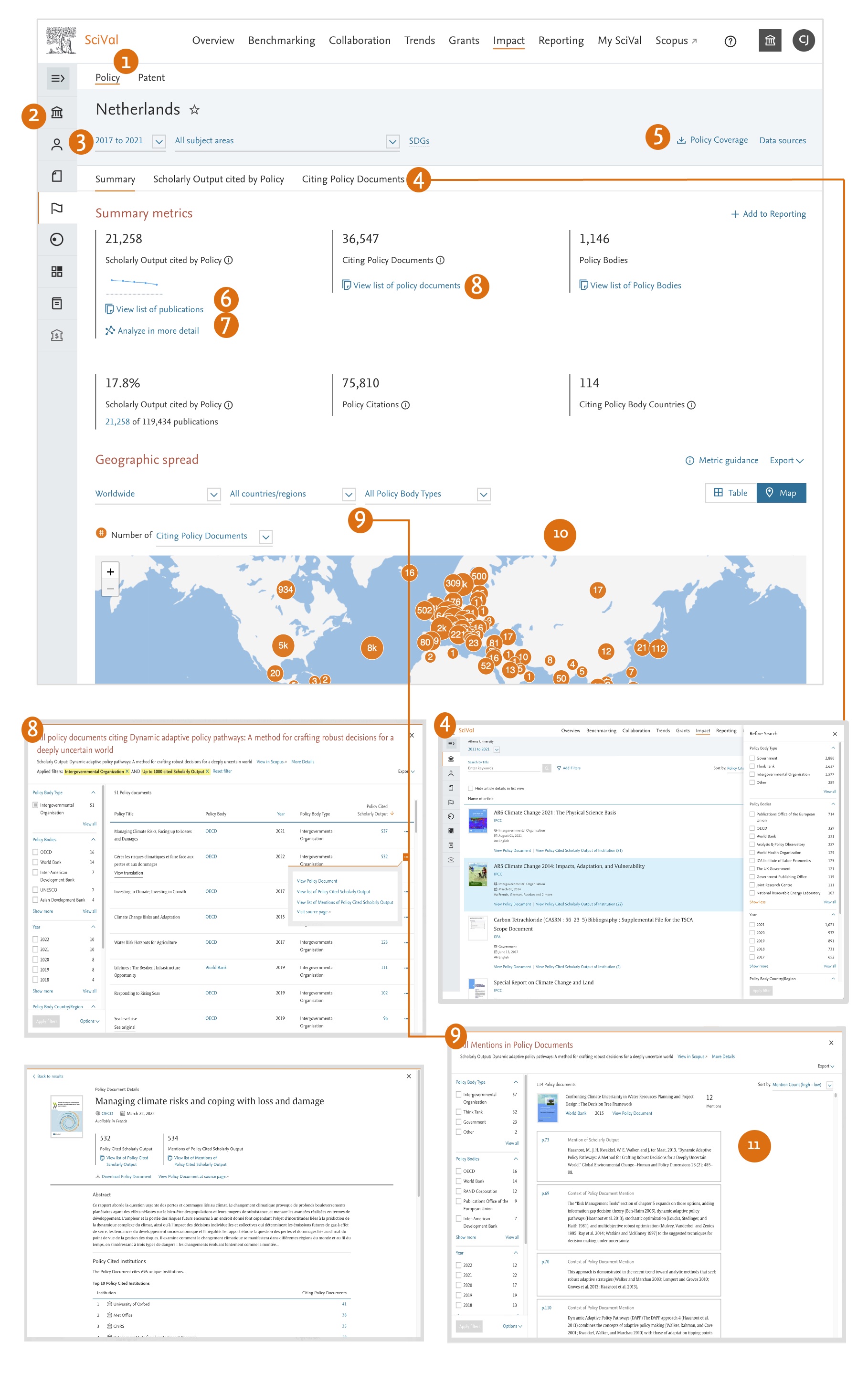
- Choose from Policy data from Overton, or Patent data from LexisNexis IP DataDirect.
- Add an entity such as an Institution or Country by typing the name in the search box. SciVal will provide you with a list of pre-defined entities matching your search to choose from.
You can choose from all available entities, including Researchers and Researcher Groups:- Institutions and Groups
- Researchers and Groups
- Countries and Groups
- Research Areas and Topics
- Scopus Sources
- Select your desired year range using the flexible year range selector.
- View the Policy Documents citing your entity from over 20 million covered by Overton and the Patent Documents from over 155 million Patents covered by LexisNexis IP DataDirect.
- For each Policy or Patent Document, see how many publications from your entity are cited, view a list of those publications and use the filters to limit the results to the Patent / Policy Body / Type / Country / Year etc of interest.
- View a list of the Scholarly Output cited by Policy or Patents.
- Filter the results, create a Publication Set and export the publications, along with their related academic citation and policy metrics.
- Compare the academic citation performance for both the Scholarly Output cited by Policy and all Scholarly Output from the entity. Often the Scholarly Output cited by Policy also receive above average scholarly citations.
- View a list of the Citing Policy or Patent Documents.
- Use the filters to limit the results.
- Export the Citing Policy or Patent Documents, including the name and Scopus EID of the entity’s publications that have been cited.
Learn more
- View a list of the Citing Policy or Patent Documents.
- Often you’ll find a Policy or Patent Document that has cited multiple Scholarly Outputs from an entity.
- By default the results are ordered from largest to smallest by number of policy document citations.
- View the geographical spread of the Policy bodies citing your entity's Scholaly Output
- A Policy document can mention a Scholarly Output more than once.
- Where possible, we show the context of the mention, so you can see what kind of impact the publication had.
- Click on the page number to go directly to the Policy mention in the PDF.
Did we answer your question?
Related answers
Recently viewed answers
Functionality disabled due to your cookie preferences