
View by category
Creating and importing departmental or institution wide hierarchies
Last updated on October 16, 2025
Also available in
In addition to the flexibility to analyze any researcher or group of researchers from any institution, you can also recreate your institution’s complete hierarchy in a few steps.
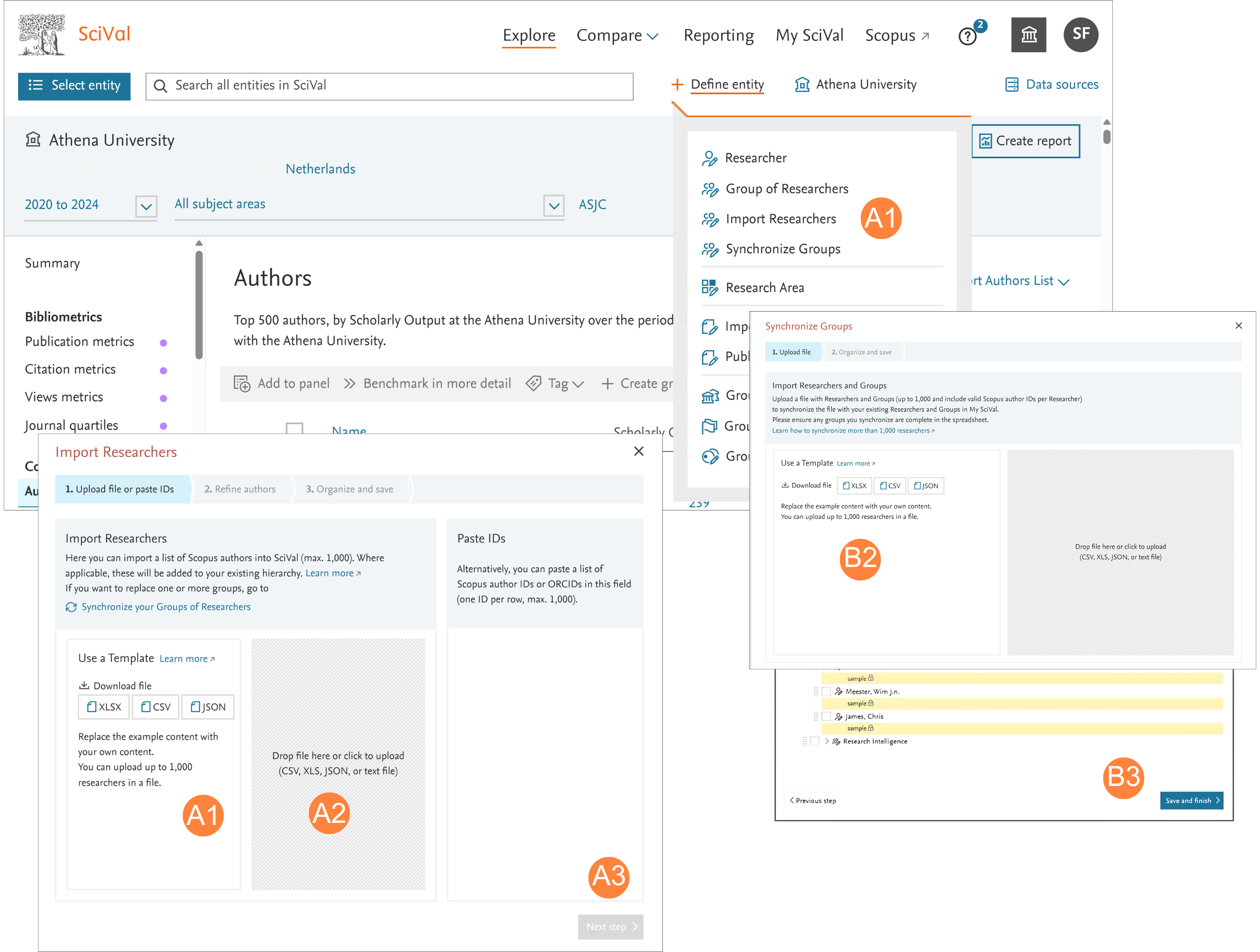
- Importing your institutional hierarchy, or part of it:
- Download and populate the Template:
- In the ‘Define entity’ link click ̒Import Researchers’
- Download an example Template in XLS, CSV, or JSON format
- Complete the Template (up to 1,000 Researchers at a time)
- Upload the completed Template:
- Drop the file into SciVal or click to upload
- Refine unmatched authors or export them to refine them offline
- Check the hierarchy structure
- Save and finish
- Modifying existing hierarchies and synchronizing:
- Export existing hierarchy:
- Go to My SciVal and select Group of Researchers from the the Entity type list in the left hand panel
- Select the hierarchy of interest and click ̒Export’ (you can export an unlimited number of researchers)
- Add or remove Researchers as required to complete the new Template
- Synchronize the updated hierarchy:
- Click the ‘Define entity' link in My SciVal in the right of the top panel
- Click ‘Synchronize Groups’ and upload your updated hierarchy file
- Verify changes and finish
Did we answer your question?
Related answers
Recently viewed answers
Functionality disabled due to your cookie preferences