
View by category
In addition to managing entities within the entity selection panel, My SciVal provides further functions including editing and sharing self-defined Research Areas.
- In ‘My SciVal’ if you want to see which entities are in your Entity panel, activate the filter "Show only entities added to your panel"
- Manage what is in your panel by selecting the entities (via the checkboxes) and using the buttons “Add to panel” or “Remove from panel”
- Edit self-defined Research Areas by adding more search terms or applying additional filters via the ‘Open definition editor’ button
- Add tags representing departments or projects to manage entities with ease. Via your Tag Manager, you can see all tags, untag entities, merge or delete tags
- Share entities with other SciVal users
- Download the information about all Topics & Topic Clusters in a single spreadsheet
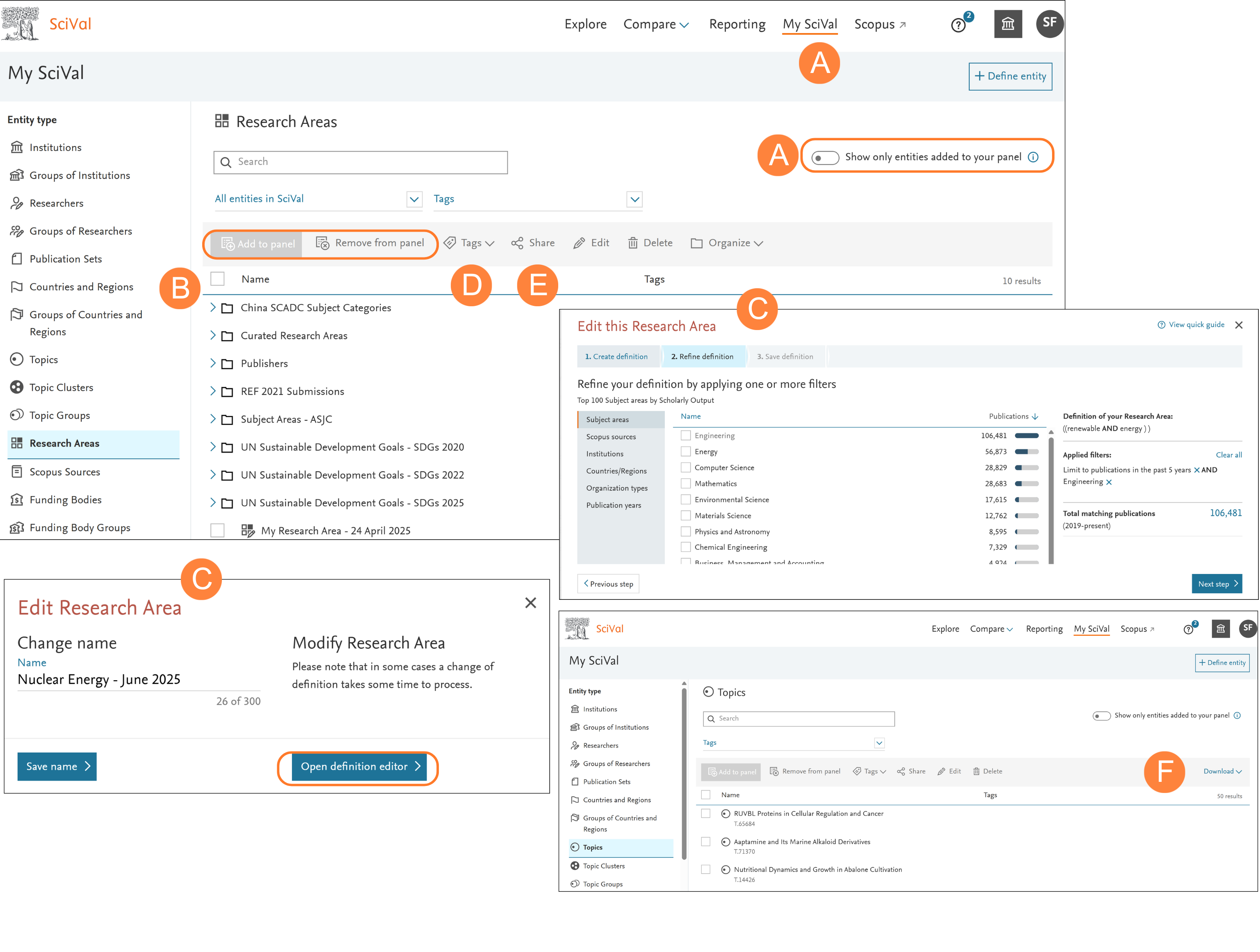
Entities can be removed from the entity selection panel but will remain in My SciVal. They can then be added back to the entity selection panel from within My SciVal at a later date. Deleting an entity from My SciVal removes the entity from SciVal completely.
Did we answer your question?
Related answers
Recently viewed answers
Functionality disabled due to your cookie preferences