
How do I fully uninstall the Word Plugin?
Last updated on May 01, 2025
- Go to Tools > Templates and Add-ins.
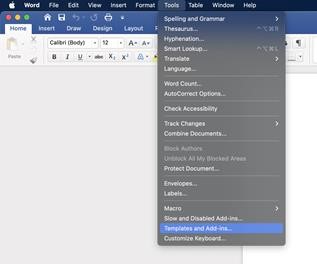
- Uncheck the Mendeley-x.x.x.dot (where x.x.x is the version number).
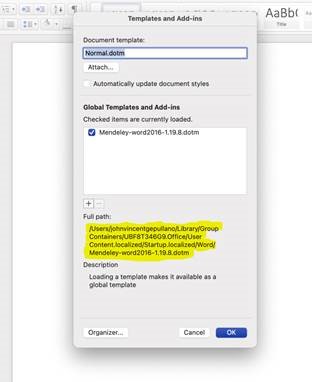
- Delete the file in the file path as highlighted in the image above.
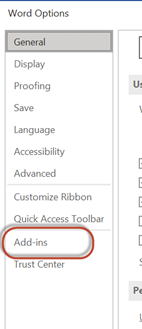
- Go to File > Options > Add-ins.
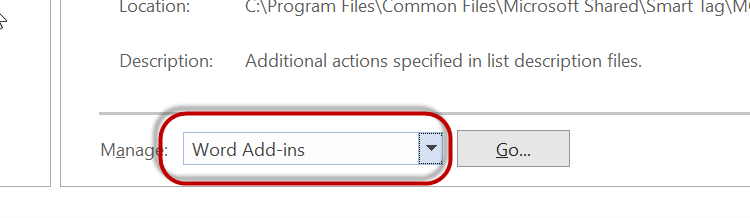
- Set the 'Manage' field to 'Word Add-ins' and click 'Go'.
- Uncheck the Mendeley-x.x.x.dotm (where x.x.x is the version number).
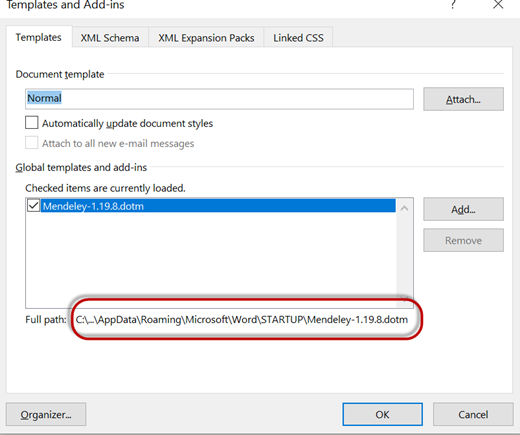
- Delete the file in the file path as highlighted in the image above, and click 'OK'.
If you're using Linux, please contact us using one of the contact options below.
Did we answer your question?
Related answers
Recently viewed answers
Functionality disabled due to your cookie preferences