
View by category
How do I search for images in a Curated Collection?
Last updated on August 17, 2026
Images in curated collectionsopens in new tab/window have more metadata, so searching for images specifically within curated collections can be more focused than searching for images from books and journals.
For example, the Elsevier Collection is just one of the collections and comprises over 400 images, specially commissioned for Elsevier, that can be used without constraints.
Access to collectionsopens in new tab/window is defined by the collection owner. Consequently, it may not be possible to find images in all collections.
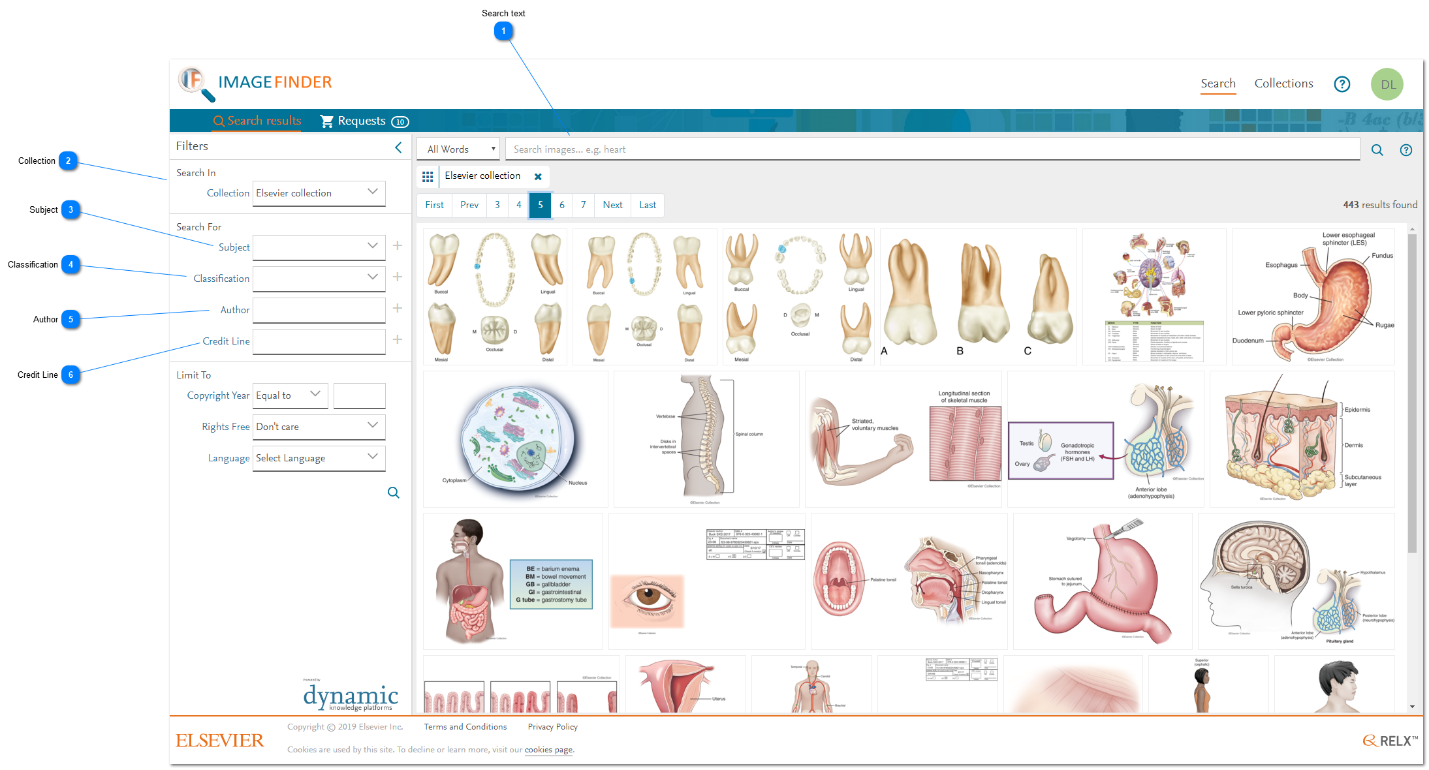
How
- Search text: In the same way as other searches, you need to enter keyword criteria in the Subject field (Search text box) to narrow your search. Note: The caption text for Elsevier Collection images has been augmented with keywords to improve the discoverability of images. See Searching by keywordsopens in new tab/window.
- Collection: If you want to search exclusively for images in a certain collection, select the collection name in the 'Collection' filter and click on either of the search icon (magnifying glass icon).
- Subject: You can narrow your search of a curated collection by using any of the collection's subject values. Each collection owner can specify their own set of subjects and they are displayed in the 'Subject' drop-down box when the collection has been selected as in 2 above.
If you choose to search in any curated collection, then you need to type some or all of the subject text in the 'Subject' field (Search text box), since curated collections do not necessarily share the same subject values across different collections. For example, the following values apply to images in the Elsevier collection:- Body Cavities
- Body Planes
- Body Regions
- Cardiovascular
- Cells
- Dental
- Digestive System
- Directions
- Endocrine System
- Integumentary
- Lymphatic
- Musculoskeletal
- Nervous System
- Oncology
- Reproductive
- Respiratory
- Senses
- Urinary System
- Vascular System
- Classification: The Classification filter restricts the results to one of the following types of image:Examples: If you select 'Line Drawing' as the filter value, then the search is performed on any line drawing classification. Likewise, if you select 'Haftone', the search is performed on any halftone classification. So, either of these options will return images classified as "Combination Drawing".
Classification
Image type
Description
Chart
line drawing
An image that shows a graphical representation of data.
Graph
line drawing
An image showing the relationship between variable quantities (typically of two).
Algorithm
line drawing
Illustration of a recipe to solve a problem (or achieve a goal) mathematical or not.
Table
line drawing
An image that shows a tabular representation of data.
Chemical Structure
line drawing
An image showing the actual number of atoms of elements in a compound, how the atoms are arranged and which atoms are bonded to one another.
Scan
line drawing
An image generated by scanning technology.
Photograph
halftone
An image captured by a camera.
Micrograph
halftone
A photograph taken through a microscope.
Topograph
halftone
A type of x-ray photograph of land surfaces.
Screenshot
halftone
Image captured from a computer (or other device) screen.
Formula
Graphical image representation of a mathematical or chemical formula. The image is in JPG format and the resolution is 500 dpi.
Combination Drawing
line drawing + halftone
A multi-panel image that consists of line drawings and halftones images.
Line Drawing
line drawing
An image that consists of distinct straight or curved lines placed against a usually plain background, without gradations in shade (darkness) or hue (color) to represent two-dimensional or three-dimensional objects.
Halftone
halftone
An image that simulates continuous-tone imagery through the use of dots, varying either in size or in spacing, thus generating a gradient-like effect.
- Author: Each curated collection has an Author assigned. For example, if you want to include Elsevier Collection images in your search for images across Publication types, you can set the Author filter to ‘Elsevier’. For other collections, the value will vary.
- Credit Line: The Credit Line filter enables you to enter the name of a person that is mentioned in the credit line of an image. All images in curated collections have credit line information. The text you enter in this filter matches exactly with a whole word in the person’s name. The word might be the first or last (family) name (or another given name, if there is one).
If you enter more than one word, this filter attempts to match the person's name precisely in the order that you have entered the values. The match ignores case sensitivity and any extra white space characters in a person's name.






Did we answer your question?
Related answers
Recently viewed answers
Functionality disabled due to your cookie preferences