
Funding Institutional Releases
Last updated on September 29, 2025
2025 Release Notes
On-Demand Funder Suggestions and In-Product User Guidance
We’ve released two new features in Funding Institutional to help you discover more opportunities and understand filters more easily: On-Demand Funder Suggestions and In-Product User Guidance.
On-Demand Funder Suggestions
The On-Demand Funder Suggestions feature helps you broaden your search by identifying additional funders with their open funding opportunities, based on awarded grants data. This makes it easier to discover complementary opportunities and consider organizations you may not have initially included.
Where to find it
- Run a funding search in Funding Institutional.
- Scroll to the “Funders” filter in the left-hand filter panel.
- Click “See all related and suggested funders.”
What you’ll see
- Filter by funders: Displays all funders included in your opportunity search results.
- Funder suggestions: Shows additional funders including their open funding opportunities, with a proven track record of awarding grants that match your search criteria but were not part of your original results.
Why this helps
- Expands your funding landscape beyond the initial search.
- Helps you identify new, relevant funders with awarding history aligned to your criteria.
- Supports informed decisions when planning funding applications.
In-Product User Guidance
We’ve also introduced in-product guidance to make it easier to understand and apply filters. This supports faster onboarding and gives all users more confidence when refining searches.
What’s new
- Info buttons: Found next to key filters such as funder and applicant geography filters. Clicking an info icon reveals a definition and explanation of the category.
- Hover-over tooltips: Short descriptions appear when you hover over filters, such as the funding, funder and applicant types, giving you quick context without leaving your search.
Why this helps
- Provides clear definitions of categories and filters directly in the interface.
- Helps new users learn the tool quickly.
- Ensures all users can apply filters effectively to find the most relevant opportunities.
Expanded Currency Filters, Accessibility Improvements, and iFrame Integration
We’re thrilled to announce the latest enhancements to Funding Institutional in 2025! Below are the key updates included in this release:
Expanded Currency Filters
In our ongoing effort to support a global audience, we have expanded our currency filters to include several new international currencies. Users can now search for funding opportunities and awarded grants using:
- US Dollar (USD)
- Euro (EUR)
- British Pound (GBP)
- Australian Dollar (AUD)
- Brazilian Real (BRL)
- Canadian Dollar (CAD)
- Swiss Franc (CHF)
- Yuan Renminbi (CNY)
- Danish Krone (DKK)
- Hong Kong Dollar (HKD)
- Indian Rupee (INR)
- Yen (JPY)
- Won (KRW)
- Sri Lanka Rupee (LKR)
- Mexican Peso (MXN)
- Malaysian Ringgit (MYR)
- Norwegian Krone (NOK)
- New Zealand Dollar (NZD)
- Swedish Krona (SEK)
- Singapore Dollar (SGD)
- Baht (THB)
- New Taiwan Dollar (TWD)
- Rand (ZAR)
This enhancement allows researchers and institutions to perform more tailored searches that reflect their local currencies, making it easier to find relevant funding opportunities across different regions. By providing these options, we aim to foster greater inclusivity and accessibility in funding searches for international users. Please note that we update currency exchange rates on a yearly basis, not dynamically.
Improved Accessibility Standards
We believe that access to funding resources should be available to everyone. To that end, our start page and search pages have undergone significant improvements to meet the latest global accessibility standards. Key enhancements include:
- Updated design features that comply with Web Content Accessibility Guidelines (WCAG).
- Improved navigation and usability for users with disabilities, ensuring that all users can easily find and access funding opportunities.
- Enhanced screen reader compatibility and keyboard navigation options.
These updates are part of our commitment to creating an inclusive platform that accommodates the diverse needs of our user base.
iFrame Embedding Capability
To further enhance user engagement, we have introduced an iFrame embedding feature that allows institutions to integrate our website into their internal pages. This functionality enables:
- Seamless access to funding resources directly from institutional platforms, making it easier for users to explore opportunities without navigating away from their home institutions.
- Customization options for institutions to tailor the embedded content to their specific needs, ensuring that users have immediate access to the most relevant information.
By facilitating this integration, we aim to strengthen the connection between institutions and their users, promoting a more efficient and effective funding discovery process. If your institution is interested in implementing the iFrame embedding, please reach out to us via [email protected]
2024 Release Notes
New Filters for Unspecified Citizenship and Applicant Country/Region Affiliation
We are excited to announce the addition of new filters to enhance your funding search experience in Funding Institutional. These updates aim to provide more comprehensive search results and help you find the most relevant funding opportunities.
New Features:
- Unspecified Citizenship Filter:
- Description: We have added a toggle for enabling the inclusion of opportunities with unspecified citizenship in the Opportunities tab.
- Functionality: When you select a country under the 'Applicant citizenship' filter, you can now enable a toggle named 'Include Opportunities with no citizenship restriction specified'. This will allow you to see opportunities where the citizenship requirement is not specified, in addition to those where it is specified or not limited.
- Unspecified Applicant Country/Region Affiliation Filter:
- Description: We have introduced a toggle for enabling the inclusion of opportunities with unspecified applicant country/region affiliation in the Opportunities tab.
- Functionality: When you select a country under the 'Applicant country/region affiliation' filter, you can now enable a toggle named 'Include Opportunities with no affiliation country/region restriction specified'. This will allow you to see opportunities where the country/region affiliation requirement is not specified, in addition to those where it is specified or not limited.
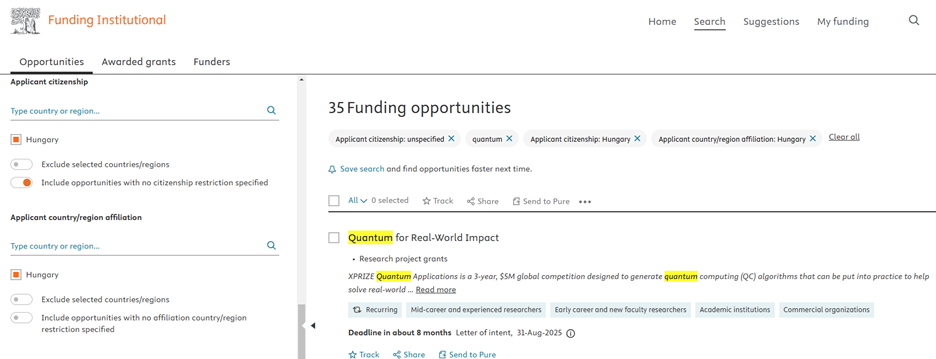
Benefits:
- Comprehensive Search Results: Users can now access a wider range of funding opportunities, including those with unspecified eligibility criteria.
- Enhanced Flexibility: The new filters provide users with more flexibility in their funding searches, ensuring they do not miss out on potential opportunities.
Thank you for choosing Funding Institutional. We are committed to continuously improving your experience and helping you find the best funding opportunities for your research. Stay tuned for more exciting updates!
We are excited to announce a new capability in our keyword search feature: the introduction of field codes. You can now search for a term in a specific field of a funding opportunity or awarded grant by entering the field code in the search bar, providing precise control over your searches. In addition to the field codes, we have fine-tuned our search rules to allow for more precise searches, ensuring the most relevant results for our users.
Field codes for Opportunity searches:
Category | Name | Field Code | Field Description | Example |
|---|---|---|---|---|
Textual content | Title | TITLE | Title of the funding opportunity | TITLE(dementia) will return funding opportunities where ‘dementia’ is in the opportunity title |
Textual content | Description | DESCR | Description of the funding opportunity | DESCR(AMR OR “antimicrobial resistance”) will return funding opportunities where either the keyword AMR or the term ‘antimicrobial resistance’ is in the opportunity description |
Textual content | Eligibility | ELIG | Eligibility section of the funding opportunity | ELIG(soci*) will return opportunities where the keywords society, or social etc. appear in the eligibility section of the opportunity |
Field codes for Awarded Grant searches:
Category | Name | Field Code | Field Description | Example |
|---|---|---|---|---|
Textual content | Title | TITLE | Title of the awarded grant | TITLE(gut AND microbiome) will return awarded grants where both keyword ‘gut’ and ‘microbiome’ are in the title of the awarded grant |
Textual content | Description | DESCR | Description section of the awarded grant | DESCR(neoplasm OR tumor) will return awarded grants where either ‘neoplasm’ or ‘tumor’ appears in the description section of the awarded grant |
Awardee Information | Surname | SURNAME | Surname of the awardee | SURNAME(smith) will return awarded grant where the awardee surname includes ‘smith’ |
Awardee Information | Given Name | GIVEN | Given name of the awardee | GIVEN(john) will return awarded grants where the awardee’s given name includes John |
Important to note:
- You need to use field codes all in capitals and with (round brackets) around the keyword
- Boolean operators also need to be used all in capitals
- When no Boolean operator is used in a search with multiple keywords, an OR operator will be used in the search logic, for example brain cancer is equivalent to brain OR cancer. Same applies to field code searches TITLE(brain cancer) is equivalent to TITLE(brain OR cancer), which will return results with either brain or cancer in the title.
- The symbol logical operators !, && and || are the equivalent of NOT, AND and OR respectively
- Field codes cannot be used in Advanced Search
- Field codes can be combined using the Boolean operators, for example SURNAME(smith) AND GIVEN(john)
- Using no field codes mean that you search in all data fields of opportunities and awarded grants
- Searching for loose/approximate terms you may use “double quotation marks”, between the (round brackets) following the field code, for example TITLE(“brain injury”), which will return results having ‘brain injury’ or ‘brain injuries’ or ‘brain injured’ etc. in the title.
- To find opportunities or awarded grants that contain an exact phrase, enclose the phrase in {curly brackets}. For example TITLE({brain injury}) will return results having ‘brain injury’ in the title.
- Only prefix wildcards are supported with the minimum prefix length being 3 characters, for example cat* is supported, *cat is not supported.
- Wildcards may be used for the keyword between the round brackets following the field code
Enhanced Export Features
We are pleased to announce an improvement to our export features. Institutional IDs have been added to the export fields, making it easier to analyze exported data.
Enhanced Reordering for Institutional Research Areas
We are pleased to announce an improvement to the Institutional Research Areas feature in Funding Institutional. Admins and Editors can now reorder Institutional Research Areas using a simple drag-and-drop option.
To reorder the Areas:
- Navigate to the Editors tab through the top left-hand spine menu.
- Select 'Institutional Research Areas' from the right-hand spine menu.
- Use the drag-and-drop buttons located next to the titles of your Areas.
Once you reorder the Areas, the updated order will be visible to all institutional users on the start page.
We're excited to introduce the new Institutional Research Areas feature in Funding Institutional. This feature enhances the functionality of our platform by enabling Institutional Admins or Editors to create and broadly socialize collections of active funding opportunities, to highlight key strategic research fields, specific funders, programs, and more.
Key features:
- Highlight what’s important: Institutional Admins or Editors can now create and manage collections of active funding opportunities. These collections, called the Institutional Research Areas, can be tailored to match specific search criteria.
- Visibility: The Institutional Research Areas will appear on the start page within the Trending Research Areas section and will be visible exclusively to users of your institution's account.
- Easy Setup: To create an Institutional Research Area, Institutional Admins or Editors can simply run an opportunity search, click "Save as Institutional Research Area" at the top right corner above the search results, and name the area to save it.
- Defined roles: Setting up an Institutional Research Area is linked to Admin or Editor user roles. If you would like to get these user roles assigned to you, please send an email to [email protected]
Step-by-Step Guide to Set Up an Institutional Research Area for Institutional Admins or Editors:
- Run an opportunity search based on your desired criteria.
- Click 'Save as Institutional Research Area' located at the top right corner above the search results.
- Name your area and save it.
- Your Institutional Research Area is now set up and will be visible to users within your institution's account on the start page under the Trending Research Areas section.
Funding Search Features for Unauthenticated Users at Subscribing Institutions
We are excited to announce a significant update to our platform that aims to enhance the user experience and provide greater value to our subscribing institutions. Effective immediately, unauthenticated users from subscribing institutions will now have access to our funding search features.
This update enables users to effortlessly explore and utilize our comprehensive database without signing in or creating a profile. By providing access to these features, our goal is to streamline the discovery of valuable funding opportunities and resources, especially for time-constrained researchers seeking actionable information with maximum efficiency.
Please note that while unauthenticated users can now access the funding search features, signing in or creating a profile will still be required for setting up alerts, tracking funding opportunities, and conducting in-depth competitive analysis. This ensures that users can fully customize and optimize their experience on our platform.
We believe that this update will greatly enhance the overall user experience and provide a more seamless and efficient way for users to discover and access valuable funding information. As always, we appreciate your support and welcome any feedback to help us continue improving our platform.
2023 Release Notes
Sorting Funding Data by Curated Research Areas
We continue to expand our Trending Research Areas section of the homepage. Building on the success of sorting funding data by the UN's Sustainable Development Goals (SDGs), we are now introducing a list of Curated Research Areas. These Areas further empower researchers, and institutions effortlessly discover funding and collaborators related to AI, Coronavirus Research, Quantum Technologies and more!
Just like for the SDGs, our sorting method for Curated Research Areas is built upon Elsevier's keyword queries, initially developed, and widely acclaimed in SciVal and Scopus. These queries have been adapted and refined to seamlessly integrate with Funding Institutional's search rules, ensuring accuracy and relevance in the context of funding.
How It Works:
Select your area of Interest: Navigate the Curated Research Areas that resonate with your research or institutional mission directly from our homepage.
Instant Access to Results: Click on the link to Funding Opportunities or Awarded Grants below the selected Curated Research Area to access the search pages with preloaded results.
Refine Results with Precision: On the Funding Opportunity or Awarded Grants Search Pages, you can also use the filters in the left-hand panel to narrow down your results by funder, geography, or other eligibility criteria.
Sorting Methodology:
Below are some general rules and considerations that were taken into account when translating Scopus queries to Funding Institutional (FI). These considerations account for differences between the search engines of the two tools, as well as differences in the context of datasets (publication vs. funding data):
- FI considers plurals; therefore, plural versions of keywords have been removed.
- FI does not consider curly brackets {}; hence, they were replaced by double quotation marks "".
- FI's stemming works differently from Scopus; hence, some keywords were not necessary to include.
Funding Institutional Curated Research Area queries:
Artificial Intelligence
"Artificial Intelligence" OR "Convolutional Neural Network" OR "Deep Learning" OR "Deep Neural Network" OR "Reinforcement Learning" OR "Artificial Neural Network" OR "Recurrent Neural Network" OR "Convolution" OR "Neural Networks" OR "Natural Language Processing" OR "Image Classification" OR "Support Vector Machine" OR "Computer Vision" OR "Long Short-term Memory" OR "Cellular Neural Networks" OR "Object Detection" OR "Facial Recognition" OR "Supervised Learning" OR "Feature Selection" OR ("Learning Systems" AND NOT Residency) OR "Learning Algorithm" OR "Multilayer Neural Network" OR "Genetic Algorithm" OR "Supervised Machine Learning" OR "Computational Linguistics" OR Autoencoders OR "Natural Language Processing" OR "Machine Learning Algorithm" OR "Learning Method" OR "Sentiment Analysis" OR "Image Segmentation" OR "Extreme Learning Machine" OR "Generative Adversarial Networks" OR "Computer-aided Diagnosis" OR "Deep Learning Model" OR "Predictive Analytics" OR "Learning Approach" OR "Image Recognition" OR "Learning Model" OR "Internet of Things" OR "Recommender Systems" OR "Random Forest" OR "Ensemble Learning" OR "Semantic Segmentation" OR "Back Propagation"
COVID-19 Research
"coronavirus disease 2019" OR covid19 OR covid OR ncov OR "sars-cov-2" OR "novel coronavirus"
General Coronavirus Research
coronavirus OR "Middle East respiratory syndrome" OR "Severe acute respiratory syndrome" OR "Porcine epidemic diarrhea virus" OR "Feline infectious peritonitis virus" OR "Murine hepatitis virus" OR "Avian infectious bronchitis virus"
mpox (monkeypox)
monkeypox OR "monkey pox" OR chimpanzeepox OR "Monkeypox virus infection" OR MPXV
Quantum Communications
"quantum communication" OR "quantum cryptography" OR "quantum teleportation" OR "entanglement swapping" OR "quantum secret sharing" OR "quantum key distribution" OR "distributed quantum computing" OR "quantum network" OR "quantum cloning" OR "quantum internet" OR "quantum memory" OR ("quantum entanglement" AND communication)
Quantum Computing
"quantum computer" OR ("quantum computing" AND ("quantum superposition" OR "quantum entanglement" OR "qubit" OR "quantum bit" OR "grover's algorithm" OR "phase estimation algorithm" OR "shor's algorithm" OR "learning parity with noise" OR "deutsch-jozsa algorithm" OR "quantum parallelism" OR "quantum computational complexity" OR "quantum search algorithms" OR "quantum fourier transform" OR "harmonic oscillator quantum computer" OR "optical photon quantum computer" OR "optical cavity quantum electrodynamics" OR "ion traps" OR "quantum error-correction" OR "hamiltonians" OR "josephson junction devices" OR "quantum dots" OR "particle swarm optimization" OR "quantum cryptography" OR "divincenzo criteria" OR "quantum logic gates" OR "superconducting quantum computing" OR "quantum turing machine" OR "quantum topological computing" OR (spin AND NOT off) OR "silicon quantum computing" OR "majorana quantum computing" OR "quantum annealing" OR "d-wave quantum computer" OR "adiabatic quantum computation"))
Quantum Metrology
"quantum metrology" OR ("quantum metrology" AND ("frequentist quantum phase estimation" OR "bayesian quantum phase estimation" OR "frequency estimation" OR "quantum optics" OR ("fisher information" AND matrix) OR "quantum computers" OR "quantum entanglement" OR "fisher information" OR "quantum communication" OR "quantum theory" OR "particle beams" OR "shot noise" OR "interferometers" OR "quantum electronics" OR "quantum chemistry" OR "quantum hall effect" OR interferometry OR "quantum cryptography" OR "quantum cascade lasers" OR "frequency standards" OR "four wave mixing" OR "parameter estimation" OR "josephson junction devices" OR "quantum noise" OR "atomic clocks" OR "spin dynamics" OR hamiltonians OR ("quantum metrology" AND estimation) OR "coherent light" OR "bose-einstein condensation" OR "uncertainty analysis" OR "hall effect devices" OR "optical metrology" OR "optical frequency metrology" OR "optical frequency conversion" OR "heisenberg limit" OR (squids AND NOT game)))
Quantum Sensing
"quantum sensor" OR ("quantum sensing" AND ("position navigation" OR cryogenics OR "superconducting x-ray" OR "josephson junctions" OR "quanta-sensor" OR "superconducting quantum interference devices" OR vacancies OR "crystal defects" OR spectrometer OR entanglement OR qubit OR "magnetic resonance" OR relaxometry OR magnetometry OR thermometry OR electrometry OR nanomagnetics OR diamond OR "lead compounds" OR "vacancies" OR "radio waves" OR artifacts OR "heavy ions" OR "quantum interference phenomena" OR "cryogenic temperature" OR microbolometers OR "quantum entanglement" OR nanodiamonds OR "quantum sensors" OR decoherence OR "quantum metrology" OR "nuclear spin" OR "noise spectroscopy" OR "nitrogen-vacancy centre in diamond" OR "magnetostrictive devices" OR "atomic beams" OR "scanning probe microscopy" OR fullerenes OR "quantum optics" OR "electric field measurement" OR "yttrium barium copper oxides" OR "lanthanum compounds" OR "thermal noise" OR "superconducting films" OR "rydberg states" OR "quantum dots"))
Quantum Simulation
"quantum simulator" OR "quantum annealing" OR "hubbard model" OR "field effect transistors" ("quantum simulator" AND ("quantum chemistry" OR "quantum optics" OR "quantum computers" OR hamiltonians OR "quantum theory" OR "quantum electronics" OR "quantum entanglement" OR bosons OR "spin dynamics" OR "ground state" OR lattices OR "quantum computation" OR "optical materials" OR "ising model" OR fermions OR "statistical mechanics" OR "rydberg states" OR "condensed matter physics" OR "bose-einstein condensation" OR "gauge theory" OR "degrees of freedom" OR "atomic beams" OR "timing circuits" OR "wave functions" OR "phase space methods" OR "quantum communication" OR traps OR algorithms OR "poisson equation" OR photons OR "laser cooling" OR "logic gates" OR "particle beams" OR ballistics))
Quantum Technologies
("SDG 10" OR "SDG10" OR ((equality AND (economic OR financial OR “socio-economic”)) AND NOT health) OR ((inequality AND (economic OR financial OR socio-economic)) AND NOT health) OR "economic reform policy" OR "political inclusion" OR "social protection policy" OR (immigration AND NOT (clinic OR services OR chemistry OR disease OR biodiversity)) OR (emigration AND NOT (chemistry OR disease OR biodiversity)) OR "foreign direct investment" OR "development gap" OR "migrant remittance" OR "responsible migration" OR "migration policy" OR "north-south divide" OR (developing AND (tariff OR "zero-tariff" OR "duty-free access")) OR "social exclusion" OR "economic marginalization" OR "economic marginalisation" OR "income inequality" OR "discriminatory law" OR "discriminatory policy" OR "economic empowerment" OR "economic transformation" OR ("global market" AND empowerment)) AND NOT (artist OR health)
Sorting Funding Data by the United Nations Sustainable Development Goals
We are thrilled to introduce a significant enhancement to our platform, empowering researchers, and institutions to effortlessly discover funding data related to the UN's Sustainable Development Goals (SDGs). With this new functionality, finding financial support for your research and discovering potential collaborators through awarded grants has never been more efficient.
Key Features:
Intuitive Homepage Navigation: Our intuitive homepage allows you to navigate funding data with precision. Easily locate funding opportunities and awarded grants that correspond to specific SDGs, including but not limited to Climate Change, Gender Equality, Quality Education, and more.
Built on Elsevier's Expertise: Our sorting method is built upon Elsevier's original keyword queries, initially developed, and widely acclaimed in SciVal and Scopus. These queries have been adapted and refined to seamlessly integrate with Funding Institutional's search rules, ensuring accuracy and relevance in the context of funding.
How It Works:
Select the SDG of Interest: Navigate the Sustainable Development Goals that resonate with your research or institutional mission directly from our homepage.
Instant Access to Results: Click on the link to Funding Opportunities or Awarded Grants below the selected SDG to access the search pages with preloaded results.
Refine Results with Precision: On the Funding Opportunity or Awarded Grants Search Pages, you can also use the filters in the left-hand panel to narrow down your results by funder, geography, or other eligibility criteria.
Sorting Methodology:
Elsevier's Data Science teams have generated three sets of SDG mappings, one for each of THE Impact Rankings (2019-2021). Our methodology relies on the 2020 Scopus queries. You can find the documentation here: "Identifying research supporting the United Nations Sustainable Development Goals."
Below are some general rules and considerations that were taken into account when translating Scopus queries to Funding Institutional (FI). These considerations account for differences between the search engines of the two tools, as well as differences in the context of datasets (publication vs. funding data):
- FI considers plurals; therefore, plural versions of keywords have been removed.
- FI does not consider curly brackets {}; hence, they were replaced by double quotation marks "".
- FI's stemming works differently from Scopus; hence, some keywords were not necessary to include.
- Generic terms like "financial aid" have been removed due to the context of funding information.
- This revised version provides better clarity and organization for the information presented.
"SDG 1" OR "SDG1" OR "extreme poverty" OR "poverty alleviation" OR "poverty eradication" OR "poverty reduction" OR "international poverty line" OR ("financial aid" AND poverty) OR ("financial aid" AND poor) OR ("financial aid" AND "north-south divide") OR "financial empowerment" OR "child labor" OR "child labour" OR "social protection" OR microfinanc* OR "resilience of the poor" OR ("safety net" AND (social OR health OR food)) OR ("economic resource" AND access) OR "food bank"
"SDG 2" OR "SDG2" OR "land tenure rights" OR (smallholder AND (farm OR forestry OR pastoral OR agriculture OR fishery OR "food producer" OR "food producers")) malnourish* OR (malnutrition AND NOT cancer) OR undernourish* OR undernutrition OR "agricultural production" OR "agricultural practices" OR "agricultural management" OR "food production" OR "food security" OR "food insecurity" OR "land right" OR "land reform" OR "resilient agricultural practices" OR (agriculture AND potassium) OR (fertilizer AND agriculture) OR "hidden hunger" OR "food nutrition improvement" OR "genetically modified food" OR agroforestry OR "agricultural innovation" OR ("food security" AND "genetic diversity") OR ("food market" AND (restriction OR tariff OR access OR "north south divide" OR "development governance") AND NOT concert) OR "food governance" OR (("food supply chain" OR "food value chain" OR "food commodity market") AND NOT disease)
"SDG 3" OR "SDG3" OR "battered child syndrome" OR "cardiovascular disease" OR chagas OR "child abuse" OR "child neglect" OR "child well-being index" OR "youth well-being index" OR "child wellbeing index" OR "youth wellbeing index" OR "waterborne disease" OR ("water borne" AND disease) OR "tropical disease" OR "chronic respiratory disease" OR "infectious disease" OR "sexually transmitted disease" OR "communicable disease" OR hiv OR tuberculosis OR malaria OR hepatitis OR polio* OR vaccin* OR cancer* OR diabet* OR "maternal mortality" OR "child mortality" OR "childbirth complications" OR "neonatal mortality" OR "neo-natal mortality" OR "premature mortality" OR "infant mortality" OR "quality adjusted life year" OR "maternal health" OR "preventable death" OR "tobacco control" OR "substance abuse" OR "drug abuse" OR "tobacco use" OR "alcohol use" OR "substance addiction" OR "drug addiction" OR "tobacco addiction" OR alcoholism OR suicid* OR "postnatal depression" OR "post-natal depression" OR "zika virus" OR dengue OR schistosomiasis OR "sleeping sickness" OR ebola OR "mental health" OR "mental disorder" OR "mental illness" OR measles OR "neglected disease" OR diarrhea OR diarrhoea OR cholera OR dysentery OR "typhoid fever" OR "traffic accident" OR "healthy lifestyle" OR "life expectancy" OR "health policy" OR (human AND (health* OR disease* OR illness* OR medicine* OR mortality))
"SDG 4" OR "SDG4" OR "school enrollment" OR "inclusive education" OR "educational inequality" OR "education quality" OR "educational enrolment" OR "educational enrollment" OR "adult literacy" OR "numeracy rate" OR "educational environment" OR "educational access" OR ("development aid" AND "teacher training") OR "early childhood education" OR "basic education" OR "affordable education" OR "educational financial aid" OR "school safety" OR "safety in school" OR ("learning opportunity" AND ("gender disparities" OR empowerment)) OR "youth empowerment" OR "women empowerment" OR "equal opportunities" OR "child labour" OR "child labor" OR discriminatory OR "educational inequality" OR "educational gap" OR ("poverty trap" AND "schooling") OR "special education needs" OR "inclusive education system" OR ("schooling" AND ("gender disparities" OR "ethnic disparities" OR "racial disparities")) OR "education exclusion" OR "education dropouts" OR "global citizenship" OR "sustainable development education" OR "environmental education" OR "education policy" OR "international education" OR "education reform"
"SDG 5" OR "SDG5" OR "gender inequality" OR "gender equality" OR "employment equity" OR "gender wage gap" OR "female labor force participation" OR "female labour force participation" OR "women labor force participation" OR "women labour force participation" OR "women’s employment" OR "female employment" OR "women's unemployment" OR "female unemployment" OR (access AND "family planning services") OR "forced marriage" OR "child marriage" OR "occupational segregation" OR "women's empowerment" OR "girls' empowerment" OR "female empowerment" OR "female genital mutilation" OR "female genital cutting" OR "domestic violence" OR (women AND violence) OR (girl AND violence) OR "sexual violence" OR ("unpaid work" AND "gender inequality") OR ("unpaid care work" AND "gender inequality") OR "women's political participation" OR "female political participation" OR "female managers" OR "women in leadership" OR "female leadership" OR "intra-household allocation" OR (access AND "reproductive healthcare") OR "honour killing" OR "honor killing" OR "antiwomen" OR "anti-women" OR "feminism" OR "misogyny" OR "female infanticide" OR "human trafficking" OR "forced prostitution" OR (equality AND ("sexual rights" OR "reproductive rights" OR "divorce rights")) OR "women's rights" OR "gender injustice" OR "gender discrimination" OR "gender disparities" OR "gender gap" OR "female exploitation" OR "household equity" OR "female political participation" OR "women's underrepresentation" Or "female entrepreneurship" OR "female ownership" OR "women's economic development" OR "women's power" OR "gender-responsive budgeting" OR "gender quota" OR ("foreign aid" AND "women's empowerment") OR "gender segregation" OR "gender-based violence" OR "gender participation" OR "female politician" OR "female leader" OR "contraceptive behaviour" OR "women's autonomy" OR "agrarian feminism" OR "microfinance" OR "women's livelihood" OR "women's ownership" OR "female smallholder" OR "gender mainstreaming"
"SDG 6" OR "SDG6" OR (Safe AND ("water access" OR "drinking water")) OR (clean AND ("drinking water" OR "water source")) OR (water AND sanitation AND hygiene) OR "water quality" OR "water resource" OR "water availability" OR "water-use efficiency" OR "water supply" OR "clean water" OR "hygienic toilet" OR "antifouling membrane" OR "anti-fouling membrane" OR "water management" OR "aquatic toxicology" OR "water toxicology" OR "aquatic ecotoxicology" OR "water ecotoxicology" OR (freshwater AND "water quality" AND ("pollutant" OR "pollution" OR contamina*)) OR (freshwater AND ("water security" OR "water shortage" OR ("waste water" AND treatment) OR (wastewater AND treatment) OR "water conservation" OR "water footprint" OR "water infrastructure" OR "water pollution" OR "water purification" OR "water use" OR sanit* OR sewer*)) OR ((water AND (ecosystem OR eco-system) AND ("protection" OR "endocrine disruptor")) AND NOT marine) OR ("water management" AND ("pollution remediation" OR "pollutant removal")) OR ((groundwater OR "ground water") AND "freshwater") OR ("water pollution" AND ("waste water" AND treatment) OR (wastewater AND treatment)) OR "freshwater availability" OR "fresh water availability" OR "water scarcity" OR "open defecation" OR "blue water" OR "green water" OR "grey water" OR "black water"
"SDG 7" OR "SDG7" OR "energy efficiency" OR "energy consumption" OR "energy transition" OR "clean energy technology" OR "energy equity" OR "energy justice" OR "energy poverty" OR "energy policy" OR "2000 Watt society" OR "smart micro-grid" OR "smart grid" OR "smart microgrid" OR "smart meter" OR "affordable electricity" OR "electricity consumption" OR "reliable electricity" OR "clean fuel" OR "clean cooking fuel" OR "fuel poverty" OR energiewende OR "life-cycle assessment" OR (photochemistry AND "renewable energy") OR photovoltaic OR "photocatalytic water splitting" OR "hydrogen production" OR "water splitting" OR "lithium-ion battery" OR "heat network" OR "district heat" OR "residential energy consumption" OR "domestic energy consumption" OR "energy security" OR "rural electrification" OR "energy ladder" OR "energy access" OR "energy conservation" OR "low-carbon society" OR "hybrid renewable energy system" OR "fuel switching" OR ("foreign development aid" AND "renewable energy") OR "energy governance" OR ("official development assistance" AND electricity) OR ("energy development" AND "developing countries")
"SDG 8" OR "SDG8" OR ("economic growth" AND NOT health) OR "economic development policy" OR "employment policy" OR "inclusive economic growth" OR "sustainable growth" OR ("economic development" AND NOT health) OR "economic globalization" OR "economic productivity" OR "low-carbon economy" OR "inclusive growth" OR microfinanc* OR "micro-financ*" OR microcredit* OR "micro-credit*" OR "equal income" OR "equal wages" OR "decent job" OR "quality job" OR "job creation" OR "full employment" OR "employment protection" OR "informal employment" OR "precarious employment" OR "unemployment" OR "precarious job" OR microenterprise* OR "micro-enterprise*" OR "small enterprise" OR "medium enterprise" OR "small entrepreneur" OR "starting entrepreneur" OR "medium entrepreneur" OR "social entrepreneurship" OR "safe working environment" OR "labor market institution" OR "labour market institution" OR "forced labour" OR "forced labor" OR "child labour" OR "child labor" OR "labour right" OR "labor right" OR "modern slavery" OR "human trafficking" OR "child soldier" OR "global jobs" OR "living wage" OR "minimum wage" OR "circular economy" OR "inclusive economy" OR "rural economy" OR "Foreign Development Investment" OR "Aid for Trade" OR "trade union" OR "working poor" OR "Not in Education, Employment, or Training" OR "carbon offset" OR "offset project" OR "economic diversification" OR "material footprint" OR "resource efficiency" OR ("cradle to cradle" AND economy) OR "economic decoupling" OR "labour market disparities" OR "sustainable tourism" OR ecotourism OR "community-based tourism" OR "tourism employment" OR "sustainable tourism policy" OR "financial access" OR "financial inclusion" OR "access to banking"
SDG 9: Industry, Innovation and Infrastructure
"SDG 9" OR "SDG9" OR "industrial growth" OR "industrial diversification" OR ("infrastructural development" AND NOT ("research infrastructure" OR health OR clinical OR disease)) OR "infrastructure investment" OR "public infrastructure" OR "resilient infrastructure" OR "transborder infrastructure" OR "industrial emissions" OR "industrial waste management" OR "industrial waste treatment" OR "traffic congestion" OR microenterprise OR "micro-enterprise" OR "small enterprise" OR "medium enterprise" OR "small entrepreneur" OR "medium entrepreneur" OR "value chain management" OR ("broadband access" AND "developing countries") OR "manufacturing innovation" OR "manufacturing investment" OR "sustainable transportation" OR "accessible transportation" OR "transportation services" OR "inclusive transportation" OR "green product" OR "sustainable manufacturing" OR ("cradle to cradle" AND industry) OR "closed loop supply chain" OR ((industrial AND innovation) AND NOT health) OR "process innovation" OR "product innovation" OR "inclusive innovation"
("SDG 10" OR "SDG10" OR ((equality AND (economic OR financial OR “socio-economic”)) AND NOT health) OR ((inequality AND (economic OR financial OR socio-economic)) AND NOT health) OR "economic reform policy" OR "political inclusion" OR "social protection policy" OR (immigration AND NOT (clinic OR services OR chemistry OR disease OR biodiversity)) OR (emigration AND NOT (chemistry OR disease OR biodiversity)) OR "foreign direct investment" OR "development gap" OR "migrant remittance" OR "responsible migration" OR "migration policy" OR "north-south divide" OR (developing AND (tariff OR "zero-tariff" OR "duty-free access")) OR "social exclusion" OR "economic marginalization" OR "economic marginalisation" OR "income inequality" OR "discriminatory law" OR "discriminatory policy" OR "economic empowerment" OR "economic transformation" OR ("global market" AND empowerment)) AND NOT (artist OR health)
("SDG 11" OR "SDG11") OR (((city OR "human settlement" OR urban OR metropoli* OR town* OR municipal*) AND (gentrification OR congestion OR transportation OR "public transport" OR housing OR slum* OR "sendai framework" OR "Disaster Risk Reduction" OR "DRR" OR "smart city" OR "smart cities" OR "resilient building" OR "resilient buildings" OR "buildings design" OR urbani?ation OR "zero energy building" OR "zero-energy building" OR "basic service" OR "governance" OR "citizen participation" OR "collaborative planning" OR "participatory planning" OR "inclusiveness" OR "cultural heritage" OR "natural heritage" OR UNESCO OR disaster OR "ecological footprint" OR "environmental footprint" OR waste OR pollution OR pollutant OR "waste water" OR recycling OR "circular economy" OR "air quality" OR "nature inclusive" OR "nature inclusive building")) AND NOT clinical)
(("SDG 12" OR "SDG12") OR "environmental pollution" OR "hazardous waste" OR "hazardous chemical" OR "toxic chemical" OR "chemical pollution" OR "ozone depletion" OR "pesticide pollution" OR "pesticide stress" OR "pesticide reduction" OR "life cycle assessment" OR "life cycle analysis" OR "low carbon economy" OR "environmental footprint" OR "material footprint" OR "harvest efficiency" OR "solid waste" OR "waste generation" OR "corporate social responsibility" OR "corporate sustainability" OR "consumer behavior" OR "consumer behaviour" OR "waste recycling" OR "resource recycling" OR "resource reuse" OR "biobased economy" OR "zero waste" OR "sustainability label" OR "sustainability labelling" OR "global resource extraction" OR "material flow accounting" OR "societal metabolism" OR "food spill" OR "resource spill" OR "resource efficiency" OR "sustainable food consumption" OR "green consumption" OR "sustainable supply chain" OR "circular economy" OR "cradle to cradle" OR "sustainable procurement" OR "sustainable tourism" OR "fossil-fuel subsidies" OR "fossil-fuel expenditure" OR "sustainability label" OR "sustainability labelling" OR (consumption AND ("resource use" OR spill))) AND NOT ("wireless sensor network" OR "wireless sensor networks" OR "wireless network" OR "wireless networks" OR wireless OR disease OR astrophysics)
("SDG 13" OR "SDG13") OR ("climate action" OR "climate adaptation" OR "climate change" OR "climate capitalism" OR ipcc OR "climate effect" OR "climate equity" OR "climate feedback" OR "climate finance" OR "climate change financing" OR "climate forcing" OR "climate governance" OR "climate impact" OR "climate investment" OR "climate justice" OR "climate mitigation" OR "climate model" OR "climate modelling" OR "climate policy" OR "climate risk" OR "climate service" OR "climate prediction" OR "climate signal" OR "climate tipping point" OR "climate variation" OR ecoclimatology OR "eco-climatology" OR "Green Climate Fund" OR "regional climate" OR "urban climate" OR (climate AND ("adaptive management" OR awareness OR bioeconomy OR carbon OR "decision-making" OR "disaster risk reduction" OR "environmental education" OR "sustainable development education" OR "energy conservation" OR emission* OR extreme OR "food chain" OR "food chains" OR framework OR hazard* OR island* OR "land use" OR megacit* OR consumption OR production OR "small island developing states" OR anthropocene OR atmospher* OR "clean development mechanism" OR "glacier retreat" OR warming OR greenhouse OR "ice-ocean interaction" OR "ice-ocean interactions" OR "nitrogen cycle" OR "nitrogen cycles" OR "ocean acidification" OR "radiative forcing" OR "sea ice" OR "sea level" OR "sea levels" OR "thermal expansion" OR unfccc OR ozone))) AND NOT (drug OR geomorphology OR clinical)
("SDG 14" OR "SDG14") OR ((marine OR ocean OR oceans OR sea OR coast* OR mangrove) AND ("water cycle" OR "biogeochemical cycle" OR "biogeochemical cycles" OR "oceanic circulation model" OR "oceanic circulation modelling" OR "oceanic circulation modeling" OR "ice-ocean" OR eutrophicat* OR marine OR "coral bleach" OR "coastal management" OR "coastal habitat" OR "marine debris" OR "ocean acidification" OR (acidification AND seawater) OR fishery OR "overfishing" OR "sustainable yield" OR "marine protected area" OR "marine conservation" OR ecotourism OR "community based conservation" OR "community-based conservation" OR "marine land slide" OR "marine pollution" OR "nutrient runoff" OR "coastal ecotourism" OR "destructive fishing" OR "local fisheries" OR "artisanal fishers" OR "fisheries rights" OR "species richness" OR "traditional ecological knowledge" OR "small Island development states" OR "marine quota" OR "marine economy" OR "marine policy") AND NOT (paleoclimate OR paleoceanography OR radiocarbon OR genetics OR medicine OR drug OR engineering OR aerosol))
("SDG 15" OR "SDG15") OR (((terrestrial OR land OR inland OR freshwater) AND (biodivers* OR "species richness" OR bioeconom* OR bio-econom* OR "biological production" OR deforest* OR desertif* OR "earth system" OR "ecological resilience" OR ecosystem* OR eco-system* OR "trophic cascade" OR "trophic level" OR "trophic web" OR "threatened species" OR "endangered species" OR "extinction risk" OR poach* OR "wildlife product" OR "wildlife traffic" OR "wildlife market" OR "wildlife trafficking" OR "invasive species" OR "alien species" OR "land use" OR "land degradation" OR "soil degradation" OR LULUCF OR forest* OR "land conservation" OR wetland* OR mountain* OR dryland* OR "mountainous cover" OR "protected area" OR REDD OR "forest management" OR silviculture OR "timber harvest" OR "illegal logging" OR "slash-and-burn" OR "fire-fallow cultivation" OR "tree cover" OR "soil restoration" OR "land restoration" OR drought OR "sustainable land management" OR "mountain vegetation" OR "habitat restoration" OR "Red List species" OR "Red List Index" OR "extinction wave" OR "habitat fragmentation" OR "habitat loss" OR "Nagoya Protocol on Access to Genetic Resources" OR "genetic resources" OR "biological invasion" OR "biodiversity-inclusive" OR "forest stewardship council" OR "rainforest alliance" OR "forest certification" OR "forest auditing" OR ecotourism OR "community-based conservation" OR "community based conservation" OR "human-wildlife conflict")) AND NOT clinical)
"SDG 16" OR "SDG16" OR (("actual innocence" OR "false confession" OR "armed conflict" OR "armed conflicts" OR "civil conflict" OR "civil conflicts" OR (war AND (conflict OR warfare OR democracy OR "Geneva Convention" OR treaty OR peace)) OR "peacekeeping" OR (corruption AND (institution OR "public official" OR government OR bribery OR conflict)) OR crime OR criminal OR "democratic deficit" OR (democrati?ation AND (institutional OR conflict OR decision-making OR society OR politics OR "financial aid")) OR "ethnic conflict" OR exoneration OR genocid* OR homicid* OR murder* OR "human traffickig" OR "criminal justice system" OR "justice system" OR "arbitrary justice" OR refugee* OR terroris* OR violence OR torture OR "effective rule of law" OR "arms flow" OR "transparent institution" OR "good governance" OR "legal identity for all" OR "freedom of information" OR "human rights institution" OR "human rights activists" OR "fundamental freedom" OR "violent conflict" OR "peaceful society" OR "effective institution" OR "accountable institution" OR "inclusive institution" OR "child abuse" OR "arbitrary detention" OR "unsentenced detention" OR "judicial system" OR "criminal tribunal" OR "inclusive society" OR "responsive institution" OR "fair society" OR "legal remedy" OR "independence of judiciary" OR "independent judiciary" OR "separation of powers" OR extremism OR "war crime" OR "peaceful society" OR "organized crime" OR "illicit transfer" OR "illicit money" OR "arms trafficking" OR cybercrime OR insurgence OR "democratic institution" OR "political instability" OR ("political decision-making" AND (responsive OR inclusive OR participatory OR representative)) OR "Aarhus Convention" OR "press freedom" OR "freedom of speech") AND NOT (disease OR genetics))
"SDG 17" OR"SDG17" OR (SDGs AND partnership) OR ("sustainable development" AND partnerships) OR "domestic resource mobilization"
Expanding our content coverage with over 1500 new North American funders
Funding Institutional partnered with GrantForward, a funding opportunity database built by academics for academics. This partnership enhances our funding opportunity database, matched with Elsevier’s comprehensive research ecosystem and data quality standards.
Through our partnership with GrantForward, we are gradually adding new funders and opportunities to the database. In this month’s release, bringing 26% growth in the number of funding opportunities from North American funders. Many of the new opportunities are not limited to North American institutions based on eligibility! We encourage all our users to explore new options and take advantage of the increased possibilities.
New Funding Institutional start page
We've added Elsevier’s Researcher Academyopens in new tab/window links to our new start page to provide you with convenient access to a wealth of free funding-related trainings. It's our way of supporting your professional growth and help achieve funding success!
We're also dedicated to enhancing your experience by constantly expanding our data coverage. With our new Quarterly Content Updates, you will get a quick overview of the new funders that have been added to our database.
New filter 'Show only new opportunities added since'
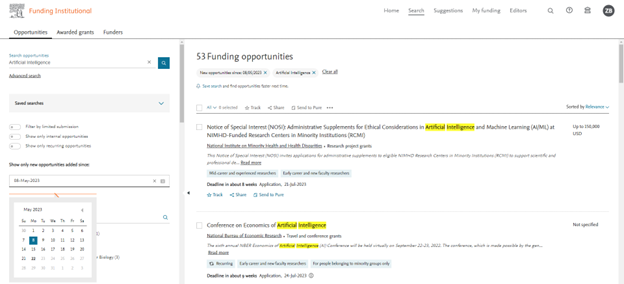
We introduced a new filter for recently added funding opportunities! Stay up-to-date and easily screen for the latest open funding opportunities. With the 'Show only new opportunities added since' date filter, users can select a specific date to view new additions. This filter also simplifies the process of identifying newly added items to Saved Searches, allowing for effortless exporting or ‘Send to Pure’ actions.
New Landing page for unauthenticated users
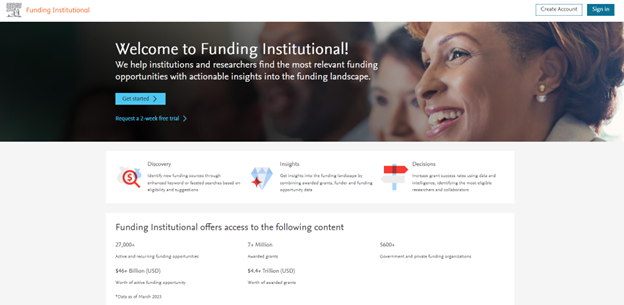
Our new landing page helps first time users to learn about the key features and data coverage of Funding Institutional.
EU data improvements
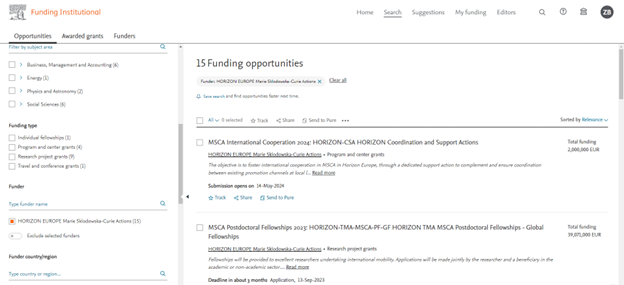
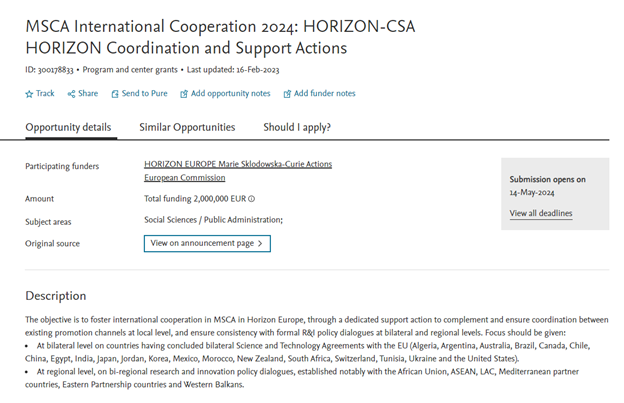
Users can now find opportunities mapped to the various subprograms of the European Commission, like the Marie Skłodowska-Curie Actions, Innovative Europe, ERC and more; showing the hierarchy of the funding scheme.
2022 Release Notes
Public API for opportunities and funders
The Funding Institutional APIs offer direct access to shareable Funding Institutional data available in real time, allowing easy integration with institutions’ CRIS systems and websites.
- RESTful architecture enabling a stateless, scalable, portable and reliable platform
- JSON API response format to optimize user experiences
- API responses include links to relevant resources to simplify navigation
- Interactive API documentation allowing users to preview API requests from the Elsevier Developer portal
Resulting publications on grant detail page
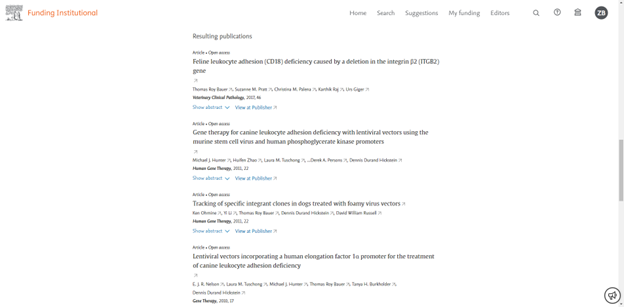
Users can now see the top ten resulting publications sorted by publication date on the grant detail page.
Each publication contains the abstract, a link to the original source and links to the Scopus profiles of each author associated with the publication.
Forthcoming and Expired Opportunities
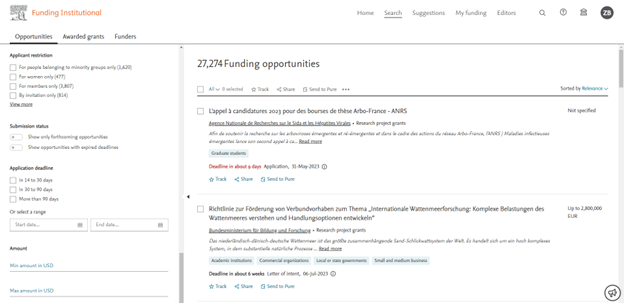
We have added a new submission status facet to the opportunity search page, which has two filtering options:
- Show only forthcoming opportunities: This allows you to filter the opportunities which are not yet open for submission.
- Expired Opportunities: This will help you filter the opportunities for which one or more mandatory deadlines have passed.
By default, the opportunity search results include forthcoming opportunities and do not include expired opportunities.
Project-level view for NIH grants
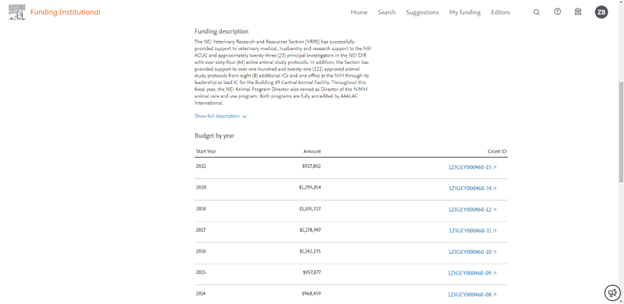
We have been improving our user interface to give you a clearer view of NIH project-level grants. These grants are usually divided into multiple sub-level grants and the budget is split across years. We used to display the sub-level ones as individual grants.
Now on the grant search page and the grant detail page, all NIH project-level grants are shown in a summary view, together with details such as yearly financial instalments and all awardees involved.
Export up to 10k

Sometimes it's handy to just download the data. From now on you can download up to 10,000 opportunities or awards with a single export.
Notes improvements
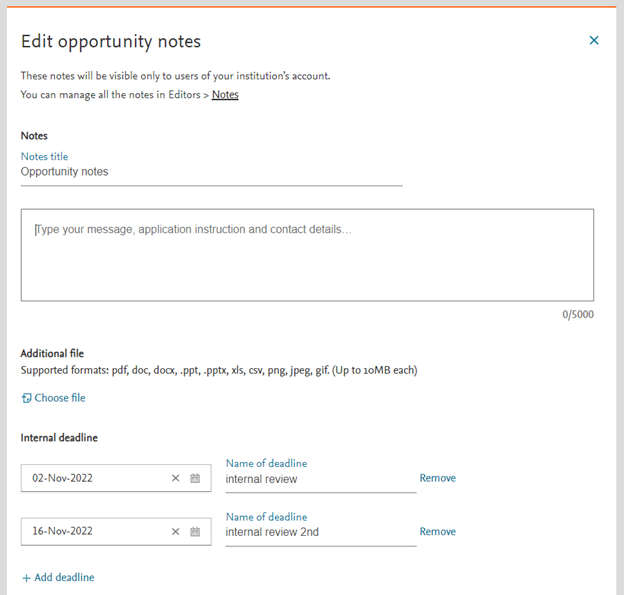
Recent improvements in opportunity notes and funder notes:
- Display the last updated date
- Increased character limit (5000)
New funder detail page
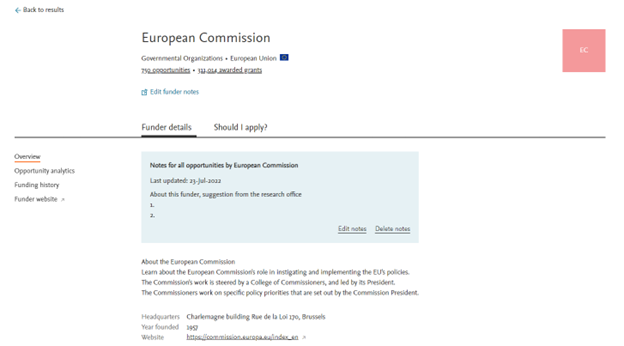
On the new funder detail page, it's now easier to browse notes as well as the funder information. Don't forget to check the "Should I apply" tab for extra analytics for your institution.
Highlight keywords
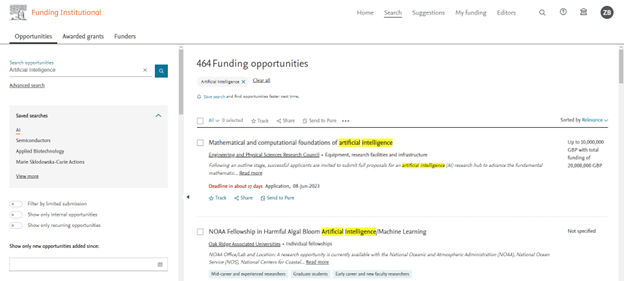
From now on, the keywords you searched for are highlighted in the opportunity detail page.
New grant detail page
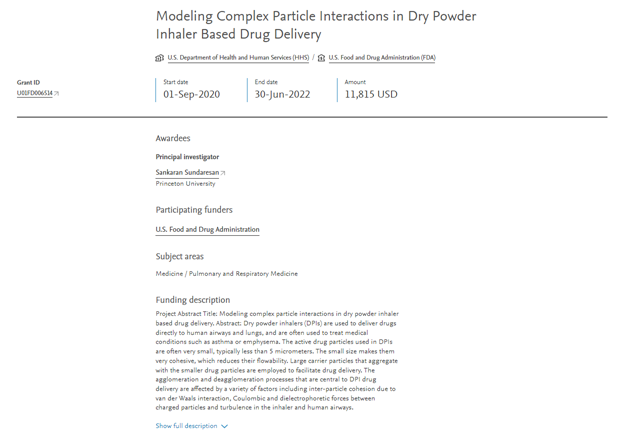
We have refreshed the grant detail page and optimized the information structure. If data is available, you will be able to find details such as co-awardees and their institutions.
Did we answer your question?
Related answers
Recently viewed answers
Functionality disabled due to your cookie preferences