
How do I change my display name in Elsa?
Last updated on September 18, 2025
Your display name in Elsa comes directly from Elsevier's Single Sign-On (SSO) for productsopens in new tab/window. If you need to update your name, you’ll need to make the change in your SSO profile. Once updated, the new name will automatically appear in Elsa (and any other connected systems).
This setup ensures that your information is:
- Consistent across all products you use
- Accurate and up to date everywhere
- Protected in line with data privacy regulations (like GDPR)
Follow the steps below to update your display name in your Elsevier profile:
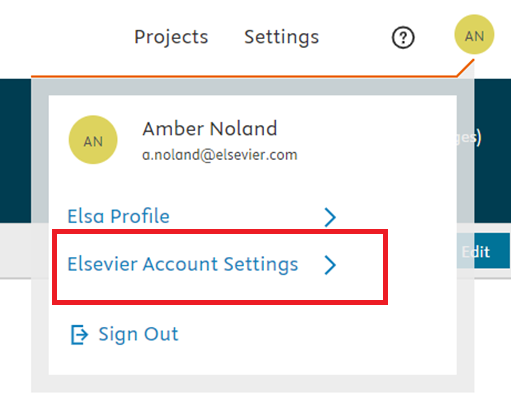
To change the way your name is displayed in Elsa, go to your profile, then select ‘Elsevier Account Settings’.
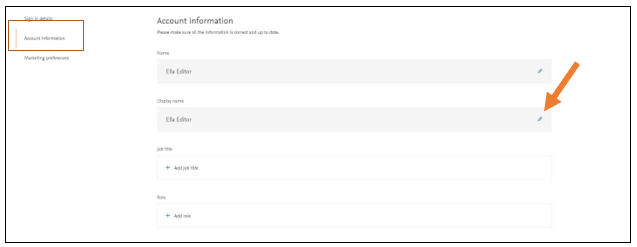
Then, under ‘Account Information’, click the edit icon to change your display name.
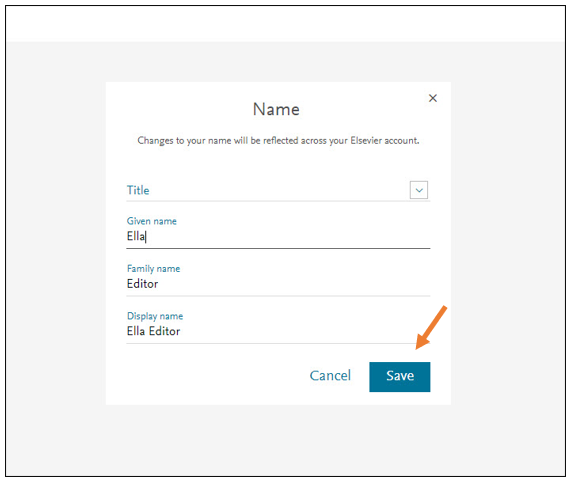
Don’t forget to click ‘Save'.
Your display name is different than your affiliation. Changing your affiliation will only update the way your name is displayed in print. For more information on updating your affiliation, see this FAQopens in new tab/window.
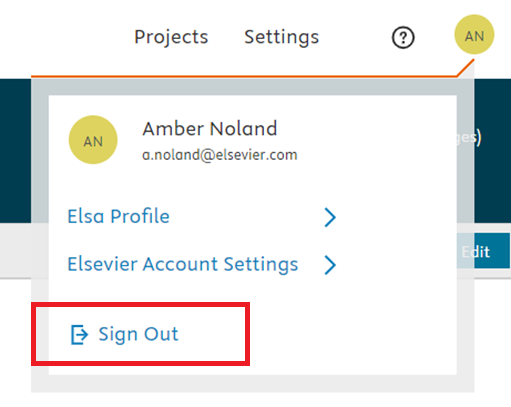
Once you change your display name under your Elsevier Account, return to Elsa and check to make sure you display name has been updated. If it has not, log out of your Elsa account by going to your profile > sign out.
Elsevier account and access issues are not handled by Elsa Support. If you continue to need help with changing your display name or other Elsevier Account settings, like changing your password or email address, visit the Elsevier Access Support Centeropens in new tab/window.
Did we answer your question?
Related answers
Recently viewed answers
Functionality disabled due to your cookie preferences