
How can I change my email login/what do I do if my email address is wrong?
Last updated on December 09, 2024
Elsa uses Elsevier’s ID+ system, so that you can use your login across multiple Elsevier products. To change your Elsa email address, you must change your information in Elsevier’s ID+ account settings.
Please note Elsevier staff are not able to change an email address on an author’s behalf owing to GDPR rules. We recommend adding a second email address to your ID+ account so you can still access your account should you no longer have access to your original email address.
If you have access to your Elsa account and your need to change your email address through your Elsevier Account settings.
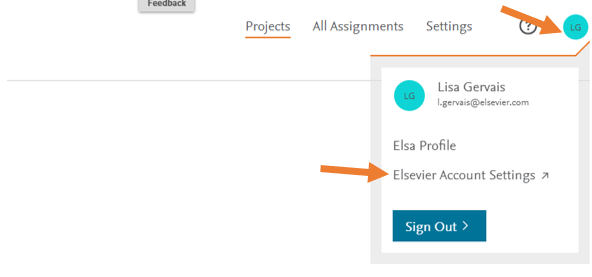
- Click on your avatar and choose 'Elsevier Account' from the dropdown.
- If prompted, sign in.
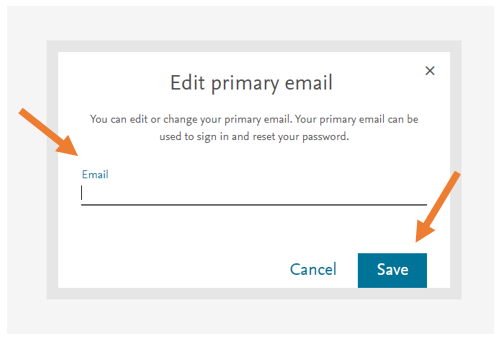
- This will bring you to Elsevier’s ID+ account settings. Click on the pencil icon next to your email address.
- Enter your new email address and click 'Save'.You can also choose to add additional emails to your login under “Other sign in emails”.
If an invitation was sent to the wrong email, and the user cannot access that email account to retrieve the email, the invitation must be resent.
If you’re an Elsevier staff member who invited an Editor/Author with the wrong email address and they cannot access that email account to retrieve the email, you must deactivate their user account and create a new one with the correct email address.
- Go to Settings > Users and use the search bar to search for the Editor/Author
- Once on their profile, click 'Deactivate'.
- Go back to the project settings page, click add Editor/Author.
- Create new user using the correct email address.
- Click ‘Save’ on the project settings page. This will trigger an email invite to be sent to the newly created Editor/Author.
Did we answer your question?
Related answers
Recently viewed answers
Functionality disabled due to your cookie preferences