
View by category
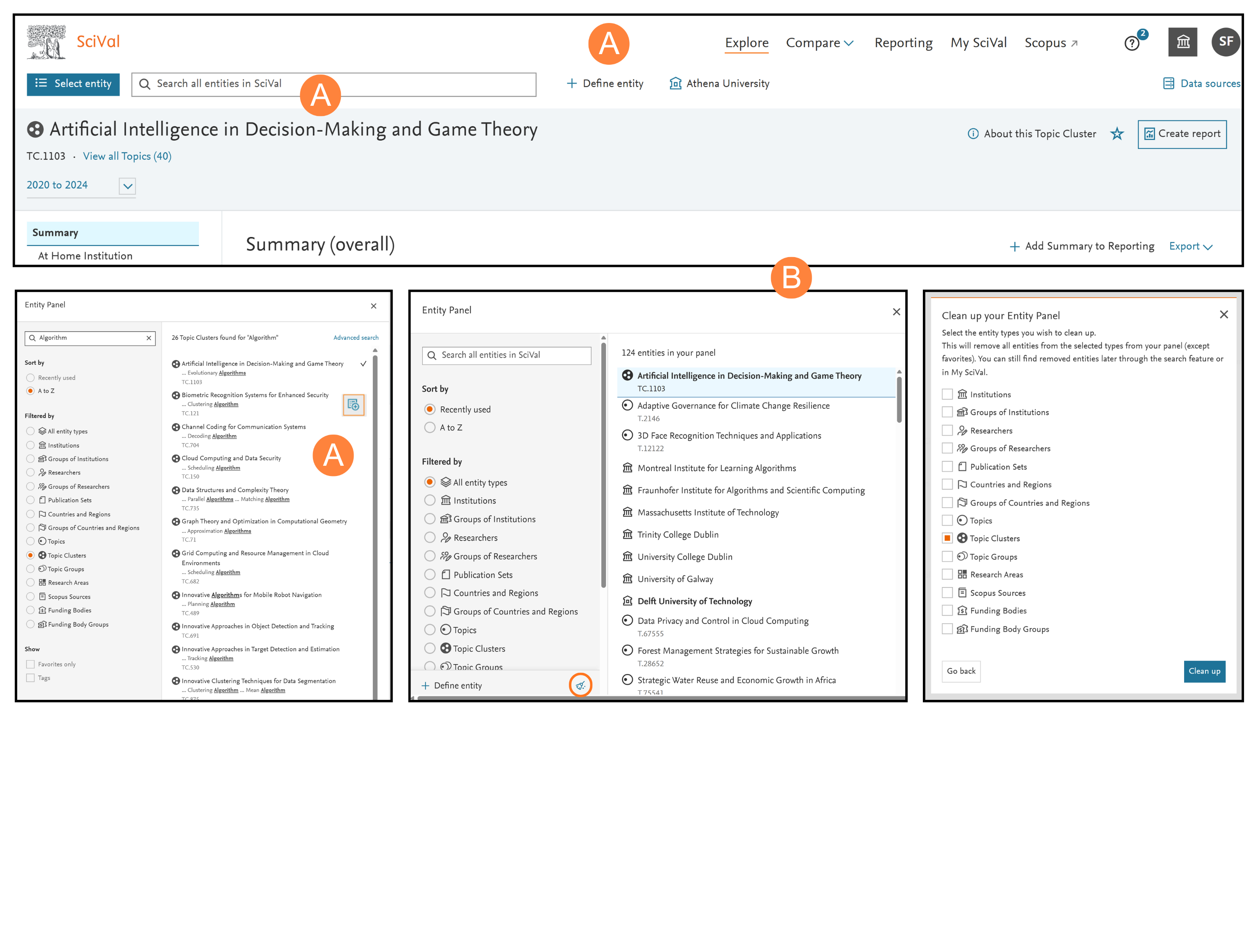
Use the entity selection panel, located on the left-hand side of the screen, like a workspace to define, add, remove, organize and use all your entities of interest. You can choose from the thousands of pre-defined entities (Institutions, Countries, Scopus Sources) or define your own entities (Researchers, research teams, Publication Sets or Research Areas).
Add entities
- Open the entity panel by clicking ‘Select entity’ OR
- Begin typing the name of the entity of interest in the ‘Search all entities in SciVal’ field and click the name when it appears in the search results OR
- Click ‘Add to panel’ option next to the entity name to select multiple entities from your search results OR
- Click the ̒Define entity’ link to define an entirely new entity
Note: Click ‘Add to panel’ option, denoted by orange square box, next to the entity name to select multiple entities from your search results
Remove entities
- Click the ‘remove’ (x) icon that appears when you hover over an entity in the panel
- Select the brush icon in the ‘Entity Panel’ to reveal a new window where you can remove e.g. all Topic Clusters from the ‘Topic Clusters’ section
- Removing entities from the entity selection panel does not permanently delete them and they can be added back at any time
Note: Defining Research Areas, Researchers and Publication Sets is covered in the following sections
Did we answer your question?
Related answers
Recently viewed answers
Functionality disabled due to your cookie preferences