
View by category
Evaluate the collaborative links between up to ten dynamic Researcher Groups in the Collaboration matrix.
The Collaboration matrix is part of the Collaboration subscription and can be found in the Compare section of SciVal.
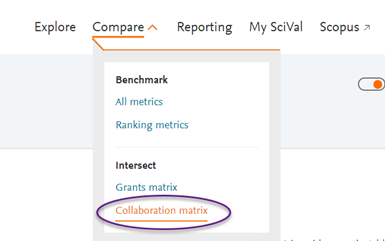
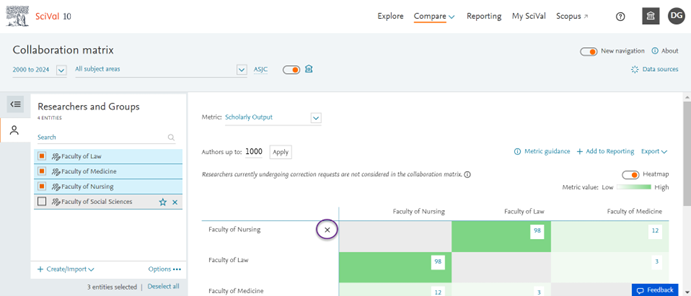
Select the Groups of Researchers you want to analyse from the entity selection panel. You can select up to 10 Groups to populate the matrix.
The matrix supports dynamic Groups of Researchers (Groups with up to 10,000 publications). Groups with more than 10,000 publications are not selectable in the panel.
To remove a Group from the matrix, use the (x) within the table rows, or remove the Group from your panel.
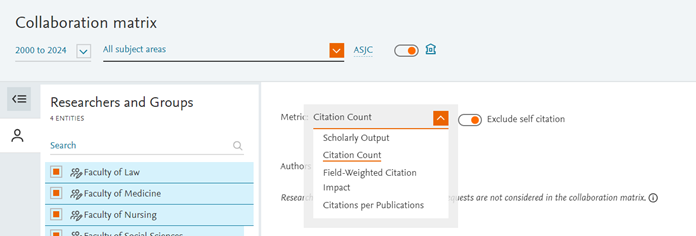
The Collaboration matrix supports 4 metrics: Scholarly Output, Field-weighted citation impact, Citation count and Citations per publication.
For Citation metrics, the “Exclude self-citations” option is available via a toggle.
What is a “self-citation”?
In the context of the Collaboration matrix, a “self-citation” refers to the collaborated output between two groups: a self-citation is a citation from one document to another document within the scholarly output that was collaborated on.
It thus differs in definition from self-citations elsewhere in SciVal, which apply at the level of the entity selected.
Year range and subject classifications
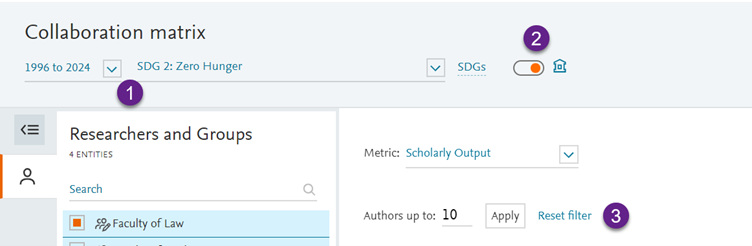
The Collaboration matrix supports the flexible year range from 1996 to present, and all 8 subject classifications available in SciVal.
The home Institution filter
The home institution filter limits the results returned in the Collaboration matrix to those documents which contain at least 1 co-author from either Group who indicated the home institution as their affiliation on publication level.
It does not require both collaborating authors to be from the home institution, for the document to be returned.
The author count filter
Use the author filter to limit the results in the Collaboration matrix to documents with the desired maximum number of co-authors, for example to filter out kilo papers. The filter allows you to freely enter the maximum number of authors (e.g. 10, 20 or 100) that you would like to specify for your analyses. Use the “Reset filter” option to clear the filter and have all documents returned.
The filter applies to the total number of authors present on a document, not to the number of co-authors that are included in the Groups of Researchers.
Please note: The author filter is set to a maximum of 1000 authors, and it is not possible to enter a value higher than 1000 into the input field. The reason is that documents with more than 1000 authors are not supported in the Collaboration matrix and are by default excluded from the documents that are returned and the metrics calculations.
If a correction request was submitted for a Researcher, and this request has not yet been completed, the Researcher in question will not be taken into account for the metrics returned in the Collaboration matrix.
The reason is that “collaborations” are identified based on author ids: a publication is considered a collaboration between 2 Groups, if at least one author from each group is present at publication level.
While a Researcher correction request is ongoing, SciVal uses a static set of documents to represent the Researcher entity – the entity is temporarily not assigned an author id. It is therefore not possible to determine whether the Researcher has collaborated.
The exclusion takes place at the level of the individual Researcher entity, not at Group level – meaning that the rest of the Group of Researchers remains usable in the matrix.
As soon as the correction request has been processed and the result is reflected to the Researcher entity on SciVal, the Researcher will be considered in the matrix automatically.
Documents with more than 1000 authors are not taken into account in the Collaboration matrix: these documents are excluded from the Scholarly output and any metric calculations in the matrix. The reason for the exclusion is to ensure performance and timely loading of the page.
Did we answer your question?
Related answers
Recently viewed answers
Functionality disabled due to your cookie preferences