
How do I find a copy of my contributor agreement?
Last updated on July 07, 2025
To access a copy of your contributor agreement, you can either download a copy at the time of signing in Elsa or you can download a copy of the agreement at any time in your Elsa profile by following the below steps:
To access your agreement from within Elsa:
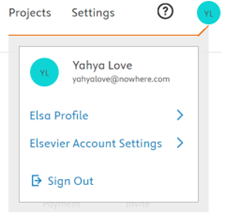
- Navigate to your "Elsa Profile" via your avatar in the upper right corner of your screen.
- Click on the name of the agreement which you would like to download in the "Contributor Agreement" column.
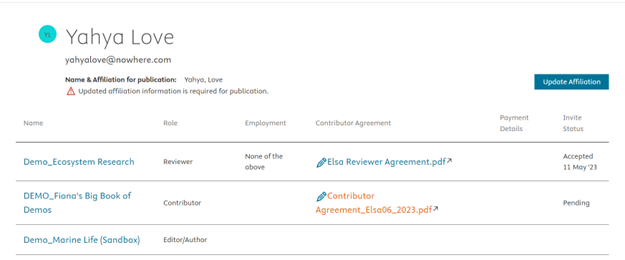
- Your agreement will start to automatically download.
Did we answer your question?
Recently viewed answers
Functionality disabled due to your cookie preferences