
View by category
My app is not working as expected. What can I do?
Last updated on March 18, 2026
If you face any issues with Complete HeartX, please try restarting the application. To do so, press the 'Crown' button followed by the 'Left' button:
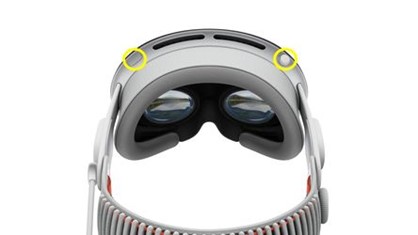
This will display a list of open apps, from which you can select Complete HeartX and force quit it.
If the issue persists, you may have to reinstall the app. To reinstall Complete HeartX, follow the steps below:
- Go back to the Home screen of your Vision Pro device.
- Long press on the Complete HeartX app icon.
- Select 'Remove App'.
- Now, open the App Store on your Vision Pro device.
- Navigate to Complete HeartX and select 'Download'.
Did we answer your question?
Related answers
Recently viewed answers
Functionality disabled due to your cookie preferences