
How do I work with author search results?
Last updated on August 15, 2024
Running an author search produces a results page with various options for interaction. Select an area of the document search results to see the relevant section or browse each topic.
| |
|
|
|
|




Select 'Edit' to return to the Author search page to edit your search terms.
For more information, see How do I search in Scopus?
Tick 'Show exact matches only' to limit the search results to the exact order the name is written.
For example, searching with Author last name Smith and Author first name J.L. finds Smith, J.L. and not Smith, L.J. Furthermore, searching Smith, J. only finds Smith authors with J as the first initial—there may be other initials after the first initial, but J must be first.
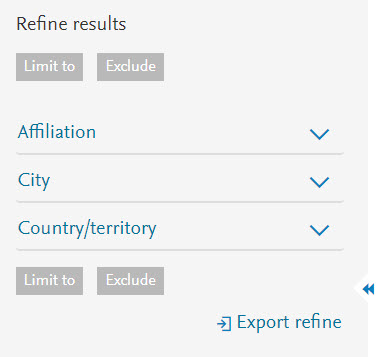
Scopus provides the options to refine your list of author search results and to limit the results list according to more specific categories.
For an author search results list, you can refine the results based on:
- Affiliation
- City
- Country/Territory
For more information, see How do I filter and refine my search results?
Author search results are sorted by the number of documents, highest number of documents first. To sort them by different criteria, select 'Sort on' to choose an option from the drop down list at the top of the results page.
- Sorting applies to the entire set of results.
- The sorting option you choose remains selected for future, signed in sessions, until you change it.
Document count
- Document count (high-low) - Results are sorted in descending order of the highest document publication count first.
- Document count (low-high) - Results are sorted in descending order of the lowest document publication count first.
Author
- Author (A-Z) - Results are sorted by author name in alphabetical order from A-Z.
- Author (Z-A) - Results are sorted by author name in alphabetical order from Z-A.
Affiliation
- Affiliation (A-Z) - Results are sorted by Affiliation name in alphabetical order from A-Z.
City
- City (A-Z) - Results are sorted by City name in alphabetical order from A-Z.
Country/Territory
- Country/Territory (A-Z) - Results are sorted by Country/Territory name in alphabetical order from A-Z.
Use Show documents to display a results list for a selected author or authors.
- Select an author or multiple authors.
- Select 'Show documents'. A results list opens listing all documents published for the selected author or authors.
Use View citation overview to analyze how often articles (such as from a specific author or journal) have been cited.
- From an Author search results list, select up to 15 authors to include in the Citation overview.
- From the analyzing and sorting options, select 'View citation overview'.
For more information, see How do I create a citation overview?
Use this option to request that Scopus merges a selected number of authors from a results list into a single profile.
- From the Author results list, tick the checkboxes next to the author names you would like to merge into a single author profile.
- Select 'Request to merge authors'. The Author feedback wizard opens with the selected names on the form.
- Select 'Start'.
- Choose the preferred author name and select 'Next'.
- Review documents in the profile and select 'Next'.
Note: If the documents are incorrect, select 'Edit documents' to add and remove documents from the list.
- Provide your contact details and click 'Submit'.
For more information, see How do I request changes to author details?opens in new tab/window
The following information and links are available for each item listed on a search results page:
|
|
|---|---|
Author name |
Select an author name to open the Author details page. Note: Authors with only 1 document indexed in Scopus are not hyperlinked to their Author details page. To view the Author details page of an author with only 1 indexed document, click the indexed document number for that author (1), then select the author's name from the document page. |
Document count |
This is the number of documents that an author has published. Click the document number to view a result list of documents published by the author. |
Subject area |
This is the subject area that the author has published under. |
Affiliation name |
This is the current affiliation that the author is associated. |
City |
This is the city of the author's current affiliation. |
Country/Territory |
This is the country or territory of the author's current affiliation. |
View last title |
Click to view information regarding the last title that the author has published. |
Did we answer your question?
Related answers
Recently viewed answers
Functionality disabled due to your cookie preferences