
View by category
You can analyze self-created Research Areas throughout SciVal to get further insights. SciVal created Research Areas cannot be used in Collaboration:
How
Select a module below to see what you can do when analyzing a research area:
See your institution's output within a Research Area
In the Explore, you can view your institution’s contribution to a particular research area by number of publications and citations.
How does your institution’s output in this area compare to the national or worldwide output?
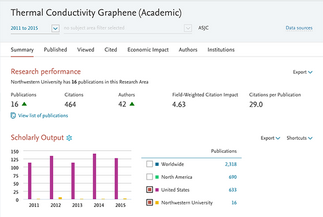
For more in-depth information, browse the 'Publications' and 'Citations' tabs.
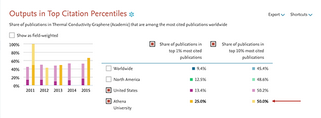
For example, to see how much of your institution's output was in the top 1% and 10% most cited publications worldwide, click on the Publications tab and scroll down to the Outputs in Top Percentiles section.
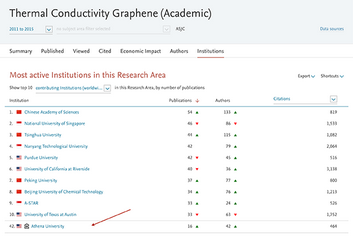
See which institutions are active within a Research Area
The Institutions page gives you an overview of the top contributing institutions in the research area within your own region or country or worldwide. You can also see which institutions are collaborating with your institution within the research area.
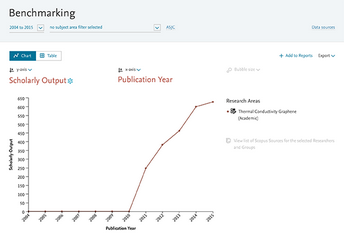
Use Compare to explore the worldwide output in a particular research area from 1996 until the present.
- Go to Compare - All metrics.
- Select the Research Area from the entity selection panel on the left-hand side.
You can spot possible trends using a variety of different metrics, such as:
- Scholarly Output (number of publications)
- Field-Weighted Citation Impact (normalized citation count)
- Outputs in Top Percentiles (an indicator of research excellence)
- Journal Category Count (an indicator of multidisciplinarity)
- Collaboration (for instance international collaboration)
Analyze your Institution's collaboration partners in a user-defined Research Area.
You can use Collaboration for an in-depth view of your Institution’s collaboration partners in a particular Research Area you have defined. Or identify potential new collaboration partners in that Research Area.
- Go to Collaboration.
- Select your home institution from the entity selection panel on the left-hand side.
- Select the Research Area filter from the filter options at the top of the page.
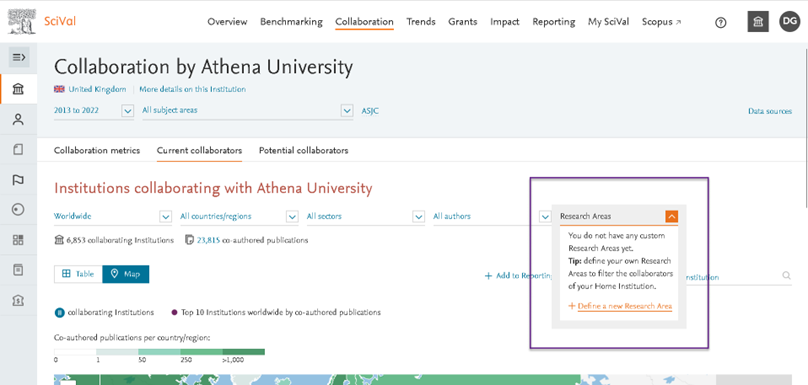
Research Area filter option in the Collaboration module.
For what purpose can I use the Research Area filter?
Research Areas allow you to customize your area of analysis. They can reflect a specific field of research you are interested in, and can be based on a selection of SciVal entities, or on keywords. Examples of how to use them in the Collaboration module include:
Analyzing the collaborations of a specific department or faculty within your Institution.
If the institutional entity you are interested in has their own Scopus affiliation id, you can create a Research Area based on their affiliation id to analyze their collaboration.
Analyzing your collaborations in a specific Topic or Topic Cluster.
Research Areas can be based on one, or multiple, Topics, allowing you to see your Institution’s collaboration partners in the specific Topic(s) of interest.
Analyzing your collaborations in any other field of interest based on keywords.
Defining your Research Area based on keywords allows you to see your Collaboration partners in your specified area of interest.
Find new collaboration partners in a Research Area.
Switch to the 'Potential collaborators' tab to view potential new collaboration partners in this Research Area. These institutions are active in this Research Area, but are not yet collaborating with your institution in that area.
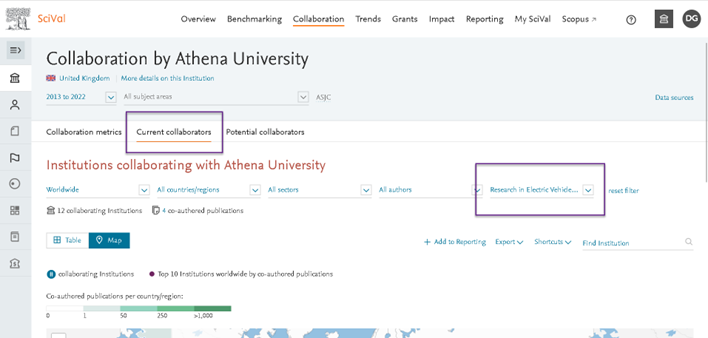
Research Area filter applied to Current Collaborators.
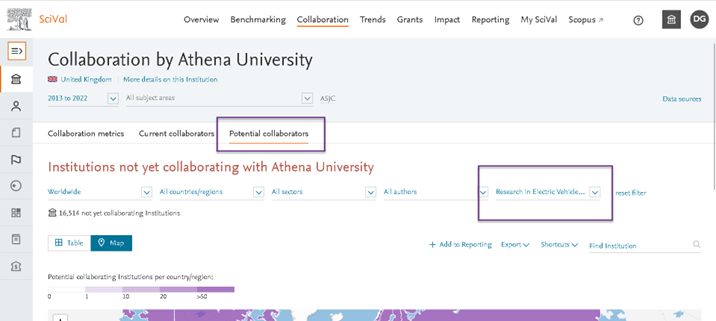
Research Area filter applied to Potential Collaborators.
Learn more about how to define a Research Areaopens in new tab/window.
Explore is built for you to analyze Research Areas in depth. See who the top performers and rising stars are based on both output and usage data. Which subtopics are viewed the most and who is contributing to them?
Did we answer your question?
Related answers
Recently viewed answers
Functionality disabled due to your cookie preferences