
View by category
In the new navigation, Overview and Collaboration modules are part of Explore in SciVal.
Subject classifications are used in SciVal to categorize Scopus publications into scientific disciplines. There are 3 ways to map a subject classification to Scopus publications. The classification can be mapped:
- At the publication level - e.g. used in the SDGs, SCADC, NIRF and DFG classifications
- The Scopus source level, (for example mapped to the journal level) – e.g. used in the Polish and FoR classifications
- To the Scopus All Science Journal Classification (ASJC). In turn the ASJCs are mapped to the subject areas in the subject classification – e.g. used in the THE and KAKEN classifications
Each publication in Scopus can be assigned to one or more categories in the selected subject classification. This lets you, for example, see the breakdown of an institution's publications by subject area - say, 50% in medicine, 30% in chemistry and 20% in physics.
All subject classifications are available in Benchmarking (all metrics) and select Explore pages only. Due to re-computation of your user-defined entities in SciVal, you can choose up to three additional Subject Classifications for the entities to be displayed in all other pages in Explore.
You can view and select classifications via the subject classification selector, located to the right of the subject area filter.
Follow these steps to select a subject classification:
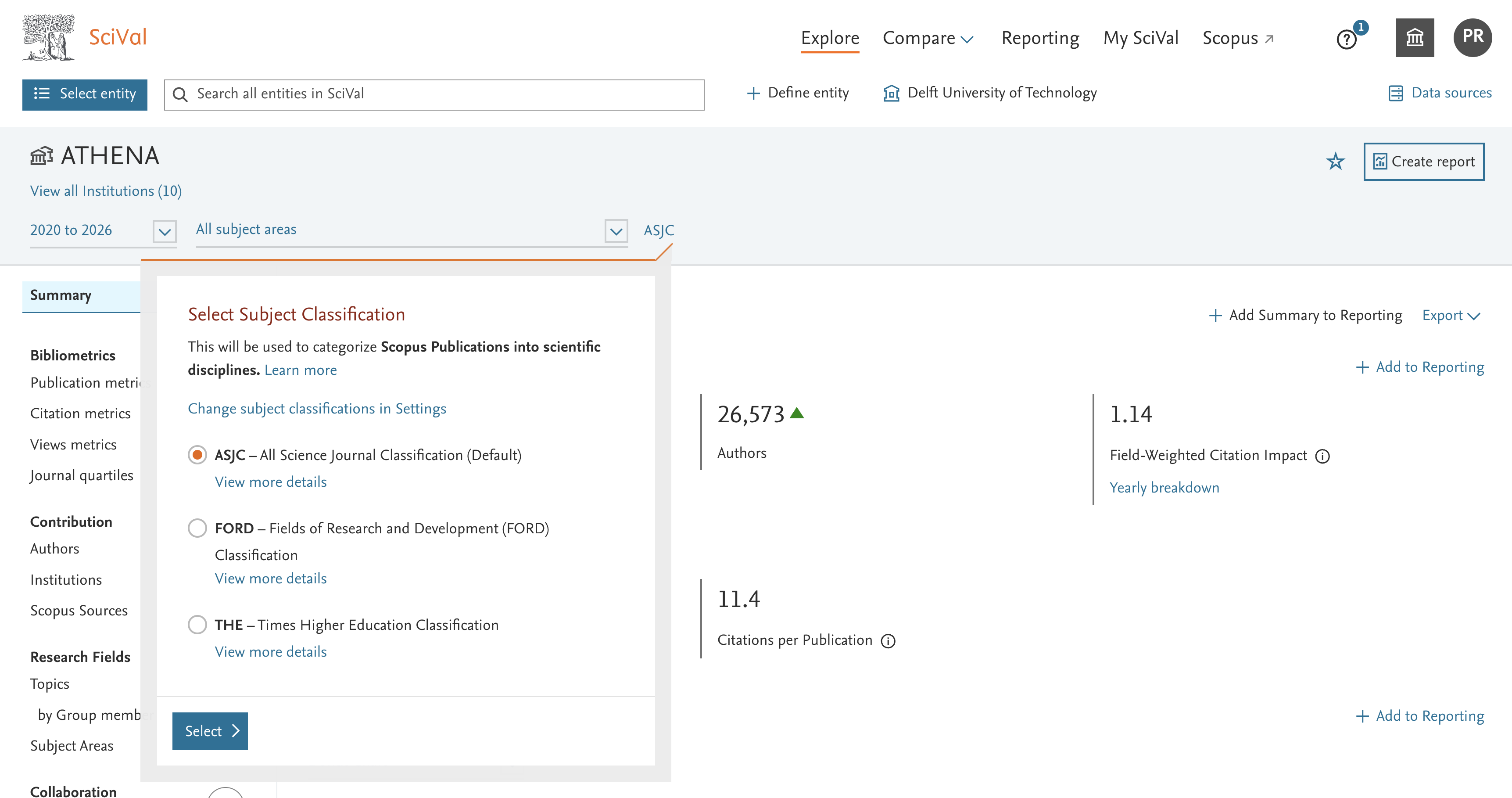
- Click on the current subject classification name, located to the right of the subject area filter.
- Select one of the available subject classifications and click ‘Select’.
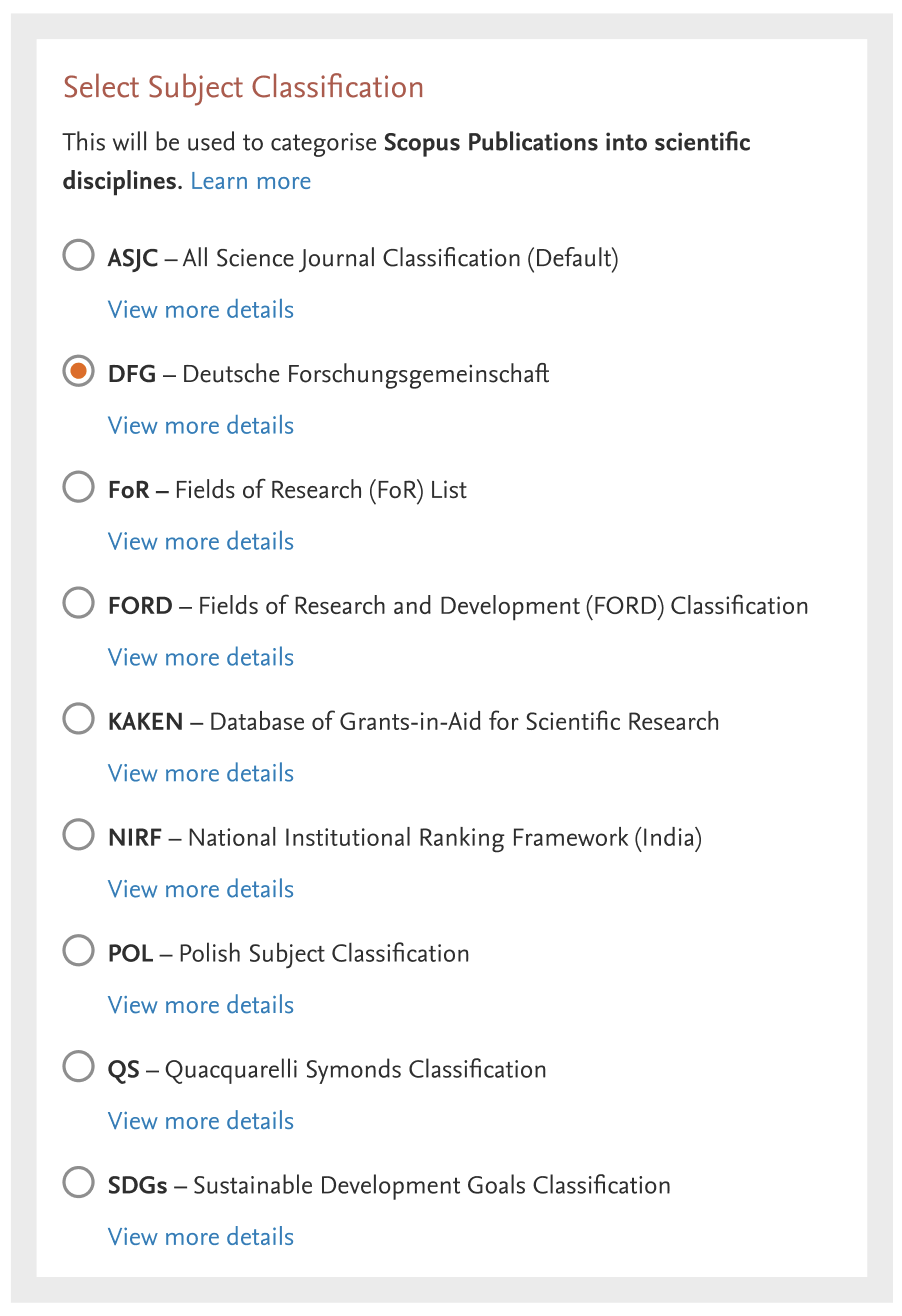
- Subject Classification dropdown displays different values:
All subject classifications are available in Benchmarking (all metrics) and select Explore pages only.
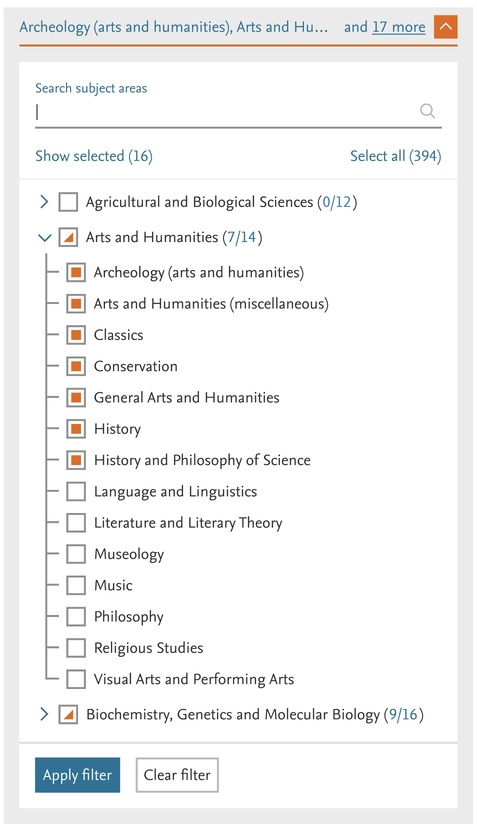
You can use subject classifications to filter the data shown in SciVal, by one or more subject areas. Select multiple subject areas to view the combined research performance of your selected entities across those fields.
For example, you can select Biochemistry, Biotechnology, and Cell Biology to analyse performance across all three subject areas.
SciVal runs an OR query over those subject areas – i.e. “Biochemistry OR Biotechnology OR and Cell Biology.” As long as a publication is indexed in any of the 3 subject areas, it will appear in the results.
See also Filtering by ASJC subject area
For more details: How can I filter by single or multiple subject area?
In SciVal, you can choose from the following Subject Classifications:
- ASJC - All Science Journal Classification:
Used in Scopus. This is the default scheme in SciVal.
Learn moreopens in new tab/window - FoR - Fields of Research (FoR) List:
Part of the 2020 Australian and New Zealand Standard Research Classification (ANZSRC). Each FoR subject area is mapped to one or more Scopus sources. Learn moreopens in new tab/window - FORD - Fields of Research and Development (FORD) Classification:
Used in the Frascati Manual of the Organisation for Economic Co-operation and Development (OECD). Each FORD subject area is mapped to one or more ASJCs, plus a selection of individual Scopus sources. - KAKEN – Database of Grants-in-Aid for Scientific Research:
KAKEN category definitions are used by the Japanese Kaken Program and covers approximately 300 categories organized into 4 levels. Each KAKEN subject area is mapped to one or more ASJCs. - QS - Quacquarelli Symonds Classification:
This classification is used in QS World University Rankings. It covers 5 subject areas and 51 subjects. Each QS subject area is mapped to one or more ASJC. - THE - Times Higher Education Classification:
This classification is used in the THE World University Rankings. It covers 11 subject areas mapped to ASJC. Each subject area is mapped to one or more ASJC. - SDGs - Sustainable Development Goals Classification:
This classification is based on United Nations SDGs. It is created using the Elsevier 2025 SDG mappings. It is currently available only in Benchmarking and select Explore pages. Each SDG subject area is mapped to one or more Scopus publications.
Learn moreopens in new tab/window - POL - Polish classification:
This classification is used by the Polish Ministry. It covers 44 key areas of focus in Poland. It is currently available only in Benchmarking and select Explore pages. Each Polish subject area is mapped to one or more Scopus sources.
Learn moreopens in new tab/window NIRF- National Institutional Ranking Framework (India) Classification:
This classification is used by National Institutional Ranking Framework (India). It covers 8 Subject areas of focus in India. It is currently available only in Benchmarking and select Explore pages. Each subject area is mapped to one or more ASJC. Learn more opens in new tab/window
SCADC - China State Council Academic Degree Committee (SCADC) Subject Categories
This classification is based on the degree-granting and academic training directory as announced and published by the State Council Academic Degree Committee (SCADC) and Ministry of Education of the People’s Republic of China in 2011. Learn moreopens in new tab/window
DFG- Deutsche Forschungsgemeinschaft
This classification focuses on funding basic research and works to ensure the effectiveness and appeal of Germany as a Centre for research, promoting its adaptability, flexibility, inclusiveness and diversity. It covers 5 subject areas. Learn more
There are 3 ways to map a subject classification to Scopus publications. The classification can be mapped:
- At the publication level - e.g. used in the SDGs, SCADC, NIRF and DFG classifications
- The Scopus source level, (for example mapped to the journal level) – used in the Polish classification
- To the Scopus All Science Journal Classification (ASJC). In turn the ASJCs are mapped to the subject areas in the subject classification – e.g. used in the THE and KAKEN classifications
The categories in the Scopus ASJC classification were mapped to equivalent categories in all classifications.
- Where applicable, the classifications were mapped at category level (ASJC category to target category)
- The ASJC categories were manually mapped to categories in the three “other” classifications.
- Many categories could be mapped to a single ASJC category. In some cases, multiple ASJC categories were mapped to a single target category, and vice versa
99.2% of publications were mapped from ASJC to the FORD and REF 2014 classifications. Only the ASJC category "Multidisciplinary" was not mapped to a category in the other classifications because there was no equivalent.
The (ANZSRC) FoR 2020 classification is a journal to FoR mapping. As a result the total publication counts will be lower than when ASJC is selected. Learn more
FORD uses both ASJC and journal to FORD mapping.
Download the subject classification definition, Subject areas and mappings:
- ASJC(Opens in a new tab or window) (Excel sheet)
- THE(Opens in a new tab or window) (Excel sheet)
- QS(Opens in a new tab or window) (Excel sheet)
- KAKEN(Opens in a new tab or window) (Excel sheet)
- FORD(Opens in a new tab or window) (Excel sheet)
- ANZSRC FoR(Opens in a new tab or window) 2020 (Excel sheet) Learn more about the mapping per Scopus Source
- POL(Opens in a new tab or window) (Excel sheet)
- SDGs(Opens in a new tab or window) (Excel sheet)
- NIRF(Opens in a new tab or window) (Excel sheet)
- DFG(Opens in a new tab or window) (Excel sheet)
Did we answer your question?
Related answers
Recently viewed answers
Functionality disabled due to your cookie preferences