
Osmosis LMS Embedding - Installation
Last updated on July 29, 2026
Osmosis LMS Embedding uses the LTI 1.1 standard. To set it up, an LMS administrator adds Osmosis as an external (“virtual”) tool using a URL, key, and secret. Once added, instructors see Osmosis as a tool or activity they can place as a resource link in their courses, and can then search for and embed Osmosis videos. Supported platforms: Canvas, Brightspace, Blackboard, and Moodle.
Before you begin
- Elsevier will provide your administrator with a key and secret. If you don’t have these yet, contact your Osmosis from Elsevier representative.
- You need administrator access in your LMS to add and configure an external tool.
- Tip: For the best faculty experience, permit incoming email addresses through your security settings.
Canvas
- Configure an external app using a URL. See Canvas’s guide: How do I configure an external app for an account using a URL?opens in new tab/window
- Use the provided key / secret and this LTI Config URL: https://www.osmosis.org/data/ltiConfig
Brightspace
- Configure an LTI 1.1 integration. See Brightspace's guide: Set up integration with a tool provideropens in new tab/window
- Use the provided key / secret and this Launch URL: https://www.osmosis.org/lti/selector
Blackboard
- Use the LTI widget and exchange the Osmosis secret and key with your administrators.
- After registering the Osmosis LTI 1.1 tool, select Deep Linking Content Tool when managing placements.
Moodle
- Register an LTI 1.1 external tool with the secret and key provided by Osmosis. See Moodle’s guide: LTI External toolsopens in new tab/window
- Tool URL: https://www.osmosis.org
- Content Selection URL: https://www.osmosis.org/lti/selectoropens in new tab/window
After setup
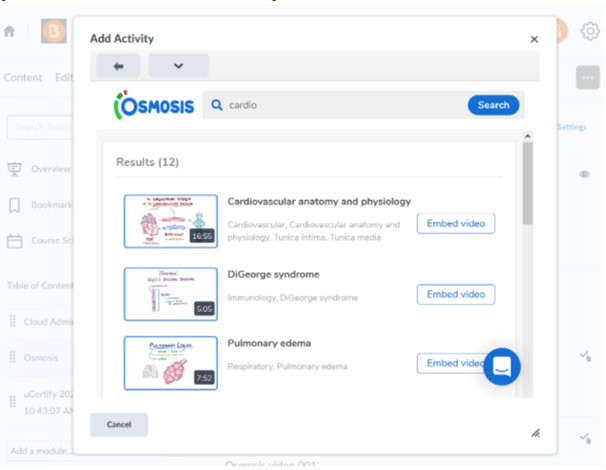
Once implemented within your LMS, faculty and administrators can search for and embed Osmosis videos directly in course content.
Osmosis video selection widget (LMS admin-only)
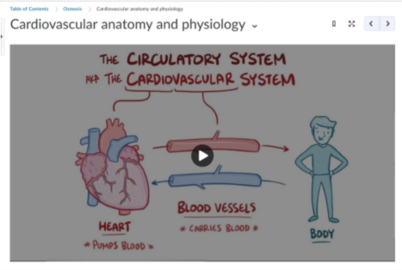
Osmosis video embed view
Security
This integration follows the LTI v1.1 specification. For security and privacy information, visit https://www.osmosis.org/privacyopens in new tab/window.
Did we answer your question?
Related answers
Recently viewed answers
Functionality disabled due to your cookie preferences