
View by product
How do I migrate from the original Mendeley Desktop to Mendeley Reference Manager?
Last updated on March 17, 2025
Mendeley Reference Manager and Mendeley Cite are new reference management applications from Mendeley. They have been developed using valuable feedback from our users to provide a more resilient, streamlined and intuitive experience.
This guide offers instruction and advice for those of you currently using the original Mendeley Desktop and the citation plug-in to assist you with transitioning to the new applications.
Key Points
- You can download and begin using the new Mendeley Reference Manager for desktopopens in new tab/window.
- You can keep using your existing Mendeley Desktop for now. There is no need to uninstall Mendeley Desktop to also use Mendeley Reference Manager on the same computer.
How to transition to Mendeley Reference Manager and Mendeley Cite
Start using Mendeley Reference Manager desktop app with your existing library
- Open your existing Mendeley Desktop application and sync your library.
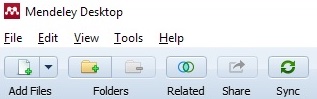
- Watch the bottom of the Mendeley Desktop window to see when the synchronize process is complete.

- Downloadopens in new tab/window and install Mendeley Reference Manager.
- Open Mendeley Reference Manager. Sign in with your Mendeley ID if prompted.
All of your folders (now called collections), as well as groups, references, metadata, files and annotations will appear in the new Mendeley Reference Manager window. You can now use Mendeley Reference Manager with your existing library.
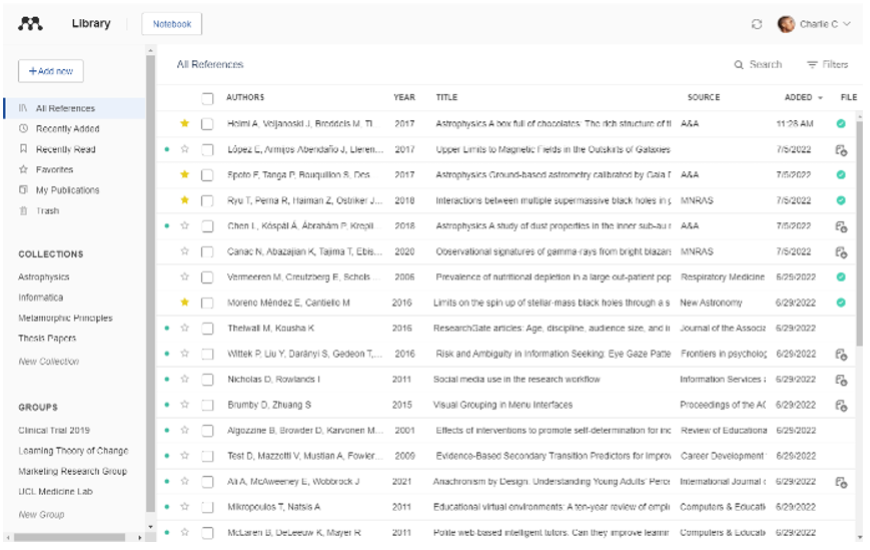
Review the Mendeley Guidesopens in new tab/window for details on how to use various features, which may vary from those in the original Mendeley Desktop. One key difference: changes you make in Mendeley Reference Manager are now synced automatically to your library, which is based in the cloud.
While transitioning to Mendeley Reference Manager, you can continue to use Mendeley Desktop if you need to. Simply open the original Mendeley Desktop application and manually sync as usual. Changes you made using Mendeley Reference Manager will appear when syncing is complete.
Add Mendeley Cite to your workflow
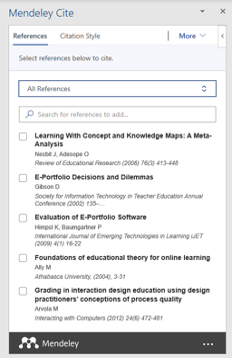
Mendeley Cite is an add-in application for Microsoft® Word that supports citing references in your papers while you write, much like the citation plug-in that came with Mendeley Desktop. Unlike the citation plug-in, Mendeley Cite runs independently of the reference manager. It accesses your reference library in the cloud to load the metadata it needs to insert citations or a bibliography in your manuscript.
You can use Mendeley Cite with either Mendeley Desktop or Mendeley Reference Manager. (The citation plug-in only works with Mendeley Desktop.)
How to install Mendeley Cite
- Visit Mendeley.comopens in new tab/window or launch Microsoft Word, go to the Insert menu and select “Get Add-ins”.
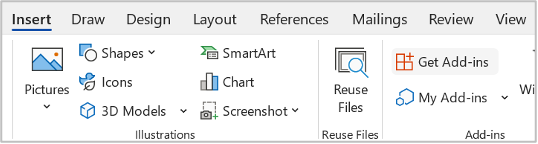
- The Microsoft AppSource page for Mendeley Citeopens in new tab/window opens. Select the “Get it now” button.

- The app will install in your version of Microsoft Word.* It will appear in the 'References' ribbon near the right side.

- Launch Mendeley Cite to see and search the references in your library, and insert citations or a bibliography into your document. Sign in to your Mendeley Account if prompted.
Read the Mendeley Guidesopens in new tab/window for detailed information on using Mendeley Cite.
* If you cannot access the Microsoft AppSource or install Add-ins, check this Mendeley FAQ for advice.
Transition considerations
Mendeley Reference Manager and Mendeley Cite feature all essential reference management and citation functions. However, there are some additional functions from Mendeley Desktop and the citation plug-in that are not available in the new applications. We are working hard to make available the functions that were used and valued in the previous applications - you can find out about our newest releases hereopens in new tab/window.
Please find below details of other factors you should be aware of when transitioning to the new applications.
Mendeley Reference Manager (desktop app)
- Mendeley Reference Manager’s desktop app will not run on 32-bit processor computers, and there is no plan to add this capabilityopens in new tab/window.
- There is no BibTeX sync option to keep external BibTeX files up to date with the content of your library.
- Older computer operating systems and older versions of MS Word are not supported (see version details in the Mendeley Support Centeropens in new tab/window). However, via a web browser you can use the web version of Mendeley Reference Manager to manage your library and reading, and the free Word Online application with Mendeley Cite.
Converting citations made with the plug-in to Mendeley Cite
Mendeley Cite can convert citations in a document that were created using the legacy citation plug-inopens in new tab/window. First save a duplicate copy of your document as a backup, as the conversion is not reversible.
You may not want to convert your document in these circumstances:
- You’re in the middle of writing an important paper with a nearby deadline that uses the citation plug-in.
- You’re collaborating on a paper(s) with multiple contributors: once you convert a paper’s citations to work with Mendeley Cite, this means everyone working on that paper has to have Mendeley Cite installed – otherwise authors with the old citation plug-in will not be able to add citations.
Institutional users of Microsoft Word
Some institutions’ IT administrators do not permit accessing or downloading add-ins from the Microsoft AppSource. You can read more about this hereopens in new tab/window. In the meantime, the free MS Word Online is a possible workaround. See “Using the free Word Online app with Mendeley Cite” below.
Other text processors besides Word
At this time Mendeley Cite is not available for LibreOffice, Google Docs, or other text processors besides Microsoft Word. An option is to use Microsoft’s free Word Onlineopens in new tab/window application. See “Using the free Word Online app with Mendeley Cite” below.
Using the free Word Online app with Mendeley Cite
An option for installing Mendeley Cite is to use Microsoft’s free Word Onlineopens in new tab/window app (available with a free personal Microsoft Account), which works on all operating systems, including Linux. You can install Mendeley Cite in this version of Word. Save your documents created in other text processors in .docx format and open them in Word Online. Then you can insert citations from your Mendeley library and add a bibliography.
Advice for Working offline
In Mendeley Reference Manager, your library is in the cloud so it can be accessed anywhere and is not lost if something happens to your computer.
You can download one, some, or all of your library’s files to a local drive for offline reading and annotating in Mendeley Reference Manager. Any annotations, notes, or other changes you make while offline will sync automatically with your cloud library once you reconnect to the internet.
Downloading your entire library is possible but can take time and also uses a lot of local storage. In most cases, it’s more efficient to work with a selection of downloaded files if you need to work offline, rather than all of your files.
Mendeley Cite needs an internet connection to launch and load your library’s metadata for citing. However, after Mendeley Cite has finished loading, you can disconnect and continue working on your manuscript. This works only for that writing session. If you close the document, you will have to reconnect to the internet and re-load Cite.