
How do I use the query builder feature in Quick Search?
Last updated on December 03, 2025
You can broaden your Engineering Village search queries using the new query builder feature on the Quick Search page. The query builder has been designed to interpret natural language, Boolean expressions, and simple keyword queries. This new feature is a powerful application that uses Engineering Village AIopens in new tab/window (artificial intelligence) to help you efficiently broaden your search queries.
The query builder feature aims to streamline the research process and facilitate knowledge discovery by building high-precision Engineering Village Booleanopens in new tab/window, proximityopens in new tab/window, and topic-exclusion search queries. This feature suggests expanded search terms tailored to your own unique keywords, natural language, and expanded Boolean queries. You can execute these expanded keyword queries directly or choose to disregard them and continue with your own input.
Simple keywords
The query builder augments simple keywords with commonly used synonyms, enriching the query and enabling much more comprehensive, precise results through expanded search syntax, such as exact phrases, proximity operatorsopens in new tab/window, and specific exclusion filters, where appropriate.
Expanded Boolean output
The query builder builds search queries from input containing ‘AND,’ ‘OR,’ and ‘NOT’ Boolean operators.
Natural language
The query builder constructs search queries from natural language instructions and questions.
Refer to the query builder examples section of this FAQ for the various types of search queries that are supported by this feature.
- Navigate to the Quick Searchopens in new tab/window page.
- Select the database(s) you want to include in your search query. The database name(s) you selected (or the number of databases if you selected more than two) are displayed on the page.
- From the ‘Search within’ dropdown box, select the field that you want to use for your query.
- The ‘All fields’ option is the default.
- From the ‘Search documents’ text box, enter your search term(s) as desired.
Click the Artificial Intelligence (AI) icon box.

The ‘Use expanded keywords’ pop-up window opens.
- Click ‘Add keywords’ to accept the expanded keyword query suggestion OR
- Click ‘Decline’ to reject the expanded keyword query suggestion OR
- Click the ‘X’ to close the pop-up window.
- If you accept the query suggestion, it will replace your original search query and display in the ‘Search documents’ text box.
- You may keep the search query as is or edit it.
- If desired, add more search fields.
- Repeat steps 4 through 8 to use the expanded query search feature.
- If desired, add a year range. Select the preferred publication year range.
- Click ‘Search’ to run your search query. If you accepted the suggested keyword(s), your search query results include the expanded keywords.
Important notes:
- To enable the query builder feature, you must enter at least one search term in the ‘Search documents’ box.
- You may use simple keywords, natural language text, and/or the Boolean connectors ‘AND,’ ‘OR,’ and ‘NOT’ between the search terms if desired.
- When using the query builder feature (by accepting the suggested keyword query suggestion), a maximum of 500 characters, including spaces, can be entered into the ‘Search documents’ text input box. However, the 500-character limit in this text input box only applies when using the query builder feature and not when entering a regular Quick search query without using this specific feature.
- This query builder feature is designed to broaden Quick Searches by suggesting additional keywords to supplement your individual search terms and natural language queries. If you prefer to use advanced Boolean logic in your search queries, use Expert Search.
Simple keywords query builder examples
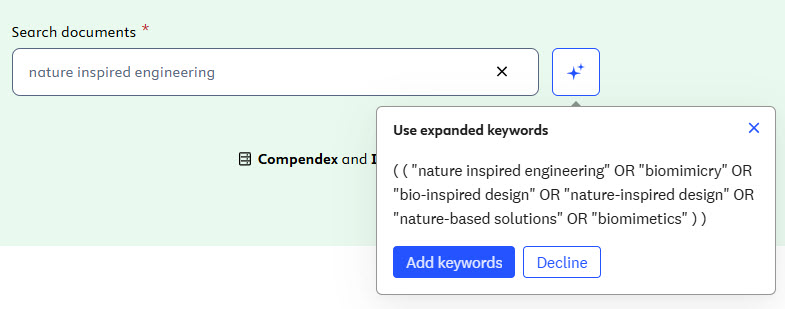
User query | Suggested expanded query |
|---|---|
nature inspired engineering | (("nature inspired engineering" OR "biomimicry" OR "bio-inspired design" OR "nature-inspired design" OR "nature-based solutions" OR "biomimetics")) |
carbon nanomaterials | (("carbon nanomaterial*" OR "carbon nanotube*" OR "carbon nanofiber*" OR "graphene" OR "fullerene*" OR "carbon quantum dot*")) |
renewable energy | (("renewable energy" OR "sustainable energy" OR "green energy" OR "clean energy" OR "alternative energy" OR "renewable power" OR "solar energy" OR "wind energy" OR "hydropower" OR "biomass energy" OR "geothermal energy")) |
smart grid communications | (("smart grid" OR "smart grid technology" OR "smart grid communication" OR "smart grid system" OR "smart grid network" OR "smart grid infrastructure" ) AND ( communication* OR "data transmission" OR "information exchange" OR "networking" OR "telecommunication")) |
Expanded Boolean input query builder examples
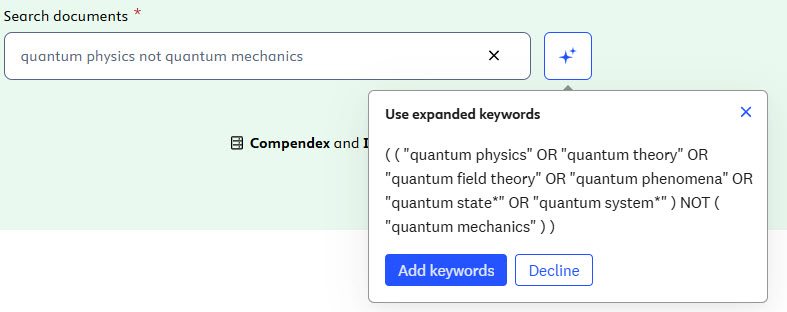
User query | Suggested expanded query |
|---|---|
mild steel and galvanic corrosion | (("mild steel" OR "low carbon steel" OR "carbon steel" ) AND ("galvanic corrosion" OR "galvanic cell" OR "electrochemical corrosion" OR "dissimilar metal corrosion")) |
quantum physics not quantum mechanics | (("quantum physics" OR "quantum theory" OR "quantum field theory" OR "quantum phenomena" OR "quantum state*" OR "quantum system*") NOT ("quantum mechanics")) |
vehicular networks or intelligent transportation systems | (("vehicular network*" OR "vehicle network*" OR "car network*" OR "automobile network*" OR "connected vehicle*" OR "vehicle-to-vehicle" OR "V2V" OR "vehicle-to-infrastructure" OR "V2I" OR "vehicle-to-everything" OR "V2X") AND ("intelligent transportation system*" OR "smart transportation system*" OR "ITS" OR "smart mobility" OR "transportation network" OR "traffic management" OR "transportation systems)) |
Natural language text query builder examples
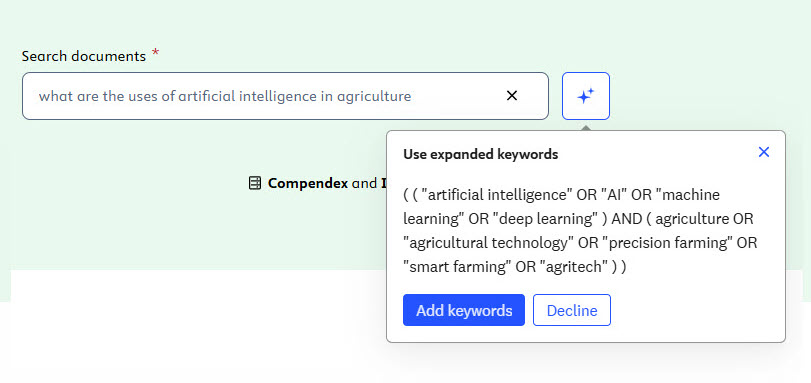
User query | Suggested expanded query |
|---|---|
what are the uses of artificial intelligence in agriculture | (("artificial intelligence" OR "AI" OR "machine learning" OR "deep learning") AND (agriculture OR "agricultural technology" OR "precision farming" OR "smart farming" OR "agritech")) |
describe corrosion on the strength of materials | ((corrosion OR "corrosion resistance" OR "corrosive effects" OR "corrosivity") AND (strength OR "mechanical strength" OR "material strength" OR "tensile strength" OR "compressive strength" OR "yield strength") AND (material* OR "materials science" OR "metal*" OR "alloy*" OR "composite*" OR "ceramic*" OR "polymer*")) |
find research on electric vehicles and do not include hybrid vehicles | (("electric vehicle*" OR "battery electric vehicle*" OR "EV" OR "plug-in electric vehicle*" OR "zero-emission vehicle*") NOT ("hybrid vehicle*" OR "hybrid electric vehicle*" OR "HEV")) |
explain blockchain but exclude cryptocurrency | ((blockchain OR "distributed ledger" OR "decentralized network" OR "smart contract*" OR "blockchain technology" OR "ledger technology") NOT (cryptocurrency OR "crypto" OR "digital currency" OR "virtual currency")) |
how are laser diodes used in nasal surgery | (("laser diode*" OR "laser-based diode*" OR "semiconductor laser*" OR "diode laser*") AND (surgery OR "surgical procedure*" OR "surgical application*" OR "surgical technique*" OR "surgical intervention*" ) AND (nasal OR "nose" OR "nasal cavity" OR "nasal surgery" OR "rhinoplasty" OR "rhinologic")) |
Although Engineering Village AI relies on trustworthy data, inaccurate, distorted, or objectionable keywords may be suggested as expanded keywords. To protect the privacy and integrity of your research, avoid entering personal, confidential, or sensitive information into the query builder search feature.
Refer to 'How do I use the Engineering Village AI feature?'opens in new tab/window for more detailed information, tips, and best practices regarding the AI search feature.
Did we answer your question?
Related answers
Recently viewed answers
Functionality disabled due to your cookie preferences