
View by category
How do I disable the auto-renewal feature for my subscription?
Last updated on February 29, 2024
The auto-renewal feature indicates that you have an active subscription for a product, which will renew automatically unless you disable the feature before your subscription expires.
Please note: any changes made via the auto-renew feature, will only take effect upon your renewal date. You can continue your access to your subscription until the expiration date as stated in the original agreement.
Regardless of when you have purchased the subscription, it will renew on the 1st January of each calendar year. You can toggle the 'auto-renew' feature off (and on again) until 31st December of the current calendar year. You can find this feature by clicking on ‘My Subscriptions’ in the left-hand menu of your Account page, as per the screenshot below:
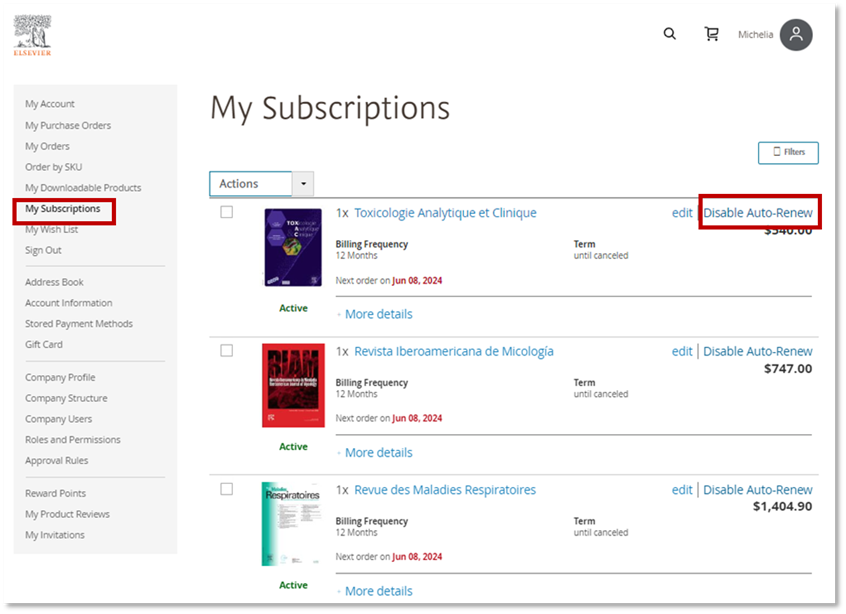
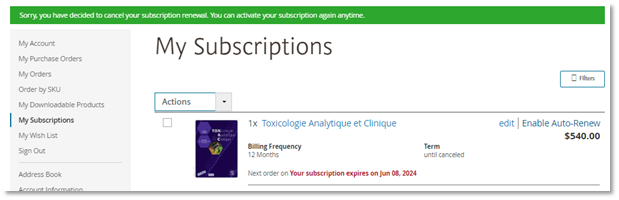
When you have disabled your subscription, the screen will show the following:
If you have any other questions about cancelling your subscription(s), please contact Customer Service via the email option found at the bottom of the page and include details about the product(s) you wish to cancel.
Did we answer your question?
Recently viewed answers
Functionality disabled due to your cookie preferences