
View by category
How do I claim US State Tax Exemption Status?
Last updated on April 19, 2024
You can claim US State Sales Tax Exemption status at the point of purchase.
To request exemption, you will have to upload a valid Tax Exemption Certificate. This needs to be a US State Sales Tax exemption form, which should correlate with the State specified in the “Ship To” address you select, if different from the Legal/Billing address. You will also be able to select a certificate expiration date, so that you do not have to upload your tax certificate every time you make a purchase, until such time your certificate is no longer valid.
Note: if you do have a “Single Purchase Exemption” status, you will be required to upload a tax certificate for every purchase.
- On the ‘Review Purchase Order’ screen, you will be presented with your legal address and billing address. The legal address is fixed, but you can change your billing address or add a new address by selecting the ‘Edit’ button. Different billing addresses can have different Tax exemption statuses attached to them.
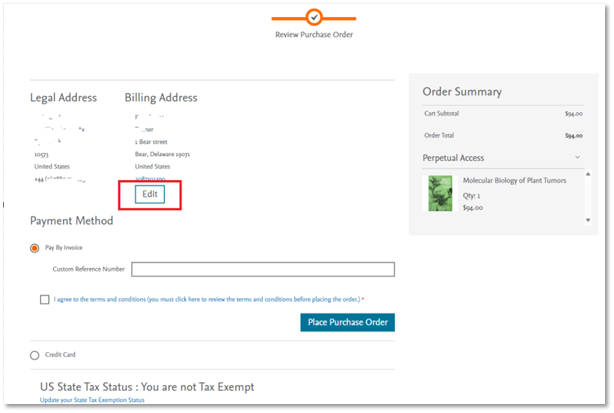
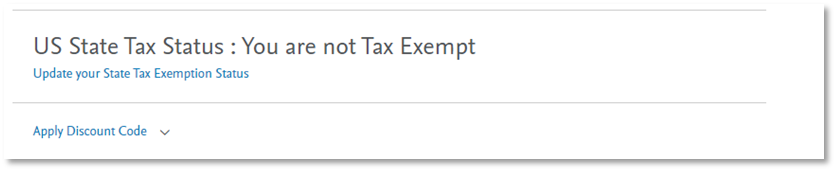
- Change your US State Tax Status by selecting the ‘Update your State Exemption Status’ at the bottom of the screen:
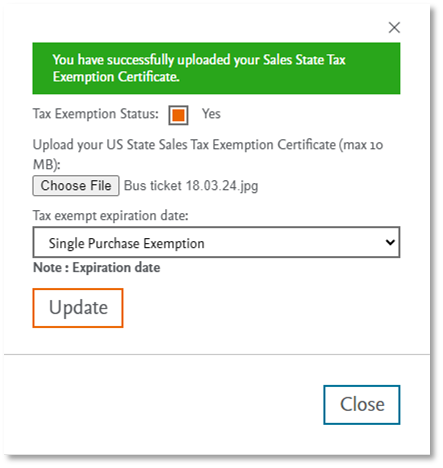
- This will prompt a pop-up screen, which will allow you to upload your US State Sales Exemption Certificate (max 10MB).
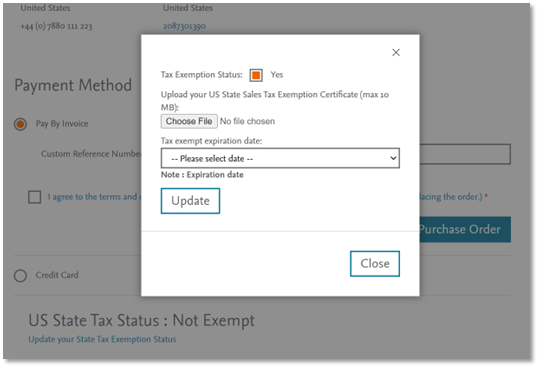
- Upload your certificate and select one of the three options under the ‘Tax exempt expiry date’ drop-down menu:
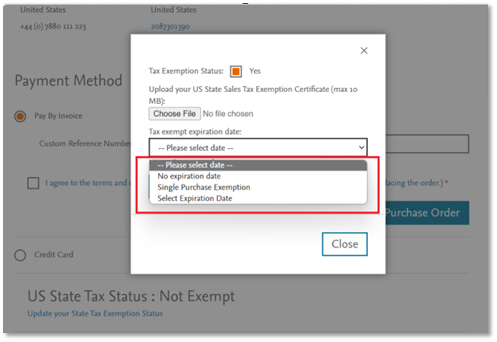
- When you have uploaded your certificate and selected an expiration date option, select the ‘Update’ button. You will receive a screen confirmation and can continue with your purchase.
- Your order summary should now not include tax. You can continue to pay by invoice or credit card.
Did we answer your question?
Recently viewed answers
Functionality disabled due to your cookie preferences