
View by category
How do I change my card details?
Last updated on July 01, 2024
As a Company Administrator you will be able to will be able to change your card details via your subscription.
- Go to your Account page and select ‘My Subscriptions’ from the left-hand menu.
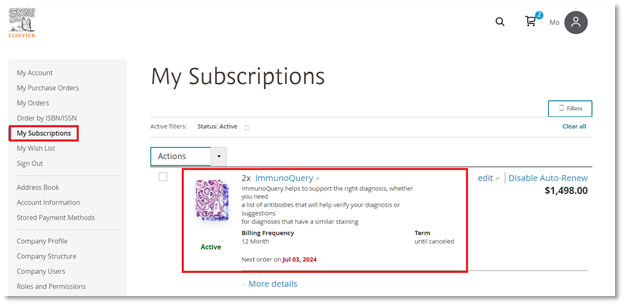
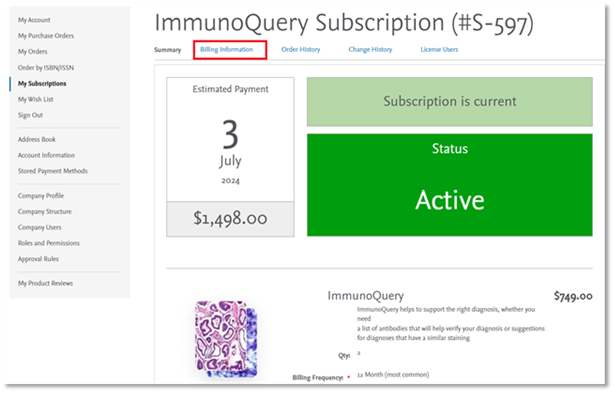
- Select the appropriate subscription on the ‘My subscriptions’ screen, and click the ‘Billing Information’ tab on the screen below.
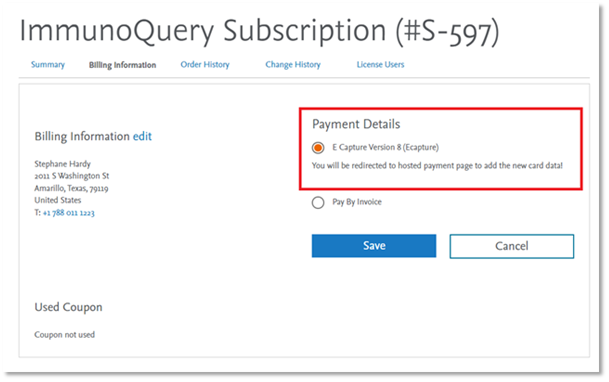
- Select ‘Card’ in the screen below, after which you will be redirected to a hosted payment page where you can change your details.
If you are experiencing any issues, please contact Customer Service via the email option found at the bottom of this page.
Did we answer your question?
Recently viewed answers
Functionality disabled due to your cookie preferences