
CASA is the remote access extension of Google Scholar’s Subscriber Links program. It provides off-campus users with one-click access to their institutional subscriptions directly from Google Scholar search results. The off-campus access is valid for up to 120 days and is both initially enabled and later renewed simply by visiting Google Scholar from a library’s on-campus IP range.
All ScienceDirect customers currently participating in the Google Scholar Subscriber Links program now have CASA enabled. If you already participate in Subscriber Links, no action is needed to benefit from CASA. If you would like to participate in Subscriber Links and CASA, contact usopens in new tab/window to inform us that you would like to activate Subscriber Links and CASA for your institution.
CASA provides users with seamless remote access to libraries’ subscribed content on ScienceDirect, with no action or log-in required. CASA extends the Subscriber Links experience to mobile and remote access devices, enabling the same enhanced visibility of full text content in Google Scholar search results for off-campus library patrons.
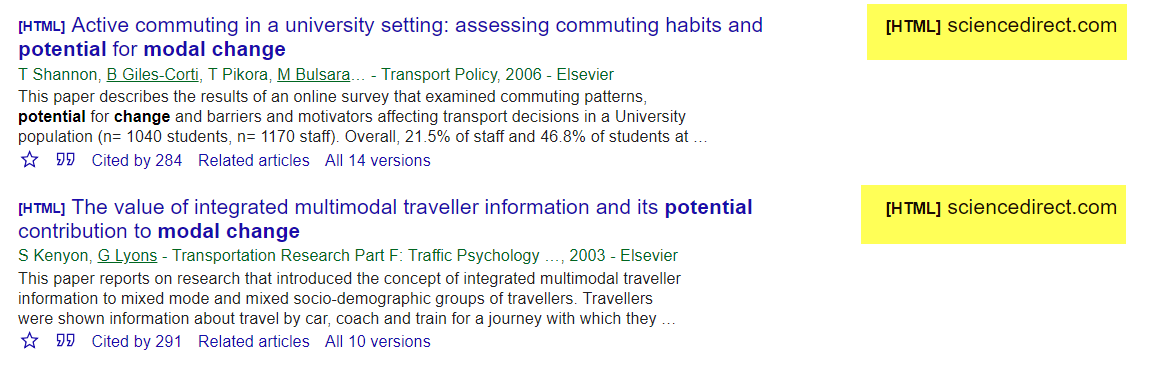
In terms of presentation and workflow, CASA is identical to Subscriber Links. CASA adds access links to subscribed articles in Scholar results. CASA-based links are prioritized over links to any other version (preprint, repository, etc.)
Recording subscription info during on-campus visits: When a user visits Google Scholar from an on-campus IP, Scholar looks up the list of subscriptions accessible to them from the Subscriber Links data it received from publisher sites. This lookup enables Subscriber Links (access links to the subscribed articles) in Scholar interface for on-campus users. CASA extends this by recording the corresponding subscription IDs for the user on Scholar servers. Each subscription ID is an opaque identifier chosen by the publisher and included in the Subscriber Links file to identify a subscription (e.g. “323278”). The recorded subscription IDs are maintained for 120 days and automatically expire after this period is over.
Propagating subscription info to off-campus visits: When the user later visits Google Scholar from an off-campus IP, Scholar looks up the recorded subscription IDs and appends an encrypted token (CASA token) to URLs from participating publishers. The CASA token includes the subscription ID for the institutional subscription that the article is a part of, the timestamp when the token was generated (to limit the period of validity), and an IP range that the token is valid for.
Enabling access based on propagated subscription info: ScienceDirect decrypts the CASA token, checks if it is still valid and extracts the subscription ID. It uses the subscription ID from the token to look up details of the subscription and checks that the article is currently included in the subscription. Based on this, it enables subscribed access for the user.
CASA is automatically enabled for institutions participating in the Google Scholar Subscriber Links program. If your institution already takes part in Subscriber Links, then no further action is needed on your part to benefit from CASA. If you would like to participate in Subscriber Links and CASA, please contact usopens in new tab/window to inform us that you would like to activate Subscriber Links and CASA for your institution.
Users enable Google CASA simply by visiting Google Scholar on campus. Doing so enables CASA from their device for the next 120 days. No action is required other than accessing Google Scholar from within your institution's IP range.
Yes. CASA tokens are distribution resistant and their validity is limited in time and controlled by IP. CASA includes institution and user level abuse monitoring. If abnormal usage spikes are detected based on historical data, CASA is disabled for a day.
No new data is shared with Google Scholar. CASA uses the subscription holdings and IP data already shared for institutions participating in the Subscriber Links program.
CASA records the list of subscription IDs that a user has access to when on campus. These are opaque identifiers provided to Scholar in the Subscriber Links files by participating publishers. Information recorded by CASA is used only for creating CASA-based access links, not for other purposes, and is automatically deleted after 120 days.
No, users do not need to be logged-in to their Google account for CASA to work. When off-campus, all that is required for library patrons to benefit from remote access to the institution’s subscribed content is to visit Google Scholar from the same device they used on campus.
If users connect to their personal Google account while visiting Google Scholar on campus, CASA will tie the subscription ID to the user’s account, rather than a specific device. This gives users even more flexibility, as they can then benefit from remote access via CASA from any one of their devices when logged into their Google account.
Yes. All usage resulting from an incoming CASA token which is accepted by ScienceDirect is assigned to the institution which enabled access via the corresponding subscription.
Google CASA is activated by joining Google Scholar’s Subscriber Links program. This can be done by contacting usopens in new tab/window and informing us that you would like to activate Subscriber Links and CASA for your institution. If you already take part in Subscriber Links, no further action is needed.
Detecting and recording a CASA association between a user and their institution is possible if the user is connected from their institution’s IP range, VPN, or transparent proxy. Unfortunately, proxies that rewrite the hostname (for example EZProxy) do not support hostname based security mechanisms, including CASA.
Once the activation is complete, any of your patrons having connected to Google Scholar from your institutional IP range, VPN, or transparent proxy in the last 120 days will benefit from CASA without any action on their part. If any patrons are unable to remotely access your ScienceDirect subscribed content via Google Scholar search results, please advise them to visit Google Scholar from your institutional IP range, VPN, or transparent proxy. This will create an association between their device/Google account and your institutional subscriptions which will last for up to 120 days, and enable remote access to your subscriptions on ScienceDirect from Google Scholar search results.
If your institution uses a hostname rewriting proxy (e.g. EZProxy), please refer to the section on proxies.
CASA can only be activated for institutions taking part in the Subscriber Links program. If you would like to opt back into Subscriber Links, please contact usopens in new tab/window to inform us of your preference.
Subscriber Links and CASA rely on the same data files (institutional subscription holdings and IP ranges of participating customers). At this time, it is not possible to have CASA without Subscriber Links nor Subscriber Links without CASA. Opting out of CASA will also opt out of the Subscriber Links program. If you would like to opt out of Subscriber Links, please refer to our Subscriber Links FAQ.
Yes. ScienceDirect supports Universal CASA for all users from Subscriber Links participating institutions. Universal CASA extends the benefits of CASA to off-campus users visiting ScienceDirect from any site, not just Google Scholar.
When a reader lands on a ScienceDirect abstract page, a standard Universal CASA button will display if the reader’s device or Google account is associated with an institutional subscription via Subscriber Links. Clicking the Universal CASA button takes readers to the full text article in HTML or PDF format. Like CASA, this usage is included in institutional usage statistics (COUNTER).
No action is needed. All Subscriber Links customers automatically benefit from CASA and Universal CASA.
Did we answer your question?
Related answers
Recently viewed answers
Functionality disabled due to your cookie preferences