
Access the Osmosis Subscription Purchased by your School
Last updated on April 01, 2026
Also available in
If your school or training program has purchased an Osmosis subscription, you will receive instructions from your institution on how to access the platform. In most cases, access is provided through either a cohort invite link or your school’s single sign-on (SSO) system. You should always begin by using the link provided by your institution.
After logging in through that link, you will receive an email prompting you to activate your Osmosis account.
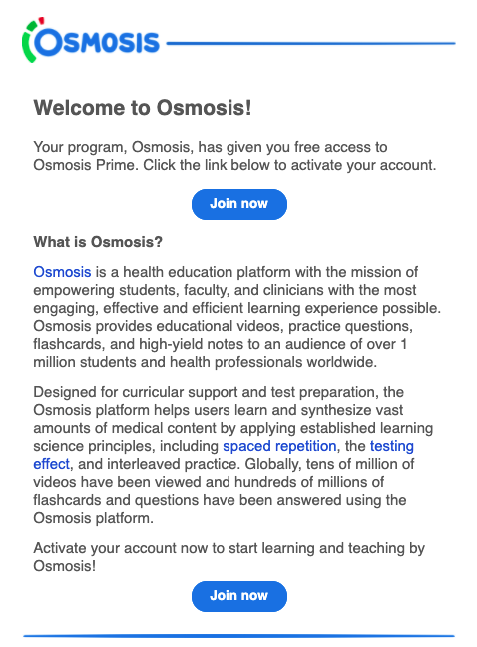
How to Activate Your School Access
- Use the invite link or login link provided by your school.
- Sign in using the method required by your institution (for example, your school credentials through SSO).
- Check your email for a message from [email protected].
- Open the email and click “Join Now” to activate your account.
- Select Go to Dashboard to access the Osmosis platform.
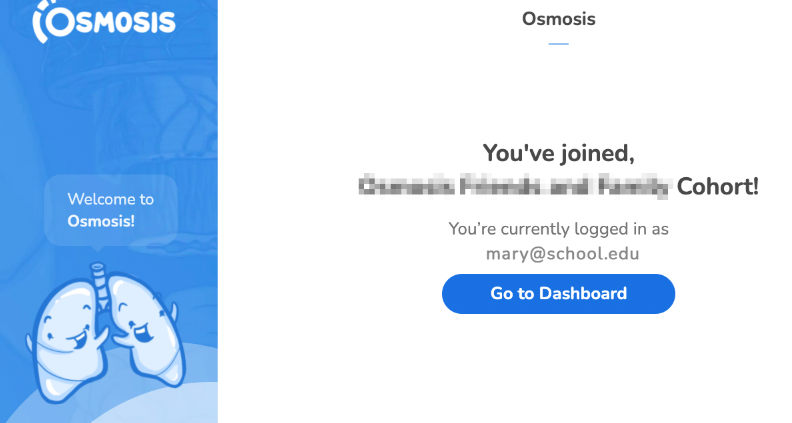
Once activated, you can log in and begin using Osmosis through your school’s subscription.
If You Previously Created an Osmosis Account
If you previously created an Osmosis account using a personal email address, your school access may need to be linked to your account. In this case, please contact Osmosis Support ([email protected]) so our team can help merge your existing account with your school subscription.
If You Did Not Receive an Activation Email
If you completed the login process through your school but did not receive an activation email:
- Check your spam or junk folder.
- Make sure you are using the email address associated with your school account.
- If you still cannot find the email, contact Osmosis Support at [email protected].
When contacting support, please include:
- Your full name
- Your school or institution
- The email address you used to sign in
- Your program or cohort (if applicable)
If you need additional assistance, please contact us at [email protected].
Did we answer your question?
Recently viewed answers
Functionality disabled due to your cookie preferences