
View by category
How can I sign in to my Elsevier account?
Last updated on May 18, 2026
When you visit an Elsevier product, you will see an option to sign in, normally located in the top right corner. Most products allow you to sign in either using your personal email and password or your organization's chosen access method.
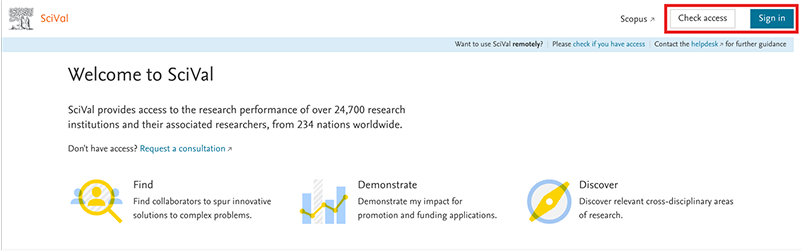
Note: Whenever you see the button “Sign out” or your initials, it indicates that you are already signed in. When you see your organization’s name by clicking on the institutional icon, it means you have either signed in via your organization, or we have detected your organization’s IP address or VPN.
When you visit an Elsevier product and you’re not already signed in, based on the cookies we recognized, then:
- Click on 'Sign In', 'Log In' or 'My Account' (this will depend on the product you are visiting. For example, it differs from Scopus, The Lancet, and ScienceDirect).
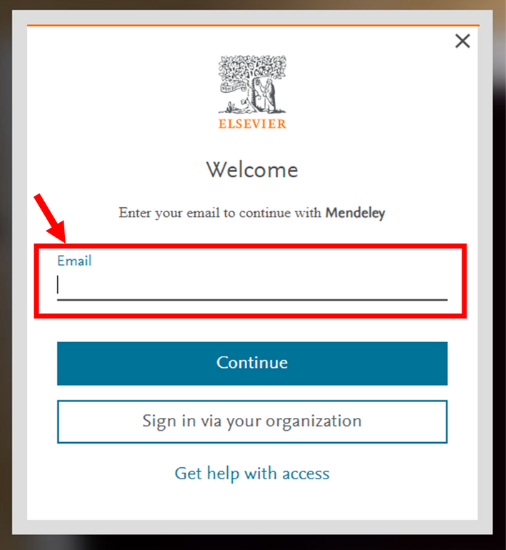
- Enter your email address and click 'Continue'.
- After clicking “Continue”, we will automatically check if your email address is in our database.
- If an Elsevier account is associated with your email address, you will be directed to the 'Sign in' screen to enter your password.
- If no account is linked to your email address, you will be directed to the 'Register' screen to create a new account.
Note: If you are directed to the “Find your organization” screen and do not wish to sign in via your organization, you can enter your personal email address on that screen. We will then take you to the Sign In screen, where you can enter your password and proceed to sign in with your personal email address.
When you visit an Elsevier product and you’re not already signed in, based on the cookies we recognized, then:
- Click on 'Sign In', 'Check access through your organization' or 'Check Access' (this will depend on the product you are visiting. For example, it differs from ScienceDirect, Scopus, and SciVal).
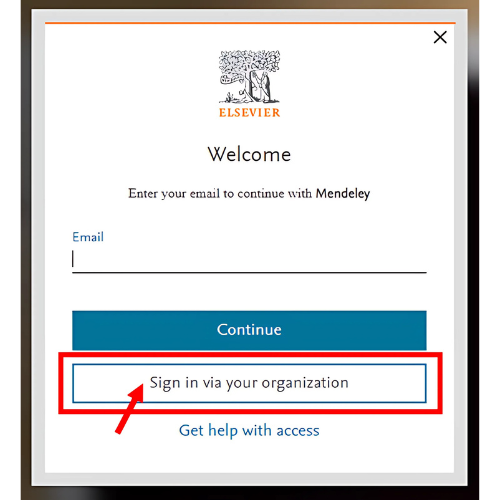
- Click on 'Sign in via your organization' if you are directed to the “Welcome” screen. Alternatively, you may be directed straight to the 'Find your organization' screen (see step 3).
- Find your organization by searching and selecting the correct result.
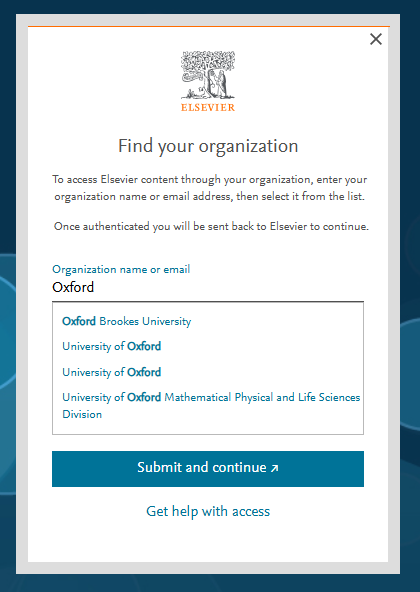
- At this point, we will determine the type of access your organization utilizes, and we will guide you through the appropriate flow.
- If your organization has federated access enabled with us, you will be directed to sign in using your university or organization credentials. After signing in, you will be redirected back to Elsevier.
- If your organization utilizes email domain confirmation for access, you will need to provide your organization’s email address. We will then send a 6-digit one-time passcode to your inbox to verify and confirm your organization email address before you access the product.
- If your organization employs another access method, such as IP or VPN, you will encounter the screen labelled "Instructions from your organization." You can then try connecting to your organization’s IP/VPN before attempting to sign in.
Note: If you are directed to the “Find your organization” screen (see step 3 above) and do not wish to sign in via your organization, you can enter your personal email address on that screen. We will then take you to the Sign In screen, where you can enter your password and proceed to sign in with your personal email address.
These steps may be longer or shorter depending on your previous visits and your organization’s configuration details.
Did we answer your question?
Related answers
Recently viewed answers
Functionality disabled due to your cookie preferences