
How can I best use the Advanced search?
Last updated on August 24, 2026
An advanced search allows you to enter complex search queries using field codes, boolean and proximity operators to narrow the scope of your search.
Use boolean operators to combine different search queries and proximity operators to find words near/within a specified distance of each other.
Boolean operators - OR, AND, AND NOT
|
|
|---|---|
OR | At least one term must appear - e.g., liver OR cirrhosis |
AND | Both terms must appear - e.g., Cognitive architecture AND robots |
AND NOT | Exclude one term - e.g., lung AND NOT cancer |
Scopus does not run a search from left to right, but follows a combination of grouping rules and the operator order of precedence. If your search string contains multiple operators, Scopus follows the order of precedence:
- OR
- W/n, PRE/n
- AND
- AND NOT
We recommend that you run your search string line-by-line using the basic search when using large string queries, especially ones containing multiple operators and proximity operators. Contact the Scopus: Access and use Support Centeropens in new tab/window if you have further questions.
| |
|---|---|
The examples and recommendations were provided thanks to the continuous feedback and contributions of Rosie Dunne, Research Services Librarian, and with permission from PhD student Marc Ayoub from the University of Galway. | |
String | Explanation |
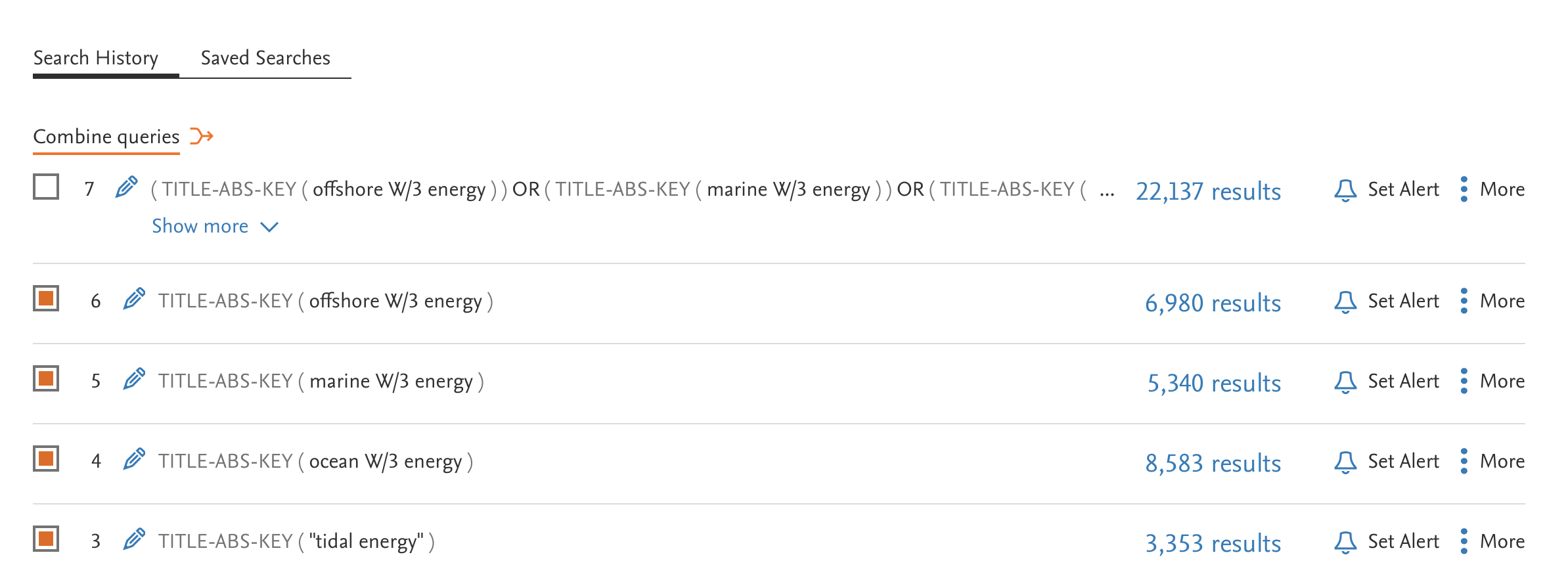
TITLE-ABS-KEY ( "Tidal Energy" OR ocean W/3 energy OR marine W/3 energy OR offshore W/3 energy ) | Scopus first runs the highlighted keyterms since they have the operator OR (first order of precedence), then it runs W/n keywords (second order of precedence).
|
| When the search is run line-by-line, Scopus groups the terms with parentheses and runs the keyterms enclosed in parenthesis first before the operator order of precedence is followed. |

You can search for a term in a specific field by entering the field code in your advanced search.
Examples
- The search TITLE-ABS-KEY(prion disease) would return documents where the terms appear in the title, abstract or keywords.
- The search INDEXTERMS(prion disease) would return documents with the indexing term “prion disease”.
- Not using a field code, e.g. (heart attack), is the same as searching ALL(heart attack).
There are only a limited number of field codes available to use on the Document search form.
- Not all documents contain all fields, so searching for specific fields could prevent some articles from appearing in your search results.
- You can enter field codes in upper or lowercase, but make sure to use the correct field code spelling (including hyphens).
|
|
|
|
|
|---|---|---|---|---|
Textual Content | Abstract | ABS | A summary of a document | Entering ABS(dopamine) will return documents where “dopamine” is in the document abstract. |
Textual Content | All Fields | ALL | Searches the following fields: ABS, AFFIL, ARTNUM, AUTH, AUTHCOLLAB, CHEM, CODEN, CONF, DOI, EDITOR, ISBN, ISSN, ISSUE, KEY, LANGUAGE, MANUFACTURER, PUBLISHER, PUBYEAR, REF, SEQBANK, SEQNUMBER, SRCTITLE, VOLUME, and TITLE. | Entering ALL("heart attack") will return documents with "heart attack" in the article title, source title, language, author, editor, affiliation, abstract, keywords, references, DOI, ISBN, ISSN, CODEN, issue, volume, publication year, sequence bank, sequence bank number, article number, chemical name, CAS registry number, manufacturer, publisher, or conference fields. |
Textual Content | Doc Title | TITLE | The title of a document. | Entering TITLE("neuropsychological evidence") will return documents with the phrase "neuropsychological evidence" in their title. |
Textual Content | Doc Title, Abstract | TITLE-ABS | A combined field that searches abstracts and documents titles | |
Textual Content | Doc Title, Abstract, Keyword | TITLE-ABS-KEY | A combined field that searches abstracts, keywords, and document titles. | Entering TITLE-ABS-KEY("heart attack") will return documents with "heart attack" in their abstracts, article titles, or keyword fields. |
Textual Content | Doc Title, Abstract, Keyword, Author | TITLE-ABS-KEY-AUTH | A combined field that searches abstracts, document titles, keywords, and author names. | Entering TITLE-ABS-KEY-AUTH("heart attack") will return documents with "heart attack" in their abstracts, article titles, keywords, or author name fields. |
Affiliations | Affiliation | AFFIL | AFFIL is a combined field that searches the following author address fields: AFFILCITY, AFFILCOUNTRY, and AFFILORG. When searching the AFFIL field, you can specify if you want all of your search terms to be found in the same affiliation. | To find documents where your search terms occur in the same affiliation, use: AFFIL(london and hospital) To find documents where both terms appear in a document, but not necessarily in the same affiliation, use: AFFIL (london) and AFFIL (hospital) |
Affiliations | Affiliation City | AFFILCITY | The city portion of an author affiliation address. | Entering AFFILCITY(beijing) will return documents where "beijing" is the city in the author affiliation fields, such as: Beijing Engineering Software Technology Co., Ltd., Beijing 100081, China |
Affiliations | Affiliation Country | AFFILCOUNTRY | The country portion of an author affiliation address. | Entering AFFILCOUNTRY(japan) will return documents where "japan" is the country in the author affiliation fields, such as: Sojo University, Kumamoto 860-0082, Japan |
Affiliations | Affiliation ID | AF-ID | A unique identification number assigned to organizations affiliation with Scopus authors. | Entering AF-ID(Harvard Medical School 3000604) or AF-ID(3000604) will return documents written by authors affiliated with Harvard Medical School and variants of that name store in Scopus. |
Affiliations | Affiliation Organization | AFFILORG | The organization portion of an author affiliation address. | Entering AFFILORG(toronto) will return documents where "toronto" is the organization in the author affiliation fields, such as: Department of Mathematics, University of Toronto, Toronto, Ont. M5S 3G3, Canada |
Authors | Author | AUTH | A combined field that searched the following author fields: AUTHLASTNAME and AUTHFIRST. | Entering AUTH(jr) will return documents with "jr" in the last name and first initial fields, including: Finn Jr., C.E. / Jenkins, J.R. |
Authors | Author Collaboration | AUTHCOLLAB | The name by which a group of authors is known. | Entering AUTHCOLLAB(atlas) will return documents with "atlas" in the collaboration field. |
Authors | Author First Initial | AUTHFIRST | The author’s first initial in their name. | Entering AUTHFIRST(j) will return documents with "j" in the author first initial field, including:
|
Authors | Author ID | AU-ID | The Scopus Author Identifier distinguishes between ambiguous names by assigning each author in Scopus a unique number and grouping together all of the documents written by that author. | Entering AU-ID(Sato, A. 100038831) or AU-ID(100038831) will return documents authored by Sato, A. and variants of that name stored in Scopus. |
Authors | Author Last Name | AUTHLASTNAME | This is the author’s last name. | Entering AUTHLASTNAME(barney) will return documents with "barney" in the author last name field. |
Authors | Author Name | AUTHOR-NAME | The name of the author. This field finds variants for a single author name. | Entering AUTHOR-NAME(carrera, s) will return documents with "carrera, s" in the author name field, including: Carrera, F S / Carrera, S / Carrera, S R / Carrera, Samuele / Carrera Diaz, S / Carrera Justiz, S C / Duenas Carrera, S / Sanchez Carrera, S |
Authors | ORCID | ORCID | An ORCID is a 16-digit number and is used by editors, funding agencies, publishers, and institutions to reliably identify individuals in the same was that ISBNs and DOIs identify books and articles. | An ORCID ID must be entered as a 16 digit number (hyphens are not counted). ORCID("0000-0002-1108-3360") ORCID(0000-0002-1108-3360) |
Biological Entities | Sequence Bank | SEQBANK | The name of the sequence bank that lists a nucleotide or amino acid sequence that is defined or mentioned in a document. | Entering SEQBANK(GenBank) will return documents with "GenBank" in the keywords field. |
Biological Entities | Sequence Number | SEQNUMBER | The number assigned to an amino acid or nucleotide sequence defined or mentioned in a document. | Entering SEQNUMBER(AB013289) will return documents with "AB013289" in the keywords field. |
Chemical Entities | CAS Registry Number | CASREGNUMBER | A numeric identifier assigned to a substance when it enters the CAS registry database. | Entering CASREGNUMBER(1199-18-4) will return documents with "1199-18-4" in the CAS registry fields. |
Chemical Entities | Chemical | CHEM | A combined field that searches CHEMNAME and CASREGNUMBER fields. | Entering CHEM(oxidopamine) will return documents with "oxidopamine" in the chemical name or CAS registry number fields. |
Chemical Entities | Chemical Name | CHEMNAME | This is the name of a chemial. | Entering CHEMNAME(oxidopamine) will return documents with "oxidopamine" in the chemical name field. |
Conferences | Conference Information | CONF | A combined field that searches information about a conference or a conference proceeding in the CONFNAME, CONFSPONSORS, and CONFLOC fields. | Entering CONF(electrical transmission) will return documents, such as: Proceedings of the Conference: Electrical Transmission in a New Age |
Conferences | Conference Location | CONFLOC | The location of a conference. | Entering CONFLOC(Tokyo) will return documents, such as: Proceedings - Seventh International Conference on High Performance Computing and Grid in Asia Pacific Region, HPCAsia 2004; Tokyo; |
Conferences | Conference Name | CONFNAME | The name of a conference. | Entering CONFNAME(electrical transmission) will return documents, such as: Proceedings of the Conference: Electrical Transmission in a New Age |
Conferences | Conference Sponsors | CONFSPONSORS | The sponsors of a conference. | Entering CONFSPONSORS(IEEE) will return documents, such as: IEEE Aerospace Conference Proceedings / 2004 IEEE 6th Workshop on Multimedia Signal Processing |
Document | Open Access | OA | The OA field code is used to filter the documents by Open Access documents. |
|
Document | Database | INDEX | To exclude Medline records from your search results, use AND NOT INDEX(medline). | INDEX(medline) without the AND NOT will find documents that are in Medline. |
Document | Doc Type | DOCTYPE | Limits your search to document types - (e.g. article (ar), review (re), book chapter(ch)). | Entering DOCTYPE(ar) will return documents classified as articles. Article-ar / Abstract Report-ab / Book-bk / Book Chapter-ch / Business Article-bz / Conference Paper-cp / Conference Review-cr / Data Paper - dp / Editorial-ed / Erratum-er / Letter-le / Note-no / Press Release-pr / Report-rp / Retracted-tb / Review-re / Short Survey-sh |
Document | Digital Object Identifier | DOI | A unique alphanumeric string created to identify a piece of intellectual property in an online environment. | Entering DOI(10.1007/s00202-004-0261-3) will return the document with the matching DOI. |
Document | Document Identifier | EID | An EID (Electronic Identifier) is a unique alphanumeric string created to identify a record in Scopus. Note: EIDs are visible through the document export function. Unlike DOIs, they are internal identifiers meant to be used only in Scopus. | Entering EID(2-s2.0-84930630277) will return the document with the matching identifier. |
Document | First Author Name | FIRSTAUTH | The first author listed for a document. | Entering FIRSTAUTH(Liming, T) will return a document with authors listed as 'Liming, T., Mingan, S., Jiangzhong, Y., Zhenhua, T.' The search does not return a document with authors listed as 'Mingan, S., Jiangzhong, Y., Liming, T., Zhenhua, T.', since "Liming T." is not the first author in the author list. |
Document | First page | PAGEFIRST | Indicates the first page of a page range within a publishing. For example, in a journal issue. | Entering PAGEFIRST(9) will return documents with page numbers, such as: 9 / 9-16 |
Document | Language | LANGUAGE | The language in which the original document is written. | Entering LANGUAGE(french) will return documents originally written in French. |
Document | Last page | PAGELAST | Indicates the last page of a page range within a publishing. For example, in a journal issue. | Entering PAGELAST(9) will return documents with page numbers, such as: 9 / 1-9 |
Document | Load Date | LOAD-DATE | The day the record has been added to Scopus or reprocessed. Note: The date format is YYYYMMDD (YYYY for year, MM for month and DD for day). You can filter documents based on load dates using the following operators: BEF - Before AFT - After IS - Is equal to | Entering LOAD-DATE AFT 20190107 will return all documents that have been added or reprocessed in Scopus after January 7th 2019. |
Document | Pages | PAGES | A combination field that searches PAGEFIRST and PAGELAST fields. | Entering PAGES(1-2) will return documents with a page number range of "1-2". Entering PAGES(9) will return documents with page numbers, such as: 1-9 / 9 / 9-16 |
Editors | Editor | EDITOR | A combined field that searches the following fields: EDLASTNAME and EDFIRST | Entering EDITOR(smith) will return documents with "smith" in the editor last name and first initial fields. |
Editors | Editor First Name | EDFIRST | This is the first name of an editor. | Entering EDFIRST(michael) will return documents with "michael" in the first name field. |
Editors | Editor Last Name | EDLASTNAME | The last name of an editor. | Entering EDLASTNAME(smith) will return documents with "smith" in the editor last name field. |
Funding | Funding Information | FUND-ALL | A combined field that searches the Funding acknowledgement text as well as the following Funding fields: FUND-NO, FUND-ACR, FUND-SPONSOR. | FUND-ALL(NIH 5RO1AI091972-3) |
Funding | Funding Sponsor | FUND-SPONSOR | Sponsor providing grant or funding for the work. | Entering FUND-SPONSOR("National Science Foundation") will return documents with "National Science Foundation" in the funding sponsor field. |
Funding | Grant Number | FUND-NO | Number of the grant or award supporting the work. | FUND-NO(25001) |
Funding | Sponsor Acronym | FUND-ACR | Acronym of the Funding Sponsor | Entering FUND-ACR(NSF) will return documents with National Science Foundation's acronym NSF in a funding sponsor acronym field. |
Keywords | Author Keywords | AUTHKEY | Keywords assigned to the document by the author. | Entering AUTHKEY(stroke) will return documents where "stroke" is an author keyword. |
Keywords | Index Terms | INDEXTERMS | Controlled vocabulary terms assigned to the document. | Entering INDEXTERMS("Fluorimetric assay") will return documents where "fluorimetric assay " is an index term. |
Keywords | Keywords | KEY | A combined field that searches the AUTHKEY, INDEXTERMS, TRADENAME, and CHEMNAME fields. | Entering KEY(oscillator) will return documents where "oscillator" is a keyword. |
Keywords | Manufacturer | MANUFACTURER | The name of a manufacturer, such as a device or chemical manufacturer. | Entering MANUFACTURER(sigma) will return documents with "sigma" in the keywords field. |
Keywords | Trade Name | TRADENAME | A name used to identify a commercial product or service. | Entering TRADENAME(morbilvax) will return documents with "morbilvax" in the keywords fields. |
Publication | Article Number | ARTNUM | A persistent identifier for a document used by a few publishers instead of, or in addition to, page numbers. Article numbers can be assigned at the time of electronic publication, so documents can be cited and searched for earlier in the publication process. | Entering ARTNUM(1) will return documents with article numbers, such as: art. no. 1 / art. no. EGT-Nr 1.096 |
Publication | Book Publisher | BOOKPUB | Search for Books from named publisher. | Searches only for books, not journals or other serials. |
Publication | CODEN | CODEN | A unique, six-character code that identifies serial and nonserial publications. | Entering CODEN(rnene) will return documents in the specified publication. |
Publication | Date of Publication | PUBDATETXT | A text date field indicating the date of publication. | Entering PUBDATETXT(July 2004) will return documents with a publication date of "July 2004" and PUBDATETXT("July 2004" or "June 2004") will return documents with a publication date of "July 2004" or "June 2004". |
Publication | EISSN | EISSN | The ISSN of the electronic version of a serial publication. | Entering EISSN(0973-0664) or entering EISSN(09730664) will return documents containing "09730664" as well as any other document containing single or multiple hyphens in any possible combination within "0973-0664". |
Publication | Exact Source Title | EXACTSRCTITLE | Searches the title of the journal, book, conference proceeding, or report in which the document was published. Exact source title searches will not find variations of your search terms-only sources that contain the exact words in your search will be returned. | Entering EXACTSRCTITLE(behavior) will return documents published in the source "Physiology and Behavior", but not documents in the source "Addictive Behaviors". |
Publication | ISBN | ISBN | A unique identification number assigned to all books. | Entering ISBN(9789066059283) will return documents containing "9789066059283"as well as any other document containing single or multiple hyphens in any possible combination within "978-906605928-3". |
Publication | ISSN | ISSN | A unique identification number assigned to all serial publications. | Entering ISSN(00-903973) or entering ISSN(00903973) will return documents containing "00903973" as well as any other document containing single or multiple hyphens in any possible combination within "00-903973". |
Publication | ISSNP | ISSNP | The ISSN of the print version of a serial publication. | Entering ISSNP(00-946354) or entering ISSN (00946354) will return documents containing "00946354" as well as any other document containing single or multiple hyphens in any possible combination within "00-946354". |
Publication | PubMed Identifier | PMID | A unique identifier for all Medline documents. | Entering PMID(10676951) will return documents that have a PubMed Identifier of "10676951". |
Publication | Serial Issue ID | ISSUE | Identifier for a serial publication. | Entering ISSUE(summer) will return documents with an issue identifier of "summer". Entering ISSUE(5) will return documents with an issue identifier, such as: 5 / 5-6. |
Publication | Serial Volume | VOLUME | Identifier for a serial publication | Entering VOLUME(34) will return documents with a volume number of 34. |
Publication | Source Identifier | SRCID | A Source Identifier is a unique number created to identify a source (journal, book, conference processing...) in Scopus. Note: Source ID is an internal identifier meant to be used only in Scopus. | Entering SRCID(16590) will return the documents belonging to the matching journal, here The Lancet. |
Publication | Source Title | SRCTITLE | The title of the journal, book, conference proceeding, or report in which the document was published. | Entering SRCTITLE(pacific) will return documents with "pacific" in the source title, such as: Asia-Pacific Journal of Public Health / Pacific Conservation Biology / 1989 Asia-Pacific Conference |
Publication | Source Type | SRCTYPE | Limits your search to source types - journal (j), book (b), conference proceeding(p). Entering SRCTYPE(j) will return documents from journal sources. Possible values are:
| Entering SRCTYPE(j) will return documents from journal sources. |
Publication | Year of Publication | PUBYEAR | A numeric field indicating the year of publication. You can indicate the year using the following operators:
| Entering PUBYEAR AFT 1994 will return documents with a publication year after 1994. Entering PUBYEAR BEF 1994 will return documents with a publication year before 1994. Entering PUBYEAR IS 1994 will return documents with a publication year of 1994. |
References | Reference | REF | REF is a combined field that searches the REFAUTH, REFTITLE, REFSRCTITLE, REFPUBYEAR, REFPAGE and WEBSITE fields. When searching the REF field, you can specify if you want all of your search terms to be found in the same reference. | To find documents where your search terms occur in the same reference, use: REF(darwin 1859). To find documents where both terms appear in a document, but not necessarily in the same reference, use: REF(darwin) AND REF(1859). For more information and examples see Searching Affiliations and References in the Help. |
References | Reference Article Number | REFARTNUM | A persistent identifier for a document used by a few publishers instead of, or in addition to, page numbers. Article numbers can be assigned at the time of electronic publication, so documents can be cited and searched for earlier in the publication process. | Entering REFARTNUM(1) will return documents with reference article numbers, such as: art. no. 1 / art. no. EGT-Nr 1.096 |
References | Reference Author | REFAUTH | The author of a cited reference. | Entering REFAUTH(Wu) will return documents with "Wu" in their reference author fields. |
References | Reference First Page | REFPAGEFIRST | The first page of a cited reference. | Entering REFPAGEFIRST(5) will return documents where "5" is in the page numbering of a document reference, such as: pp. 854-879 / pp. 5-7 |
References | Reference Page Numbers | REFPAGE | The page numbers of a cited reference. | Entering REFPAGE(75) will return documents where "75" is in the page numbering of a document reference, such as: pp. 71-75 / 75 pp. |
References | Reference Publication Year | REFPUBYEAR | A numeric field indicating the year of publication of a document reference. | Entering REFPUBYEAR IS 1994 will return documents with references published in 1994. Note: You can indicate the year using the IS operator. |
References | Reference Source Title | REFSRCTITLE | The source title of a cited reference. | Entering REFSRCTITLE(neuropharmacology) will return documents where "neuropharmacology" is in the source title of a reference. |
References | Reference Title | REFTITLE | The document title of a cited reference. | Entering REFTITLE(dioxin) will return documents with "dioxin" in their reference title. |
References | Reference Website | WEBSITE | The URL of a website of a cited reference. | WEBSITE (bbc.co.uk) finds documents with this URL in the references. |
Subject Areas
| ||||
Health Sciences | All Health Sciences | SUBJAREA(MEDI OR NURS OR VETE OR DENT OR HEAL OR MULT) | All Health Sciences is a combined field that searches Medicine, Nursing, Veterinary, Dentistry, and Health Professions subject areas. | Entering SUBJAREA(MEDI OR NURS OR VETE OR DENT OR HEAL OR MULT) will return documents that are classified under the subject area "Health Sciences". The following subjects are classified under it:
|
Health Sciences | Subject Area search for Medicine | SUBJAREA(MEDI) | A search field which returns documents related to Medicine. | Entering SUBJAREA(MEDI) will return documents that are classified under the subject area “Medicine”. The following subjects are classified under it:
|
Health Sciences | Subject Area search for Nursing | SUBJAREA(NURS) | A search field which returns documents related to Nursing. | Entering SUBJAREA(NURS) will return documents that are classified under the subject area “Nursing”. The following subjects are classified under it:
|
Health Sciences | Subject Area search for Veterinary | SUBJAREA(VETE) | A search field which returns documents related to Veterinary. | Entering SUBJAREA(VETE) will return documents that are classified under the subject area “Veterinary”. The following subjects are classified under it:
|
Health Sciences | Subject Area search for Dentistry | SUBJAREA(DENT) | A search field which returns documents related to Dentistry. | Entering SUBJAREA(DENT) will return documents that are classified under the subject area “Dentistry”. The following subjects are classified under it:
|
Health Sciences | Subject Area search for Health Professions | SUBJAREA(HEAL) | A search field which returns documents related to Health Professions. | Entering SUBJAREA(HEAL) will return documents that are classified under the subject area “Health Professions”. The following subjects are classified under it:
|
Life Sciences | Subject Area search for All Life Sciences | SUBJAREA(AGRI OR BIOC OR IMMU OR NEUR OR PHAR) | All Life Sciences is a combined field that searches Agricultural and Biological Sciences, Biochemistry, Genetics, and Molecular Biology, Immunology and Microbiology, Neuroscience, and Pharmacology, Toxicology, and Pharmaceutics subject areas. | Entering SUBJAREA(AGRI OR BIOC OR IMMU OR NEUR OR PHAR) will return documents that are classified under the subject area “Life Sciences”. The following subjects are classified under it:
|
Life Sciences | Subject Area search for Agricultural and Biological Sciences | SUBJAREA(AGRI) | A search field which returns documents related to Agricultural and Biological Sciences. | Entering SUBJAREA(AGRI) will return documents that are classified under the subject area “Agricultural and Biological Sciences”. The following subjects are classified under it:
|
Life Sciences | Subject Area search for Biochemistry, Genetics, and Molecular Biology | SUBJAREA(BIOC) | A search field which returns documents related to Biochemistry, Genetics, and Molecular Biology. | Entering SUBJAREA(BIOC) will return documents that are classified under the subject area “Biochemistry, Genetics, and Molecular. The following subjects are classified under it:
|
Life Sciences | Subject Area search for Immunology and Microbiology | SUBJAREA(IMMU) | A search field which returns documents related to Immunology and Microbiology. | Entering SUBJAREA(IMMU) will return documents that are classified under the subject area “Immunology and Microbiology”. The following subjects are classified under it:
|
Life Sciences | Subject Area search for Neuroscience | SUBJAREA(NEUR) | A search field which returns documents related to Neuroscience. | Entering SUBJAREA(NEUR) will return documents that are classified under the subject area “Neuroscience”. The following subjects are classified under it:
|
Life Sciences | Subject Area search for Pharmacology, Toxicology and Pharmaceutics | SUBJAREA(PHAR) | A search field which returns documents related to Pharmacology, Toxicology, and Pharmaceutics. | Entering SUBJAREA(PHAR) will return documents that are classified under the subject area “Pharmacology, Toxicology, and Pharmaceutics”. The following subjects are classified under it:
|
Physical Sciences | Subject Area search for All Physical Sciences | SUBJAREA(CENG OR CHEM OR COMP OR EART OR ENER OR ENGI OR ENVI OR MATE OR MATH OR PHYS) | All Physical Sciences is a combined field that searches Chemical Engineering, Chemistry, Computer Science, Earth and Planetary Sciences, Energy, Engineering, Environmental Sciences, Materials Sciences, Mathematics, and Physics and Astronomy subject areas. | Entering SUBJAREA(CENG OR CHEM OR COMP OR EART OR ENER OR ENGI OR ENVI OR MATE OR MATH OR PHYS) will return documents that are classified under the subject area “Physical Sciences”. The following subjects are classified under it:
|
Physical Sciences | Subject Area search for Chemical Engineering | SUBJAREA(CENG) | A search field which returns documents related to Chemical Engineering. | Entering SUBJAREA(CENG) will return documents that are classified under the subject area “Chemical Engineering”. The following subjects are classified under it:
|
Physical Sciences | Subject Area search for Chemistry | SUBJAREA(CHEM) | A search field which returns documents related to Chemistry. | Entering SUBJAREA(CHEM) will return documents that are classified under the subject area “Chemistry”. The following subjects are classified under it:
|
Physical Sciences | SUBJAREA(COMP) | Subject Area search for Computer Science | A search field which returns documents related to Computer Science. | Entering SUBJAREA(COMP) will return documents that are classified under the subject area “Computer Science”. The following subjects are classified under it:
|
Physical Sciences | Subject Area search for Earth and Planetary Sciences | SUBJAREA(EART) | A search field which returns documents related to Earth and Planetary Science. | Entering SUBJAREA(EART) will return documents that are classified under the subject area “Earth and Planetary Sciences”. The following subjects are classified under it:
|
Physical Sciences | Subject Area search for Energy | SUBJAREA(ENER) | A search field which returns documents related to Energy. | Entering SUBJAREA(ENER) will return documents that are classified under the subject area “Energy”. The following subjects are classified under it:
|
Physical Sciences | Subject Area search for Engineering | SUBJAREA(ENGI) | A search field which returns documents related to Engineering. | Entering SUBJAREA(ENGI) will return documents that are classified under the subject area “Engineering”. The following subjects are classified under it:
|
Physical Sciences | Subject Area search for Environmental Science | SUBJAREA(ENVI) | A search field which returns documents related to Environmental Science. | Entering SUBJAREA(ENVI) will return documents that are classified under the subject area “Environmental Science”. The following subjects are classified under it:
|
Physical Sciences | Subject Area search for Materials Science | SUBJAREA(MATE) | A search field which returns documents related to Materials Science. | Entering SUBJAREA(MATE) will return documents that are classified under the subject area “Materials Science”. The following subjects are classified under it:
|
Physical Sciences | Subject Area search for Mathematics | SUBJAREA(MATH) | A search field which returns documents related to Mathematics. | Entering SUBJAREA(MATH) will return documents that are classified under the subject area “Mathematics”. The following subjects are classified under it:
|
Physical Sciences | Subject Area search for Physics and Astronomy | SUBJAREA(PHYS) | A search field which returns documents related to Physics and Astronomy. | Entering SUBJAREA(PHYS) will return documents that are classified under the subject area “Physics and Astronomy”. The following subjects are classified under it:
|
Social Sciences | Subject Area search for All Social Sciences | SUBJAREA(ARTS OR BUSI OR DECI OR ECON OR PSYC OR SOCI) | All Social Sciences is a combined field that searches Arts and Humanities, Business, Management, and Accounting, Decision Sciences, Economics, Econometrics, and Finance, Psychology, and Social Sciences subject areas. | Entering SUBJAREA(ARTS OR BUSI OR DECI OR ECON OR PSYC OR SOCI) will return documents that are classified under the subject area “Social Sciences”. The following subjects are classified under it:
|
Social Sciences | Subject Area search for Arts and Humanities | SUBJAREA(ARTS) | A search field which returns documents related to Arts and Humanities. | Entering SUBJAREA(ARTS) will return documents that are classified under the subject area “Arts and Humanities”. The following subjects are classified under it:
|
Social Sciences | Subject Area search for Business, Management, and Accounting | SUBJAREA(BUSI) | A search field which returns documents related to Business, Management and Accounting. | Entering SUBJAREA(BUSI) will return documents that are classified under the subject area “Business, Management and Accounting”. The following subjects are classified under it:
|
Social Sciences | Subject Area search for Decision Sciences | SUBJAREA(DECI) | A search field which returns documents related to Decision Science. | Entering SUBJAREA(DECI) will return documents that are classified under the subject area “Decision Sciences”. The following subjects are classified under it:
|
Social Sciences | Subject Area search for Economics, Econometrics and Finance | SUBJAREA(ECON) | A search field which returns documents related to Economics, Econometrics, and Finance. | Entering SUBJAREA(ECON) will return documents that are classified under the subject area “Economics, Econometrics, and Finance”. The following subjects are classified under it:
|
Social Sciences | Subject Area search for Psychology | SUBJAREA(PSYC) | A search field which returns documents related to Psychology. | Entering SUBJAREA(PSYC) will return documents that are classified under the subject area “Psychology”. The following subjects are classified under it:
|
Social Sciences | Subject Area search for Social Sciences | SUBJAREA(SOCI) | A search field which returns documents related to Social Science. | Entering SUBJAREA(SOCI) will return documents that are classified under the subject area “Social Sciences”. The following subjects are classified under it:
|
Add authors or affiliations to an Advanced search
You can search for and add author names or affiliations to your search from the Advanced search form.
Tips:
- If you know the unique author identifier/affiliation identifier you want to search for, you can enter it directly in the Advanced search form using the AU-ID/AF-ID field code.
- When using AUTHOR-NAME ( john AND smith ), the search is looking for documents having both john and smith as a single author. If you are looking for a larger set of results, the more appropriate search thread would be AUTHOR-NAME ( john ) AND AUTHOR-NAME ( smith ), as this search looks for both names anywhere within a document.
- On the Advanced search form, click the Author name or affiliation link. The Make Author or Affiliation Selection page opens:
- FOR AUTHORS: On the Make Author or Affiliation Selection page, enter the author's last name and, if available, the first name or initial.
Select 'Show exact matches only' to find authors that match exactly the name you entered in the Author Last Name and Initials or First Name fields. - FOR AFFILIATIONS: In the Affiliation field, enter your affiliation search criteria, such as the affiliation name and location.
- Select the search icon. A second Scopus page opens providing author search results.
- From the search results page, select one of the following:
- Select individual check boxes of author names/affiliations that you want to include in your Advanced search.
- Select 'All' to select all authors from the results list.
- Select 'Select page' to select all authors/affiliations on the current page of results.
- Select a selected check box to remove that author/affiliation from the selection.
- Select 'Add to search' to add selected authors/affiliations to your Advanced search. The Advanced search form updates with the author search field code.
Note: You also have the option to use the various Author search results functions on the second Scopus page.
You can use the REFAUTH field in conjunction with the REF field to find reference authors.
|
|
|
|---|---|---|
Written by a specific author | REFAUTH(Watson crick) | References written by the following authors:
|
With all your search terms in the same reference | REF(Watson crick) | References containing both terms anywhere in the reference:
|
Written by two specific authors | REF(REFAUTH(Watson) AND REFAUTH(Crick)) | References written by both Watson and Crick |
Written by one or more authors | REFAUTH(Watson) AND REFAUTH(Crick) | References written by:
|
Find affiliations in references
A document can contain many references and may contain more than one affiliation. When you search for affiliations (AFFIL field) or references (REF field), you can specify if you want all of your search terms to be found in the same reference or affiliation.
|
|
|
|---|---|---|
Find references that include all your search terms | REF | REF(darwin species 1859) finds results where darwin, species, and 1859 are in the same reference: Darwin (1859) The Origin of the Species |
Find affiliations that include all your search terms | AFFIL | AFFIL(University College london) finds results where university, college, and london are in the same reference: Royal Free and University College Medical School, London, United Kingdom |
Specify the fields for your search terms | Sub-fields | REF(REFAUTH(darwin) AND REFSRCTITLE(species) AND REFPUBYEAR IS 1859) finds results where darwin is the author, species is in the source title, and 1859 is the publication year: Darwin (1859) The Origin of the Species |
Find references that cite any of your search terms | Sub-fields without the REF field | REFAUTH(darwin) AND REFSRCTITLE(species) AND REFPUBYEAR IS 1859 Ref. 1: Darwin, A.G. (2001) Journal of Biochemistry Ref. 2: Cayley, A. (1859) Mem. R. Astron. Soc. Ref. 3: Smith, B. (1999) J. Bird Species Res. |
Find authors in references | REFAUTH | REFAUTH(j smith) finds references that contain both j and smith, such as Smith, J. It does not find references written by authors, such as:
|
There are two ways of searching for phrases in Scopus: loose/approximate phrase searching and exact phrase searching. Use the option that matches how precise you need the search to be.
Use straight double quotation marks to search for a loose or approximate phrase.
Example:
- Loose phrase: TITLE-ABS-KEY( "heart attack") searches for documents where heart attack appear together in the title, abstract, or keywords.
- Not a loose phrase: TITLE-ABS-KEY( heart attack) searches for documents where heart and attack appear together or separately in the title, abstract, or keywords.
- Do not use curly or smart quotation marks: “heart attack”. Curly quotes may cause Scopus to return a query parsing error, especially for complex or large strings.
- Tip: When copying a query from Word, Google Docs, reference managers, PDFs, or web pages, check that quotation marks are straight ASCII quotes.
Rules
- Use straight double quotation marks for phrase searching: "heart attack"
Do not use curly/smart quotes: “heart attack” , “heart attack”
- Punctuation is ignored except for hyphens and dots: heart attack or heart/attack return the same results (heart and attack):
- Dots and hyphens are treated as intentional. When a dot/hyphen is used, it is ignored and the search terms are treated as a loose phrase
- heart-attack or heart.attack is searched as "heart attack"
- Wildcards work: "criminal* liab*" finds criminally liable and criminal liability.
- Plurals and spelling variants are included: heart attack includes heart attacks, anesthesia includes anaesthesia.
- Double quotation marks can be used to search specifically for stop words and special characters: "crocodiles with alligators" will return results such as: Crocodiles with alligators are among the largest reptiles.
- Wildcards must be used with words because they cannot be standalone. When a hyphen/dot/slash is placed between a wildcard and a word, the wildcard is dropped:
- title-abs-key (*/art) is searched as title-abs-key(art)
- abs(iwv-*) is searched as abs(iwv)
To find documents that contain an exact phrase, enclose the phrase in braces: {oyster toadfish}.
RESULT: This includes any stop words, spaces, and punctuation which you included in the braces. For example:
- {heart-attack} and {heart attack} will return different results because the dash is included.
- Wildcards are searched as actual characters, e.g., {health care?} returns results such as: Who pays for health care?
Did we answer your question?
Related answers
Recently viewed answers
Functionality disabled due to your cookie preferences