
The advanced search form offers an open design which allows you to specify one or more pieces of information to find related documents in ScienceDirect. You can easily build an explicit query using multiple Boolean operators and nested clauses in your search.
Search tip: None of the available fields are mandatory to an advanced search query. You are simply required to complete at least one field with searchable information.
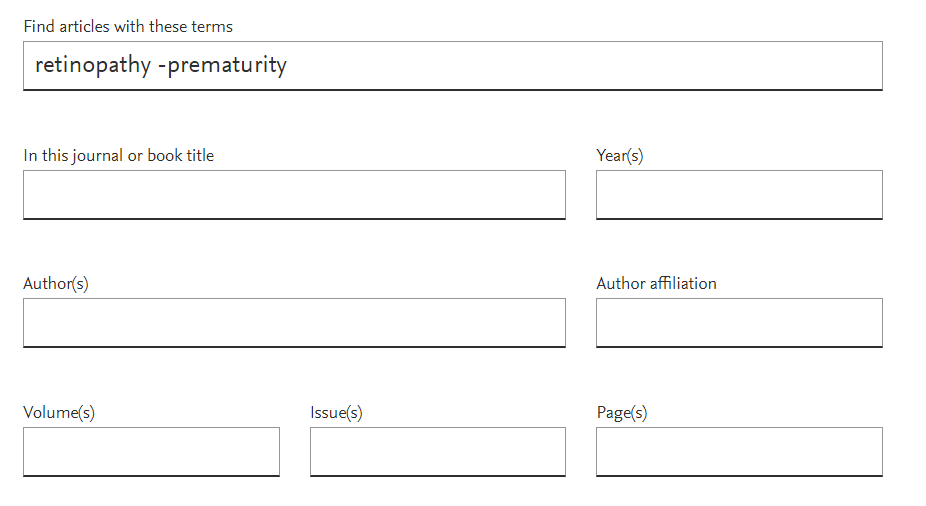
You can search specific parts (fields) of a document or search the entire document in ScienceDirect.
Field |
Explanation |
Find articles with these terms |
ScienceDirect will search all parts of the document for instances of the term (excluding references). |
In this journal or book title |
Begin keying the journal or book title, ScienceDirect will display a list of suggested title to choose. Notes:
|
Years |
ScienceDirect will search for documents of the entered year or year range.
|
Author(s) |
ScienceDirect will search only the author segments of the document for the author name(s). |
Author affiliation |
ScienceDirect will search the author affiliation segment of the document for instances of the terms. |
Volume(s)/Issue(s)/Page(s) |
|
Title, abstract, or author-specified keywords |
ScienceDirect will search only these segments of the document for instances of the terms. (Select 'Show more fields' to display this field) |
Title |
ScienceDirect will search for documents which contain the terms in the document title. (Select 'Show more fields' to display this field) |
References |
ScienceDirect will search the bibliographic references cited at the end of the document. (Select 'Show more fields' to display this field) |
ISBN or ISSN |
ScienceDirect will search only these segments of the document. (Select 'Show more fields' to display this field) |
Select a topic below to learn how to further specify your advanced search, or view this FAQopens in new tab/window to learn more about the techniques ScienceDirect uses to improve search results.
- Boolean operators currently supported include AND, OR, NOT, and the hyphen (or minus symbol)
- Boolean operators must be entered in all uppercase
- The hyphen (or minus symbol) is interpreted as the NOT operator
- Example: black -hole will return results containing 'black', but exclude any instances where 'hole' appears with it.
- Boolean precedence is as follows:
- NOT
- AND
- OR
- Parentheses can be used when nesting clauses so the grouping is clear and unambiguous
- Example: Instead of searching a OR b AND c OR d
Please use (a OR b) AND (c OR d)
- Quotation marks can be used to specify terms which must appear next to each other
- Example:("heart attack" OR "myocardial infarction") AND diabetes AND NOT cancer
- The above example can be expressed more concisely as: ("heart attack" OR "myocardial infarction") diabetes -cancer
Rules
- Punctuation is ignored in a phrase search. The searches "heart-attack" and "heart attack" return the same results.
- Plurals and spelling variants are included: "heart attack" includes "heart attacks", "color code" includes "colour code"
ScienceDirect supports the UTF-8 character set, meaning you can enter all UTF-8 characters directly in the search form, including non-Roman and accented characters.
View the tips in the table below to see how to search for special characters:
|
|
|---|---|
Spelling variations |
Both British and American spelling variants are supported. A search for colour returns color, and vice versa |
Greek letters and character equivalents |
To search the Greek letter Ω, enter omega. This matches documents containing the word omega as well as the symbols Ω (uppercase omega) and ω (lowercase omega). |
Subscript and superscript |
Enter subscripted and superscripted characters on the same line as the other characters. To search for the chemical notation "H2O," enter H2O. |
Accented characters |
To search for the name Fürst, enter Fürst or Furst. |
Non-alphanumeric characters |
Characters such as bullets, arrows, daggers, and plus signs are ignored. |
The following words are identified as stop words and are not searchable:
about again all almost also although always am among an and another any are as at be because been before being between both but |
by can could did do does done due during each either enough especially etc ever for found from further had hardly has have having |
hence her here him his how however if in into is it its itself just made mainly make might most mostly must nearly neither |
obtained of often on onto or our overall perhaps quite rather really regarding said seem seen several she should show showed shown shows significantly |
since so some such than that the their theirs them then there thereby therefore these they this those through thus to too upon use |
used using various very viz was we were what when where whereby wherein whether which while whom whose why with within without would you |
Proximity operators are not supported on ScienceDirect. ScienceDirect's advanced search feature is designed with a focus on semantic search capabilities. Semantic search technology allows ScienceDirect to analyze the context of a user's query, understand the relationships between terms, and provide more accurate and relevant search results without the need for explicit syntax or proximity operators. This approach helps streamline the search process and make it more intuitive for users across different levels of expertise.
After completing your search, you can use the filters available on the Search results page to refine your results by:
- Subscribed journals
- Article type
- Subject areas
- Publication title
- Access Type
- Years
Did we answer your question?
Related answers
Recently viewed answers
Functionality disabled due to your cookie preferences