
View by category
How do I register for a remote access account using a Registration ID and Password?
Last updated on November 14, 2023
To access the product remotely by using a registration ID and password, please follow the instructions found in the video. An additional step by step walkthrough is also provided under the video player.
Please note: Before you start the activation process, make sure you have completely logged out of ClinicalKey Student. Check whether your name appears in the upper-right corner when you are into ClinicalKey Student. If it does, click 'My Account' in the upper-right corner of the screen, and then click 'Log out'.
Registering for ClinicalKey with a Registration ID and Registration Password
Enter the registration ID and password provided to you here
Please note: ID and password are case-sensitive.
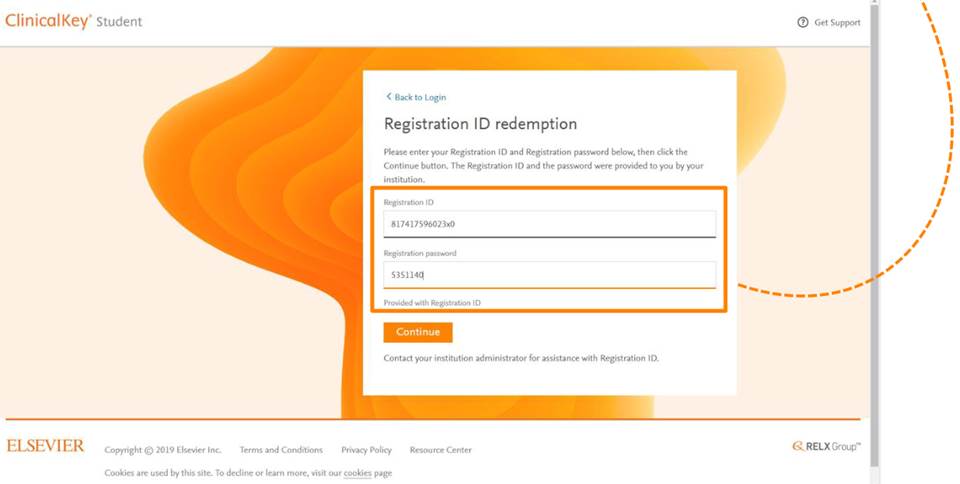
- Click 'Continue'.
Do you already have a username (email address) and password for any of these Elsevier products?
- ClinicalKey
- ScienceDirect
- Scopus
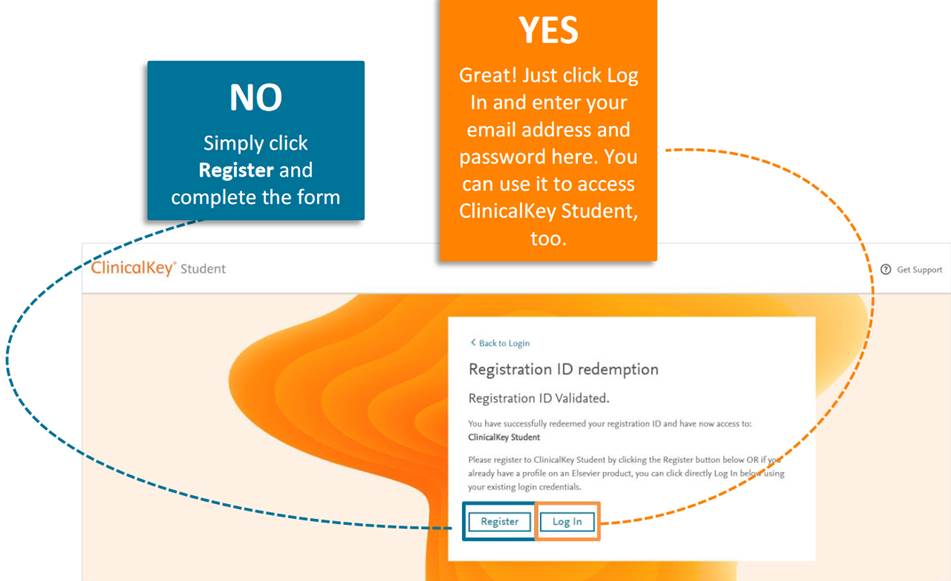
You now have remote access to www.clinicalkey.com/student
If you have any questions or require assistance, contact Customer Support by using one of the options found at the bottom of this page.
Did we answer your question?
Related answers
Recently viewed answers
Functionality disabled due to your cookie preferences